cancel
Showing results for 
Search instead for 
Did you mean: 

We've captured the moments from FabCon & SQLCon that everyone is talking about, and we are bringing them to the community, live and on-demand. Starts on April 14th. Register now

Reply
Anonymous
Not applicable

Difference column error

Hello,

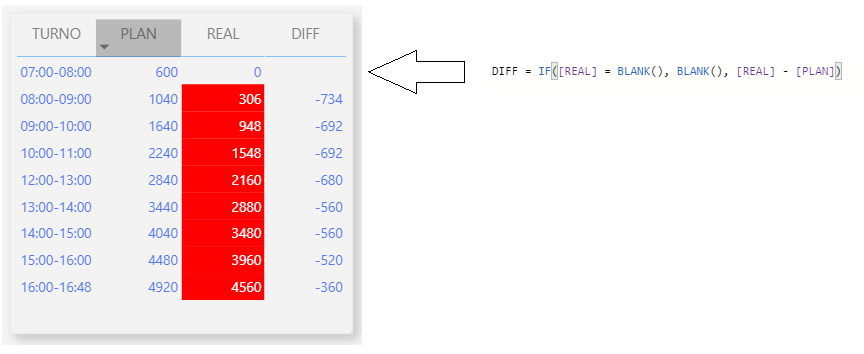
This table refers to a real project that receives new data on a daily basis, I created a measure to calculate the difference as shown in the example below, but when my real cumulative is 0, the difference is set to null, but in my measure I specify which is to treat this case only if my real accumulated is null. If it is 0 it should do a normal subtraction, but it is not happening.

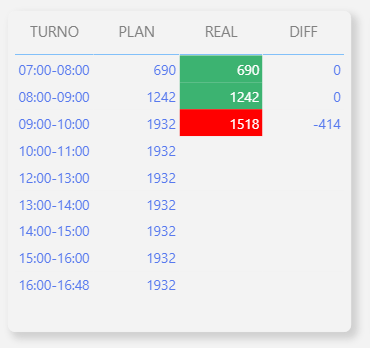
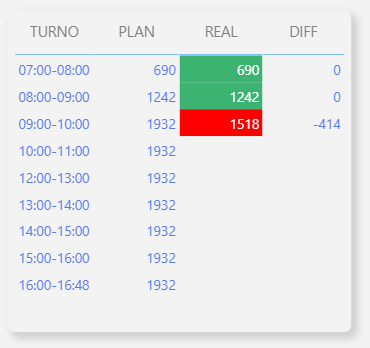
nulo.PNGThe table works as follows: daily data is inserted in this table, the PLAN field is completely filled in early in the day, while the REAL is filled according to the current time, if we are, for example, at 9 am, the data in the REAL and DIFF fields in the fields below must be null and only the PLAN field must be filled in, as shown in the example below.

Capturar.PNG

In summary, with the measure seen in the first image, I manage to deal with the case that the real accumulated is null, but he is doing the same treatment for 0 when it should make a simple sum. Can anyone help?

5 REPLIES 5
v-easonf-msft
Community Support
Community Support

Hi , @Anonymous 

Not very clear what happened.

 When using the following measure,does the same problem occur?


DIFF =[REAL] - [PLAN] )


If help ,take a  try of  this measure please:


DIFF =
IF ( ISERROR ( [REAL] - [PLAN] ), BLANK (), [REAL] - [PLAN] )


If it doesn't work please show me the result /or detail  error message


Best Regards,
Community Support Team _ Eason


Anonymous
Not applicable

@v-easonf-msft hi, this measure: 

DIFF =[REAL] - [PLAN] )

It works partially, but when doing this, I have a difference from all the displayed times, and in this case I must show the differences only until the current time.

For example, in this case:

Capturar.PNG 

I have REAL data until 10am and therefore I must have DIFF by 10am too, but with this measure above, it sets all DIFFs even if there is no REAL (null). The current problem is when I have a REAL with a value 0, because it is considering that my REAL is null and is putting null in the DIFF as well, because my current measure is:

DIFF = IF([**bleep** REAL] = BLANK(), BLANK(), [**bleep** REAL] - [**bleep** PLAN])


amitchandak
Super User
Super User

@Anonymous , Not very clear you can create a new column like this

table[plan] - maxx(filter(table,table[plan]<earlier(table[plan])),table[plan])

Share with Power BI Enthusiasts: Full Power BI Video (20 Hours) YouTube
Microsoft Fabric Series 60+ Videos YouTube
Microsoft Fabric Hindi End to End YouTube
Anonymous
Not applicable

@amitchandak It doesn't work, both PLAN and REAL are measures used to make an accumulated sum. However, in some way or power, the bi is not differentiated between zero and null, because as you can see the measure that I put in the attachment I request that the diff receives null only if REAL is null, then that null it will also be displayed null.

@Anonymous  check isblank(Table[REAL]) that should give you true for blank

Share with Power BI Enthusiasts: Full Power BI Video (20 Hours) YouTube
Microsoft Fabric Series 60+ Videos YouTube
Microsoft Fabric Hindi End to End YouTube

Helpful resources

Announcements
New to Fabric survey Carousel

New to Fabric Survey

If you have recently started exploring Fabric, we'd love to hear how it's going. Your feedback can help with product improvements.

Power BI DataViz World Championships carousel

Power BI DataViz World Championships - June 2026

A new Power BI DataViz World Championship is coming this June! Don't miss out on submitting your entry.

Join our Fabric User Panel

Join our Fabric User Panel

Share feedback directly with Fabric product managers, participate in targeted research studies and influence the Fabric roadmap.

March Power BI Update Carousel

Power BI Community Update - March 2026

Check out the March 2026 Power BI update to learn about new features.