cancel
Showing results for 
Search instead for 
Did you mean: 

The Power BI Data Visualization World Championships is back! Get ahead of the game and start preparing now! Learn more

Reply
jakepowers21
Frequent Visitor

Difference Between two columns

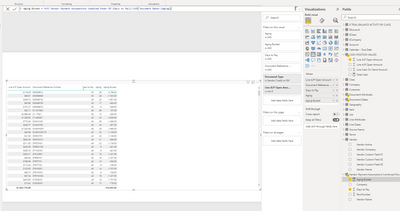
I am attempting to calculate the difference between two columns and can't seem to get the correct numbers. I would like: Aging Bucket = 'Days to Pay' - 'Aging'. Please see attached reports and the fomula created. 


jakepowers21_0-1649969860426.png


4 REPLIES 4
Anonymous
Not applicable

Hi @jakepowers21 ,


Not sure what your data model is. Please try this measure.

Aging Bucket = MAX('Vendor Payment Assumptions Combined Power BI'[Days to Pay])-MAX('Document Dates'[Aging])


If this doesn't work for you or I misunderstand your needs, please consider sharing more details about it. And it would be great if there was a sample file without any sensitive information here.

How to provide sample data

How to Get Your Question Answered Quickly


Best Regards,
Community Support Team_Gao


If there is any post helps, then please consider Accept it as the solution to help the other members find it more quickly. If I misunderstand your needs or you still have problems on it, please feel free to let us know. Thanks a lot!

How to get your questions answered quickly -- How to provide sample data

jakepowers21
Frequent Visitor

Yes, the fist line on the table have the following values: 'Days to Pay' = 30, 'Aging' = 36. I am trying to simply create a calculation to show me the difference between the two numbers, 30-36=-6 (Aging Bucket). However, the result that I am getting for the aging bucket is -2,796. I believe it is taking the sum of multple rows of data, but I would like it specific for that row and the results should be -6. I just can't seem to figure out how to correct this. The 'Days to Pay' and 'aging' fields are from different tables, which im not sure if that is effecting the result of the calulated forumla. 

The following is the current calulated column that is showing the inccorect result:

Aging Bucket = SUM('Vendor Payment Assumptions Combined Power BI'[Days to Pay])-SUM('Document Dates'[Aging])

amitchandak
Super User
Super User

@jakepowers21 ,The information you have provided is not making the problem clear to me. Can you please explain with an example.

Appreciate your Kudos.


In case you need a bucket

Dynamic segmentation -Measure to Dimension conversion: https://youtu.be/gzY40NWJpWQ


Dynamic Segmentation Bucketing Binning
https://community.powerbi.com/t5/Quick-Measures-Gallery/Dynamic-Segmentation-Bucketing-Binning/m-p/1...


Dynamic Segmentation, Bucketing or Binning: https://youtu.be/CuczXPj0N-k

Share with Power BI Enthusiasts: Full Power BI Video (20 Hours) YouTube
Microsoft Fabric Series 60+ Videos YouTube
Microsoft Fabric Hindi End to End YouTube

Helpful resources

Announcements
Power BI DataViz World Championships

Power BI Dataviz World Championships

The Power BI Data Visualization World Championships is back! Get ahead of the game and start preparing now!

December 2025 Power BI Update Carousel

Power BI Monthly Update - December 2025

Check out the December 2025 Power BI Holiday Recap!

FabCon Atlanta 2026 carousel

FabCon Atlanta 2026

Join us at FabCon Atlanta, March 16-20, for the ultimate Fabric, Power BI, AI and SQL community-led event. Save $200 with code FABCOMM.