Join us at FabCon Atlanta from March 16 - 20, 2026, for the ultimate Fabric, Power BI, AI and SQL community-led event. Save $200 with code FABCOMM.
Register now!The Power BI Data Visualization World Championships is back! Get ahead of the game and start preparing now! Learn more
Hi all
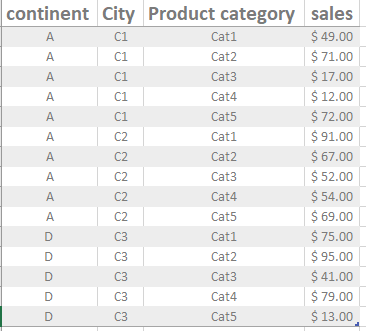
I have the following flat table which consist of 4 simple columns:
continent, City, Product category, sales
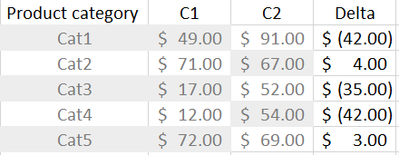
I want to use a slicer for City column and compare product categories sales for "only two cities"beside each other and calculate the delta
so the resulted table will be simillar like this,
Is this possible ??
Extra challenge: can I make the Matrix column headers equal to the chosen slicer values.
Thanks in adavnce
regards
Solved! Go to Solution.
@Nazdac911 , You can have meausre like
//Date1 is independent Date table
new measure =
var _max = maxx(allselected(city),city[city])
var _min = minx(allselected(city),city[city])
return
if(isinscope(city[city]) , [measure],
calculate([Measure], filter('city', 'city'[city] =_max )) -calculate([Measure], filter('city', 'city'[city] =_min )) )
isinscope will move delta to column grand total of matrix column
another approach
Compare Categorical Data Using Slicers - Compare two Brands: https://youtu.be/exN4nTewgbc
@Nazdac911 , You can have meausre like
//Date1 is independent Date table
new measure =
var _max = maxx(allselected(city),city[city])
var _min = minx(allselected(city),city[city])
return
if(isinscope(city[city]) , [measure],
calculate([Measure], filter('city', 'city'[city] =_max )) -calculate([Measure], filter('city', 'city'[city] =_min )) )
isinscope will move delta to column grand total of matrix column
another approach
Compare Categorical Data Using Slicers - Compare two Brands: https://youtu.be/exN4nTewgbc
As expected always from you
Thank you for the great solution 🙂
The Power BI Data Visualization World Championships is back! Get ahead of the game and start preparing now!
Check out the November 2025 Power BI update to learn about new features.
| User | Count |
|---|---|
| 59 | |
| 46 | |
| 42 | |
| 23 | |
| 17 |
| User | Count |
|---|---|
| 190 | |
| 122 | |
| 96 | |
| 66 | |
| 47 |