cancel
Showing results for 
Search instead for 
Did you mean: 

Join the FabCon + SQLCon recap series. Up next: Power BI, Real-Time Intelligence, IQ and AI, and Data Factory take center stage. All sessions are available on-demand after the live show. Register now

Reply
Anonymous
Not applicable

Dax optimization help

Hi, i'm having trouble with a slow DAX formula. The first formula takes 1 second to run, but when adding a "HASONEVALUE(productions[Productionid]) to determine if i'm calculating for one production order for multiple (the sum at the bottom of the table) it takes around 60 seconds.

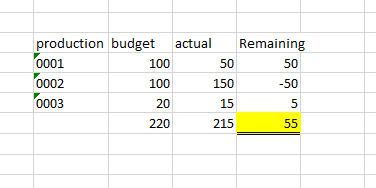
The desired table shows the remaining hours for a given production order, and also shows the number, if it's a negative number. However the total should not include the number, if it's negative. ( see example)


Query 1 (1-2 seconds)

Remaining Hours:= 
/*Create a smaller table, before i do calculations*/
Var T1 = CALCULATETABLE(
SUMMARIZE(Productions, /*Table*/
Productions[ProductionId],Productions[ProductionStatus] /*Group by*/
)
,Productions[ProductionStatus]<>"Ended" && Productions[ProductionStatus] <> "Finished") /*Filters*/)
Return

SUMX(T1,
Var Result =CALCULATE([BudgetHours] - [Actual production hours])
Return

IF(Result<0,0,Result)

 Query2 (60 seconds)

Remaining Hours test:= 
/*Create a smaller table, before i do calculations*/
Var T1 = CALCULATETABLE(
SUMMARIZE(Productions, /*Table*/
Productions[ProductionId],Productions[ProductionStatus] /*Group by*/
)
,Productions[ProductionStatus]<>"Ended" && Productions[ProductionStatus] <> "Finished") /*Filters*/
Return

IF(HASONEVALUE(Productions[ProductionId]),

/*If true (single line)*/
CALCULATE([Forkalkulerede timer by created Date] - [Actual production hours],Productions[ProductionStatus] <> "ended" && Productions[ProductionStatus]<>"Finished"),


SUMX(T1,
Var Result =CALCULATE([BudgetHours] - [Actual production hours])
Return

IF(Result<0,0,Result)

) )

 BI15-09-2020 slet.PNG

3 REPLIES 3
v-diye-msft
Community Support
Community Support

Hi @Anonymous 


You might consider providing your dummy pbix that would be helpful for us to investigate it further. 

You can upload it to the onedrive for business and share the link here. please don't forget to disclose the expected results and remove the confidential info.


Community Support Team _ Dina Ye
If this post helps, then please consider Accept it as the solution to help the other members find it more
quickly.
amitchandak
Super User
Super User

@Anonymous , what ar formula for [BudgetHours] , [Actual production hours].

What are you trying to do with hasonevalue


Can you share sample data and sample output in table format? Or a sample pbix after removing sensitive data.

Share with Power BI Enthusiasts: Full Power BI Video (20 Hours) YouTube
Microsoft Fabric Series 60+ Videos YouTube
Microsoft Fabric Hindi End to End YouTube
Anonymous
Not applicable

Hi @amitchandak,

The HASONEVALUE is to return 2 different results.
If there is only 1 production i.e. we are inside the table, it should return [BudgetHours] - [Actual Hours] (this will either return a postive or negative number)

But if there are 2+ i.e. we are in the "sum" part of the table. it should return a SumX, where  [BudgetHours] - [Actual Hours] is returned for each row. However rows with a negative number will be set to 0.

Nothing fancy in  [BudgetHours] and [Actual production hours].
Actual production hours:= SUM(ProcessingTransactions[Hours])
BudgetHours:=SUM(Routes[BudgetHours])

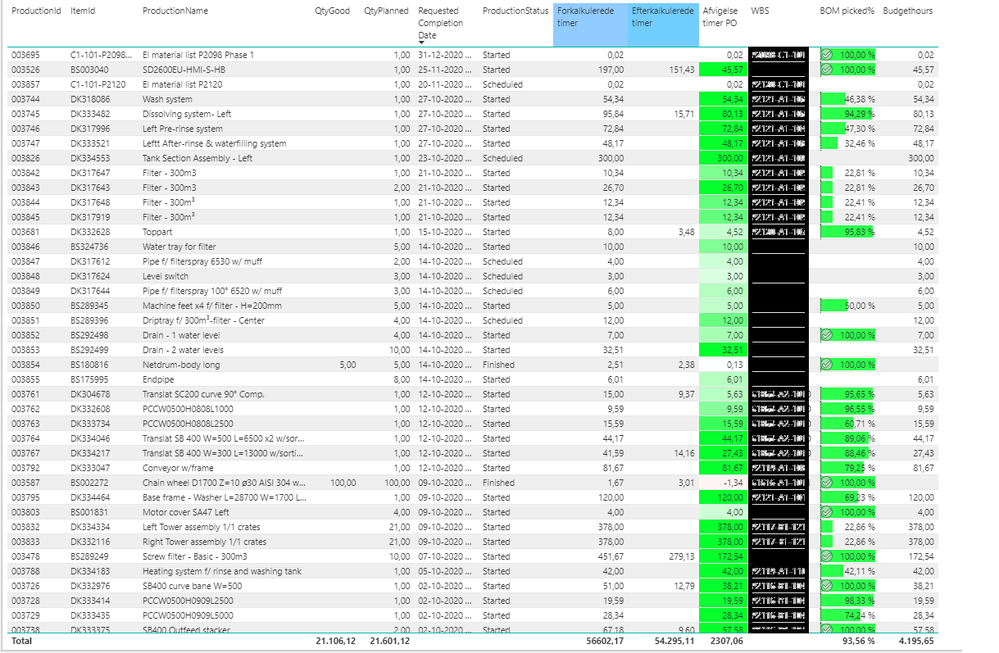
Output looks like this. BudgetHours column is all to the right. The sum of the column is around 3500, but since i'm couting negative columns as 0, the value returns as 4195,65. This is due to the HASONEVALUE.

BI15-09-2020 slet.PNG

Helpful resources

Announcements
April Power BI Update Carousel

Power BI Monthly Update - April 2026

Check out the April 2026 Power BI update to learn about new features.

New to Fabric survey Carousel

New to Fabric Survey

If you have recently started exploring Fabric, we'd love to hear how it's going. Your feedback can help with product improvements.

Power BI DataViz World Championships carousel

Power BI DataViz World Championships - June 2026

A new Power BI DataViz World Championship is coming this June! Don't miss out on submitting your entry.

FabCon and SQLCon Highlights Carousel

FabCon &SQLCon Highlights

Experience the highlights from FabCon & SQLCon, available live and on-demand starting April 14th.