Don't miss your chance to take the Fabric Data Engineer (DP-700) exam on us!
Learn moreWe've captured the moments from FabCon & SQLCon that everyone is talking about, and we are bringing them to the community, live and on-demand. Starts on April 14th. Register now
Hi,
I have 2 tables and 2 columns and with this I need to create a formula based on 4 different scenarios:
Logic (scenarios):
IF Forecast[Name] IS NOT IN Actual[Name] THEN "Removed"
IF Actual[Name] IS NOT IN Forecast[Name] THEN "New"
IF Actual[Name] IS EQUAL TO Forecast[Name] THEN IF Actual[Level] IS EQUAL TO Forecast[Level] THEN BLANK
IF Actual[Name] IS EQUAL TO Forecast[Name] THEN IF Actual[Level] IS NOT EQUAL TO Forecast[Level] THEN "Promoted"
| Actual | |
| Level | Name |
| Senior Manager | henry |
| Senior Analyst | antonio |
| Analyst | tom |
| Analyst | anna |
| Forecast | |
| Level | Name |
| Senior Manager | henry |
| Analyst | antonio |
| Analyst | tom |
| Senior Analyst | stuart |
So in my visual I should see the measure with sometinhg like this:
| My Visual | ||
| Level | Name | Measure |
| Senior Manager | henry | |
| Senior Analyst | stuart | Removed |
| Analyst | tom | |
| Senior Analyst | antonio | Promoted |
| Analyst | antonio | Promoted |
| Analyst | anna | New |
Thanks,
Solved! Go to Solution.
Hi @cristianml ,
New a calculated table.
Table_1 = UNION(Actual,Forecast)
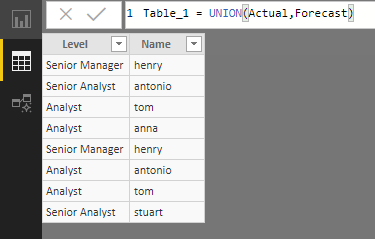
Add fields from above table into visual, and create below measure.
Measure =
VAR _isinActual =
IF ( SELECTEDVALUE ( Table_1[Name] ) IN VALUES ( Actual[Name] ), 1, 0 )
VAR _isinForecast =
IF ( SELECTEDVALUE ( Table_1[Name] ) IN VALUES ( Forecast[Name] ), 1, 0 )
VAR _LevelinActual =
CALCULATE (
SELECTEDVALUE ( Actual[Level] ),
FILTER ( Actual, Actual[Name] = SELECTEDVALUE ( Table_1[Name] ) )
)
VAR _LevelinForecast =
CALCULATE (
SELECTEDVALUE ( Forecast[Level] ),
FILTER ( Forecast, Forecast[Name] = SELECTEDVALUE ( Table_1[Name] ) )
)
RETURN
IF (
_isinActual = 0
&& _isinForecast = 1,
"Removed",
IF (
_isinActual = 1
&& _isinForecast = 0,
"New",
IF (
_isinActual = 1
&& _isinForecast = 1,
IF ( _LevelinActual = _LevelinForecast, BLANK (), "Promoted" )
)
)
)
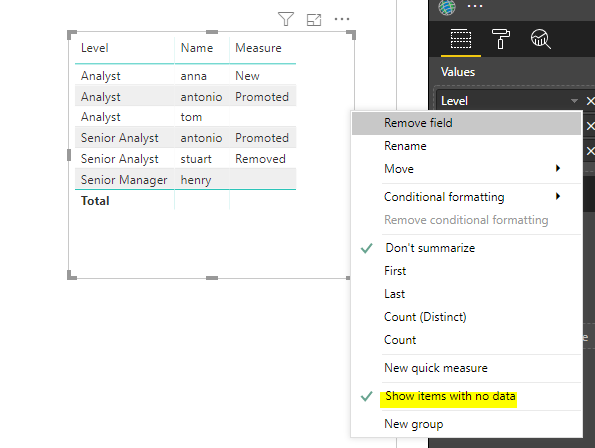
Best regards,
Yuliana Gu
Hi @cristianml ,
New a calculated table.
Table_1 = UNION(Actual,Forecast)
Add fields from above table into visual, and create below measure.
Measure =
VAR _isinActual =
IF ( SELECTEDVALUE ( Table_1[Name] ) IN VALUES ( Actual[Name] ), 1, 0 )
VAR _isinForecast =
IF ( SELECTEDVALUE ( Table_1[Name] ) IN VALUES ( Forecast[Name] ), 1, 0 )
VAR _LevelinActual =
CALCULATE (
SELECTEDVALUE ( Actual[Level] ),
FILTER ( Actual, Actual[Name] = SELECTEDVALUE ( Table_1[Name] ) )
)
VAR _LevelinForecast =
CALCULATE (
SELECTEDVALUE ( Forecast[Level] ),
FILTER ( Forecast, Forecast[Name] = SELECTEDVALUE ( Table_1[Name] ) )
)
RETURN
IF (
_isinActual = 0
&& _isinForecast = 1,
"Removed",
IF (
_isinActual = 1
&& _isinForecast = 0,
"New",
IF (
_isinActual = 1
&& _isinForecast = 1,
IF ( _LevelinActual = _LevelinForecast, BLANK (), "Promoted" )
)
)
)
Best regards,
Yuliana Gu
Hi @v-yulgu-msft,
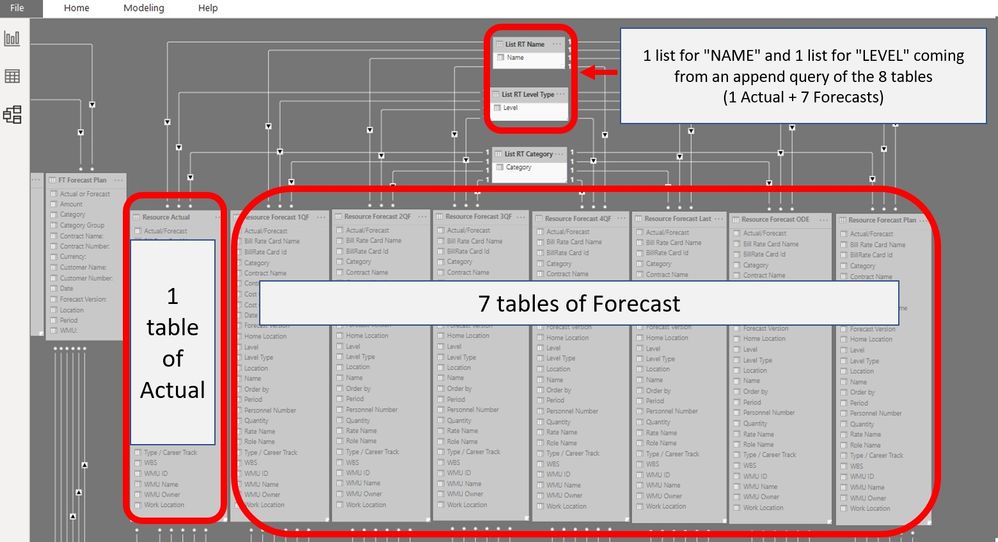
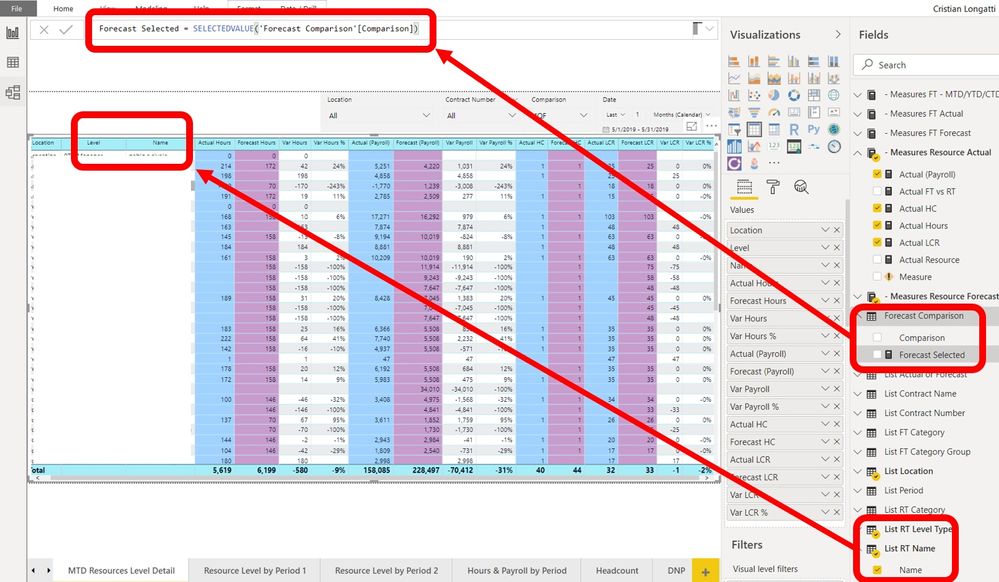
Thanks for your measure. I tried to replicate it in my model but i have a problem. My forecast table is based on a selected value cause I have 7 different versions of FORECAST. And to list the Names/and Levels I created an append table with all tables together and I take from there the list for the visual. See the pictures :
How can I solve/replicate this part ?: IN VALUES ( Forecast[Name] ), 1, 0 )
Thanks
If you have recently started exploring Fabric, we'd love to hear how it's going. Your feedback can help with product improvements.
A new Power BI DataViz World Championship is coming this June! Don't miss out on submitting your entry.
Share feedback directly with Fabric product managers, participate in targeted research studies and influence the Fabric roadmap.
| User | Count |
|---|---|
| 51 | |
| 37 | |
| 35 | |
| 19 | |
| 17 |
| User | Count |
|---|---|
| 72 | |
| 70 | |
| 39 | |
| 34 | |
| 23 |