cancel
Showing results for 
Search instead for 
Did you mean: 

Vote for your favorite vizzies from the Power BI Dataviz World Championship submissions. Vote now!

Reply
prash4030
Frequent Visitor

Dax PowerPivot Adding Measure

Hi, need help with creating measure


 i'm trying to create a measure in powerpivot to add total of a measure to another measure. For example, in below table

 i want to add total of Internal measure (with is 20 in this case) to Owned only for RSD.


 OwnedInternal
IT2010
WPS2010
RSD10 

so, my new measure should look as per below table. (Final measure).


 OwnedInternalFinal
IT201020
WPS201020
RSD10 30
1 ACCEPTED SOLUTION
v-yuta-msft
Community Support
Community Support

Hi prash4030,


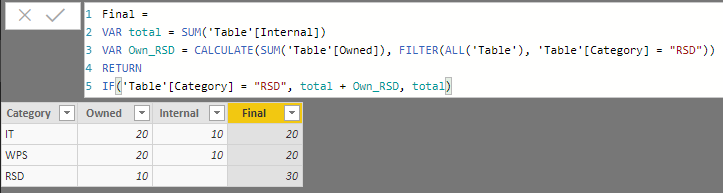
Measure is already an aggregation value so I'm afraid you can't aggregation measure again. As a workaround, you may convert measure [Internal] to calculate columns, than create a calculate columns using DAX formula below:


Final = 
VAR total = SUM('Table'[Internal])
VAR Own_RSD = CALCULATE(SUM('Table'[Owned]), FILTER(ALL('Table'), 'Table'[Category] = "RSD"))
RETURN
IF('Table'[Category] = "RSD", total + Own_RSD, total)

Capture.PNG  


You may also refer to the sample pbix file.


Regards,

Jimmy Tao

View solution in original post

3 REPLIES 3
v-yuta-msft
Community Support
Community Support

Hi prash4030,


Measure is already an aggregation value so I'm afraid you can't aggregation measure again. As a workaround, you may convert measure [Internal] to calculate columns, than create a calculate columns using DAX formula below:


Final = 
VAR total = SUM('Table'[Internal])
VAR Own_RSD = CALCULATE(SUM('Table'[Owned]), FILTER(ALL('Table'), 'Table'[Category] = "RSD"))
RETURN
IF('Table'[Category] = "RSD", total + Own_RSD, total)

Capture.PNG  


You may also refer to the sample pbix file.


Regards,

Jimmy Tao

thank you so much. it worked. thank you

AlB
Community Champion
Community Champion

Hi @prash4030


I would need to see the code for your measures [Owned] and [Internal] but if I make a guess on what they look like, let's try this:


Final =
CALCULATE ( [Internal], All[Table1] )
    + CALCULATE ( [Owned], KEEPFILTERS ( Table1[FirstField] = "RSD" ) )


where Table1 is the name of the table with your data and FirstField is the name of the column containing "RSD", "IT", etc.


Always show the structure of your tables with names so it is easier for people to help.

Helpful resources

Announcements
Power BI DataViz World Championships

Power BI Dataviz World Championships

Vote for your favorite vizzies from the Power BI World Championship submissions!

Sticker Challenge 2026 Carousel

Join our Community Sticker Challenge 2026

If you love stickers, then you will definitely want to check out our Community Sticker Challenge!

January Power BI Update Carousel

Power BI Monthly Update - January 2026

Check out the January 2026 Power BI update to learn about new features.

FabCon Atlanta 2026 carousel

FabCon Atlanta 2026

Join us at FabCon Atlanta, March 16-20, for the ultimate Fabric, Power BI, AI and SQL community-led event. Save $200 with code FABCOMM.