Join us at FabCon Atlanta from March 16 - 20, 2026, for the ultimate Fabric, Power BI, AI and SQL community-led event. Save $200 with code FABCOMM.
Register now!The Power BI Data Visualization World Championships is back! Get ahead of the game and start preparing now! Learn more
| DateDimensionID | JobCloseDate | PolicyNumber | TermNumber | BranchID | Job | MostRecentModel |
| 1 | 7/1/2016 0:00 | A | 1 | 1 | Submission | 1 |
| 2 | 7/2/2016 0:00 | A | 1 | 2 | Policy Change | 1 |
| 2 | 7/2/2016 0:00 | B | 1 | 2 | Policy Change | 1 |
| 3 | 7/3/2016 0:00 | A | 1 | 3 | Cancellation | 0 |
| 3 | 7/3/2016 0:00 | B | 1 | 3 | Cancellation | 0 |
| 3 | 7/3/2016 1:00 | A | 1 | 4 | Reinstatement | 1 |
| 3 | 7/3/2016 1:00 | B | 1 | 4 | Reinstatement | 1 |
| 4 | 7/5/2016 0:00 | A | 1 | 5 | Cancellation | 1 |
Hi,
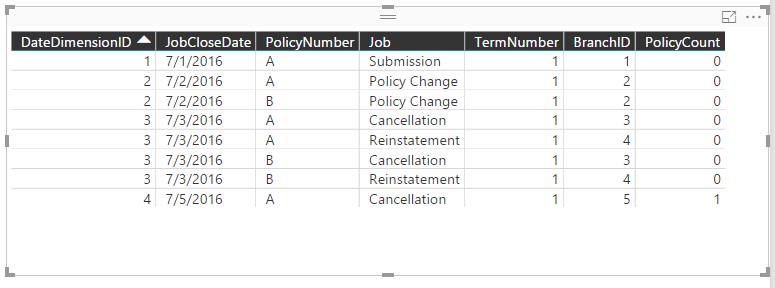
Above is the sample table I am working on. I looking to Calculate PolicyCount. It should count policies that has Previous Job type as Reinstatement
Example
JobcloseDate =7/5/2016 0:00 then it should show 1 policies (Which is Policy A because on 7/3/2016 it is reinstated)
I am not able to write exact measure to reflex this on Power BI Desktop.
Kindly help
Hi @vickyprudhvi,
You can also create a measure and place the measure in a table visual, see:
PolicyCount =
VAR TempCount =
CALCULATE (
COUNTROWS ( Table1 ),
FILTER (
ALL( Table1 ),
Table1[JobCloseDate] < MAX ( Table1[JobCloseDate] )
&& Table1[Job] = "Reinstatement"
),
VALUES ( Table1[PolicyNumber] )
)
RETURN
( IF ( TempCount = BLANK (), 0, TempCount ) )
Best Regards,
Qiuyun Yu
Hi @vickyprudhvi,
Do you mean you want to write the measure on SSAS side instead of Power BI desktop? In my opinion, you can also achieve your requirement by create a measure in Power BI Dekstop. If you want to create a measure in tabular model, you can post the issue in SSAS forum: https://social.msdn.microsoft.com/Forums/sqlserver/en-US/home?forum=sqlanalysisservices.
Best Regards,
Qiuyun Yu
Hi @vickyprudhvi,
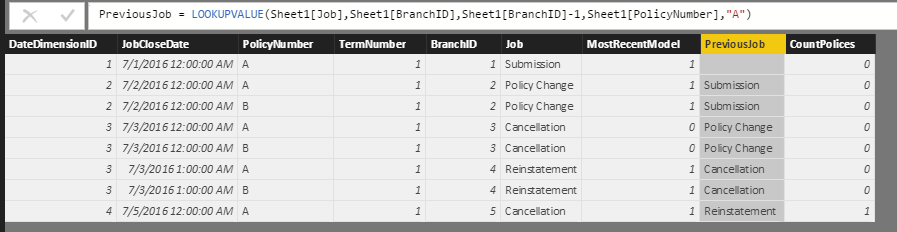
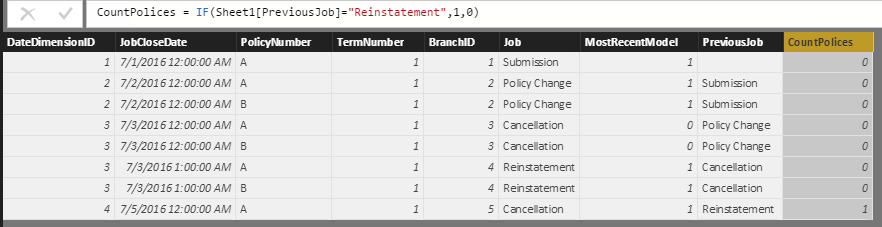
In your scenario, I would suggest you create a calculated column which returns Previous Job type for each row, then decide whether it's Reinstatement. See:
PreviousJob = LOOKUPVALUE(Sheet1[Job],Sheet1[BranchID],Sheet1[BranchID]-1,Sheet1[PolicyNumber],"A")
CountPolices = IF(Sheet1[PreviousJob]="Reinstatement",1,0)
If you have any question, please feel free to ask.
Best Regards,
Qiuyun Yu
The Power BI Data Visualization World Championships is back! Get ahead of the game and start preparing now!
| User | Count |
|---|---|
| 39 | |
| 37 | |
| 33 | |
| 33 | |
| 29 |
| User | Count |
|---|---|
| 132 | |
| 90 | |
| 78 | |
| 66 | |
| 65 |