cancel
Showing results for 
Search instead for 
Did you mean: 

Get Fabric Certified for FREE during Fabric Data Days. Don't miss your chance! Request now

Reply
RENJITH_R_S
Resolver II
Resolver II

Dax Help : Status Column

Hi Friends, Could you please help me to write the dax query for the status column in the below example scenario


Week No is a slicer visual


Input Table  
NameSubjectWeek No
ACSWeek 1
BITWeek 1
CEEWeek 1
ACSWeek 2
SCEWeek 2
FECWeek 2
Output Table  
user selects date =  Week 1  
NameSubjectStatus
ACSavaialble
BITavaialble
CEEavaialble
   
user selects date = Week 2  
NameSubjectStatus
ACSavailable
BITleft
CEEleft
SCEavailable
FECavailable
5 REPLIES 5
v-luwang-msft
Community Support
Community Support

Hi @RENJITH_R_S  ,

You could use the following steps:

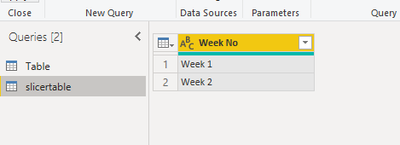
Step1, create a new table like below:

v-luwang-msft_0-1614148425164.png


Step 2,use the following dax to create a measure:

table =
VAR table1 =
    CALCULATETABLE (
        VALUES ( 'Table'[Subject] ),
        FILTER (
            ALL ( 'Table' ),
            'Table'[Week No] = SELECTEDVALUE ( slicertable[Week No] )
        )
    )
VAR table2 =
    IF ( MAX ( 'Table'[Subject] ) IN table1"aliaviable""left" )
RETURN
    table2


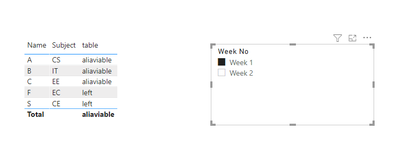
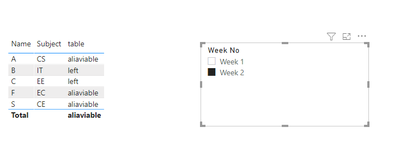
Then you will get the  below:

v-luwang-msft_1-1614148425167.png


v-luwang-msft_2-1614148425169.png


Wish  it is helpful for you!


Click   here  to download pbix if you need.


Best Regard

Lucien Wang

@v-luwang-msft 


I have worked on it, its doesn't met my requirement . Let me explain my requirement in a simpler way

Consider the data set(every week data will added up)


Name   Week No

Aju        week 31

Anu       week 31

Abu       week 31

binu       week 31

vinu       week 32

biju        week 32

viju         week 32

binu        week 32

ram         week 33

sam         week 33

viju          week 33


Now coming to visulization Week no is the slicer, once we select a value in slicer the selected week & its previous week needs to be considered


So if user selects week no = week 33


output is


Name   Status

ram       new joinee

sam      new joinee

viju        already

binu      left

vinu      left

biju      left


if user select week no = week 32


Aju        left

Anu       Left

Abu       left

binu       already

vinu       new joinee

biju        new joinee

viju        new joinee


So while selecting week number, first check the names of selected week with previous week, if name is matching then set "already", if name not found in previous week then set "New Joinee" , then check from previous week to selected week, if name is not found in selected week then set "left"


@v-luwang-msft Thanks 

amitchandak
Super User
Super User

@RENJITH_R_S , Create a new measure like


Measure =
var _1 = calculate(count([Subject]), filter(allselected(Table),Table[Subject] = max(Table[Subject])))
var _2 = calculate(count([Subject]), filter(all(Table),Table[Subject] = max(Table[Subject])))
return
if(Isblank(_1) && not(isblank(_2)), "left", "available")

Share with Power BI Enthusiasts: Full Power BI Video (20 Hours) YouTube
Microsoft Fabric Series 60+ Videos YouTube
Microsoft Fabric Hindi End to End YouTube

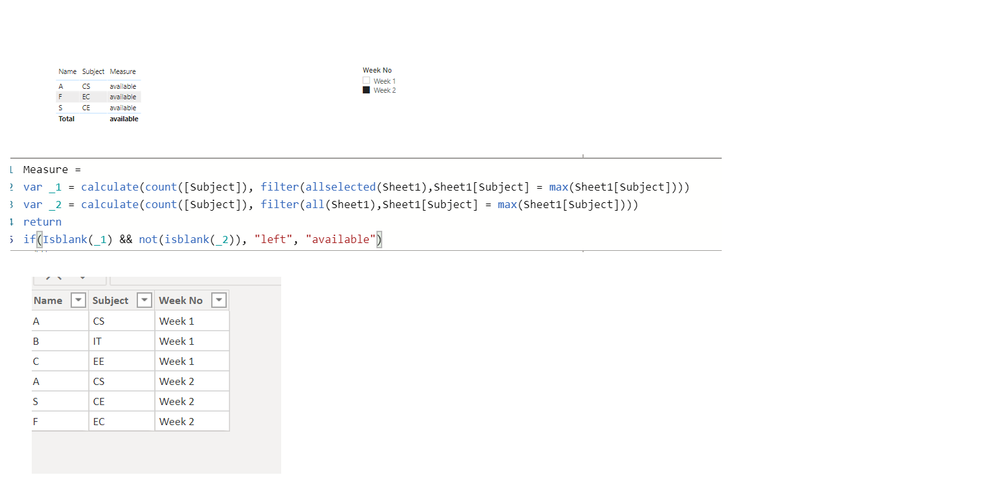
@amitchandak , I have created your measure but its not Result.pngworking 

Helpful resources

Announcements
November Power BI Update Carousel

Power BI Monthly Update - November 2025

Check out the November 2025 Power BI update to learn about new features.

Fabric Data Days Carousel

Fabric Data Days

Advance your Data & AI career with 50 days of live learning, contests, hands-on challenges, study groups & certifications and more!

FabCon Atlanta 2026 carousel

FabCon Atlanta 2026

Join us at FabCon Atlanta, March 16-20, for the ultimate Fabric, Power BI, AI and SQL community-led event. Save $200 with code FABCOMM.

Top Solution Authors
Top Kudoed Authors