cancel
Showing results for 
Search instead for 
Did you mean: 

Get Fabric Certified for FREE during Fabric Data Days. Don't miss your chance! Request now

Reply
kampyy
Frequent Visitor

Dax Expression to concatenate and group by

IDSub IDSub Level 
11level 3
12level 2
23level 3
34level 3
35level 1
46level 3
57level 2
68level 2


Looking for DAX Expression to - create a comma separate column of "Sub Level" group by "ID"

For EX.

IDSub IDSub Level New Column
11level 3level 3, Level 2 
12level 2level 3, Level 2 
23level 3level 3
34level 3level 3, Level 1
35level 1level 3, Level 1
46level 3level 3
57level 2level 2
68level 2level 2


Thanks in Advance

2 ACCEPTED SOLUTIONS
amitchandak
Super User
Super User

@kampyy , A new column


concatenatex(Filter(Table, [ID] = earlier([ID]) ) , [Sub Level] )


Concatenate Text- Measure, DAX Table, and Power Query Table: https://youtu.be/xAh3tz1qo24

Share with Power BI Enthusiasts: Full Power BI Video (20 Hours) YouTube
Microsoft Fabric Series 60+ Videos YouTube
Microsoft Fabric Hindi End to End YouTube

View solution in original post

Anonymous
Not applicable

Hi @kampyy ,

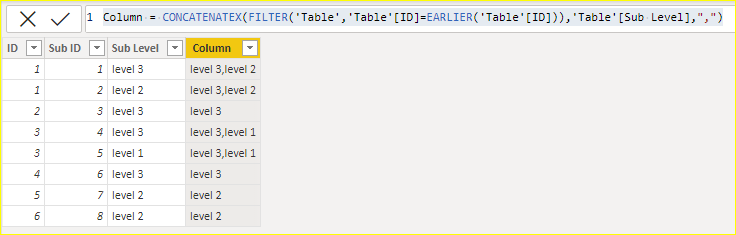
Made some edits, added separator parameter (",").

Column = CONCATENATEX(FILTER('Table','Table'[ID]=EARLIER('Table'[ID])),'Table'[Sub Level],",")

vcgaomsft_0-1664271225883.png

Best Regards,
Gao

Community Support Team


If there is any post helps, then please consider Accept it as the solution  to help the other members find it more quickly. If I misunderstand your needs or you still have problems on it, please feel free to let us know. Thanks a lot!

How to get your questions answered quickly -- How to provide sample data

View solution in original post

4 REPLIES 4
Anonymous
Not applicable

I have below data 

Run RUNID Job TerminalStatetime
XYZ1FailedThu, 13 Feb 2025 13:19:05
XYZ2FailedThu, 13 Feb 2025 13:03:42
XYZ3SuccessFri, 07 Feb 2025 07:21:55
XYZ4FailedFri, 07 Feb 2025 07:07:52
XYZ5FailedWed, 05 Feb 2025 15:43:51
XYZ6SuccessFri, 17 Jan 2025 07:38:35
XYZ7SuccessFri, 17 Jan 2025 07:35:55


I need below output, Job terminal state will be recent 5 states to show in single row like below

Run Job TerminalState
XYZFailed Failed Success Failed Failed
Anonymous
Not applicable

Hi @kampyy ,

Made some edits, added separator parameter (",").

Column = CONCATENATEX(FILTER('Table','Table'[ID]=EARLIER('Table'[ID])),'Table'[Sub Level],",")

vcgaomsft_0-1664271225883.png

Best Regards,
Gao

Community Support Team


If there is any post helps, then please consider Accept it as the solution  to help the other members find it more quickly. If I misunderstand your needs or you still have problems on it, please feel free to let us know. Thanks a lot!

How to get your questions answered quickly -- How to provide sample data

amitchandak
Super User
Super User

@kampyy , A new column


concatenatex(Filter(Table, [ID] = earlier([ID]) ) , [Sub Level] )


Concatenate Text- Measure, DAX Table, and Power Query Table: https://youtu.be/xAh3tz1qo24

Share with Power BI Enthusiasts: Full Power BI Video (20 Hours) YouTube
Microsoft Fabric Series 60+ Videos YouTube
Microsoft Fabric Hindi End to End YouTube

Hello,

Is it possible to make your formula dynamic in a measure?

Helpful resources

Announcements
November Power BI Update Carousel

Power BI Monthly Update - November 2025

Check out the November 2025 Power BI update to learn about new features.

Fabric Data Days Carousel

Fabric Data Days

Advance your Data & AI career with 50 days of live learning, contests, hands-on challenges, study groups & certifications and more!

FabCon Atlanta 2026 carousel

FabCon Atlanta 2026

Join us at FabCon Atlanta, March 16-20, for the ultimate Fabric, Power BI, AI and SQL community-led event. Save $200 with code FABCOMM.

Top Solution Authors
Top Kudoed Authors