FabCon is coming to Atlanta
Join us at FabCon Atlanta from March 16 - 20, 2026, for the ultimate Fabric, Power BI, AI and SQL community-led event. Save $200 with code FABCOMM.
Register now!- Power BI forums
- Get Help with Power BI
- Desktop
- Service
- Report Server
- Power Query
- Mobile Apps
- Developer
- DAX Commands and Tips
- Custom Visuals Development Discussion
- Health and Life Sciences
- Power BI Spanish forums
- Translated Spanish Desktop
- Training and Consulting
- Instructor Led Training
- Dashboard in a Day for Women, by Women
- Galleries
- Data Stories Gallery
- Themes Gallery
- Contests Gallery
- QuickViz Gallery
- Quick Measures Gallery
- Visual Calculations Gallery
- Notebook Gallery
- Translytical Task Flow Gallery
- TMDL Gallery
- R Script Showcase
- Webinars and Video Gallery
- Ideas
- Custom Visuals Ideas (read-only)
- Issues
- Issues
- Events
- Upcoming Events
The Power BI Data Visualization World Championships is back! Get ahead of the game and start preparing now! Learn more
- Power BI forums
- Forums
- Get Help with Power BI
- Desktop
- Dax Count rows todays date and previous day - work...
- Subscribe to RSS Feed
- Mark Topic as New
- Mark Topic as Read
- Float this Topic for Current User
- Bookmark
- Subscribe
- Printer Friendly Page


- Mark as New
- Bookmark
- Subscribe
- Mute
- Subscribe to RSS Feed
- Permalink
- Report Inappropriate Content
Dax Count rows todays date and previous day - working days
Hi I have two tables , a dates table (which diplays working and non working days)and a facts table. I require 2 dax measures please
Measure 1 Count of facts table rows for today - working days only
Measure 2 Count of facts table rows for previous day- working days only
| Dates Table | ||
| Date | Is working day | Day |
| 25/05/2020 | 1 | Mon |
| 26/05/2020 | 1 | Tue |
| 27/05/2020 | 1 | Wed |
| 28/05/2020 | 1 | Thu |
| 29/05/2020 | 1 | Fri |
| 30/05/2020 | 0 | Sat |
| 31/05/2020 | 0 | Sun |
| 01/06/2020 | 1 | Mon |
| 02/06/2020 | 1 | Tue |
| 03/06/2020 | 1 | Wed |
| 04/06/2020 | 1 | Thu |
| 05/06/2020 | 1 | Fri |
| 06/06/2020 | 0 | Sat |
| 07/06/2020 | 0 | Sun |
| Facts Table | ||
| Date | Trade | |
| 29/05/2020 | PLUM | |
| 29/05/2020 | PLUM | |
| 29/05/2020 | ELEC | |
| 29/05/2020 | ELEC | |
| 29/05/2020 | ELEC | |
| 29/05/2020 | ELEC | |
| 29/05/2020 | ELEC | |
| 29/05/2020 | DRAIN | |
| 01/06/2020 | DRAIN | |
| 01/06/2020 | DRAIN | |
| 01/06/2020 | DRAIN | |
| 01/06/2020 | DRAIN | |
| 01/06/2020 | DRAIN | |
| 01/06/2020 | DRAIN |
thank you
RIchard
Solved! Go to Solution.


- Mark as New
- Bookmark
- Subscribe
- Mute
- Subscribe to RSS Feed
- Permalink
- Report Inappropriate Content
@cottrera , not very clear, this how you can get day wise data
Last Day Non Continous = CALCULATE(sum('order'[Qty]),filter(all('Date'),'Date'[Date] =MAXX(FILTER(all('Date'),'Date'[Date]<max('Date'[Date])),Table['Date'])))
or
Day behind Sales = CALCULATE(SUM(Sales[Sales Amount]),dateadd('Date'[Date],-1,Day))
or
Last Day = CALCULATE(sum('order'[Qty]), FILTER(ALL('Date'),'Date'[Date]=max('Date'[Date])-1))
////
This Day = CALCULATE(sum('order'[Qty]), FILTER(ALL('Date'),'Date'[Date]=max('Date'[Date])))
Or
This Day =sum('order'[Qty])
To get the best of the time intelligence function. Make sure you have a date calendar and it has been marked as the date in model view. Also, join it with the date column of your fact/s. Refer :
https://radacad.com/creating-calendar-table-in-power-bi-using-dax-functions
https://www.archerpoint.com/blog/Posts/creating-date-table-power-bi
https://www.sqlbi.com/articles/creating-a-simple-date-table-in-dax/
See if my webinar on Time Intelligence can help: https://community.powerbi.com/t5/Webinars-and-Video-Gallery/PowerBI-Time-Intelligence-Calendar-WTD-Y...
Appreciate your Kudos.
- Mark as New
- Bookmark
- Subscribe
- Mute
- Subscribe to RSS Feed
- Permalink
- Report Inappropriate Content
@cottrera , not very clear, this how you can get day wise data
Last Day Non Continous = CALCULATE(sum('order'[Qty]),filter(all('Date'),'Date'[Date] =MAXX(FILTER(all('Date'),'Date'[Date]<max('Date'[Date])),Table['Date'])))
or
Day behind Sales = CALCULATE(SUM(Sales[Sales Amount]),dateadd('Date'[Date],-1,Day))
or
Last Day = CALCULATE(sum('order'[Qty]), FILTER(ALL('Date'),'Date'[Date]=max('Date'[Date])-1))
////
This Day = CALCULATE(sum('order'[Qty]), FILTER(ALL('Date'),'Date'[Date]=max('Date'[Date])))
Or
This Day =sum('order'[Qty])
To get the best of the time intelligence function. Make sure you have a date calendar and it has been marked as the date in model view. Also, join it with the date column of your fact/s. Refer :
https://radacad.com/creating-calendar-table-in-power-bi-using-dax-functions
https://www.archerpoint.com/blog/Posts/creating-date-table-power-bi
https://www.sqlbi.com/articles/creating-a-simple-date-table-in-dax/
See if my webinar on Time Intelligence can help: https://community.powerbi.com/t5/Webinars-and-Video-Gallery/PowerBI-Time-Intelligence-Calendar-WTD-Y...
Appreciate your Kudos.
- Mark as New
- Bookmark
- Subscribe
- Mute
- Subscribe to RSS Feed
- Permalink
- Report Inappropriate Content
thank you I will check out the links you have sent before continuing with this problem therefore marking this post as resolved


- Mark as New
- Bookmark
- Subscribe
- Mute
- Subscribe to RSS Feed
- Permalink
- Report Inappropriate Content
Hi,
in your date tabe add a column for working days and none working days and use DAX
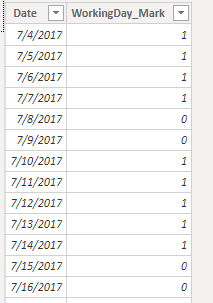
then Count rows that contain 1
Let me know how it works out for t
Regards
Amine Jerbi
If I answered your question, please mark this thread as accepted
and you can follow me on
My Website, LinkedIn and Facebook
- Mark as New
- Bookmark
- Subscribe
- Mute
- Subscribe to RSS Feed
- Permalink
- Report Inappropriate Content
Hi
thank you for your response. I already have this column on my dates table. I am having trouble explaining what I want possibly down to lack of knowledge.
- Mark as New
- Bookmark
- Subscribe
- Mute
- Subscribe to RSS Feed
- Permalink
- Report Inappropriate Content
It's ok,
maybe if you can send us a Dummy Pibx file and your needs we will be more helpfull.
Regards
Amine Jerbi
If I answered your question, please mark this thread as accepted
and you can follow me on
My Website, LinkedIn and Facebook

- Mark as New
- Bookmark
- Subscribe
- Mute
- Subscribe to RSS Feed
- Permalink
- Report Inappropriate Content
@cottrera - Sorry, I am not clear on what you want. What would be your expected results from the information provided and why?
Follow on LinkedIn
@ me in replies or I'll lose your thread!!!
Instead of a Kudo, please vote for this idea
Become an expert!: Enterprise DNA
External Tools: MSHGQM
YouTube Channel!: Microsoft Hates Greg
Latest book!: DAX For Humans
DAX is easy, CALCULATE makes DAX hard...
- Mark as New
- Bookmark
- Subscribe
- Mute
- Subscribe to RSS Feed
- Permalink
- Report Inappropriate Content
Hi based on the table below and using 2 dax formulas one for each result I would expect these results
| Todays result (01/06/2020) = 6 |
| Previous working day (29/05/2020 = 4 |
| Date | Trade |
| 25/05/2020 | PLUM |
| 25/05/2020 | DRAIN |
| 25/05/2020 | DRAIN |
| 25/05/2020 | DRAIN |
| 25/05/2020 | DRAIN |
| 25/05/2020 | DRAIN |
| 25/05/2020 | DRAIN |
| 26/05/2020 | ELEC |
| 26/05/2020 | ELEC |
| 26/05/2020 | ELEC |
| 27/05/2020 | ELEC |
| 27/05/2020 | ELEC |
| 27/05/2020 | ELEC |
| 28/05/2020 | PLUM |
| 29/05/2020 | PLUM |
| 29/05/2020 | PLUM |
| 29/05/2020 | PLUM |
| 29/05/2020 | PLUM |
| 30/05/2020 | PLUM |
| 30/05/2020 | PLUM |
| 31/05/2020 | PLUM |
| 01/06/2020 | PLUM |
| 01/06/2020 | ELEC |
| 01/06/2020 | ELEC |
| 01/06/2020 | DRAIN |
| 01/06/2020 | DRAIN |
| 01/06/2020 | ELEC |

Helpful resources

Power BI Dataviz World Championships
The Power BI Data Visualization World Championships is back! Get ahead of the game and start preparing now!

Power BI Monthly Update - December 2025
Check out the December 2025 Power BI Holiday Recap!

FabCon Atlanta 2026
Join us at FabCon Atlanta, March 16-20, for the ultimate Fabric, Power BI, AI and SQL community-led event. Save $200 with code FABCOMM.

| User | Count |
|---|---|
| 38 | |
| 38 | |
| 36 | |
| 28 | |
| 28 |


| User | Count |
|---|---|
| 124 | |
| 89 | |
| 73 | |
| 66 | |
| 65 |


