cancel
Showing results for 
Search instead for 
Did you mean: 

The Power BI Data Visualization World Championships is back! Get ahead of the game and start preparing now! Learn more

Reply
Anonymous
Not applicable

Dax ALL function Performance Problem

Hi All,


I'm telling you the scenerio with sample data. I'm unable to share 

I created a measure on my report something like that.


Measure2 = 
CALCULATE(
          CALCULATE(
                 SUM('TABLE'[Measure]),
                     FILTER('TABLE',
                                 'TABLE'[Dim1] = "A"
                                 && 'TABLE'[Dim2] = "X"
                                )
                            ),
                    ALL('TABLE'[Dim3], 'TABLE'[Dim4])
               )​


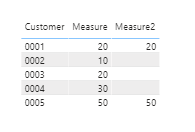
I'm showing it like that.
Screenshot_10.png


This measure performance is terrible.
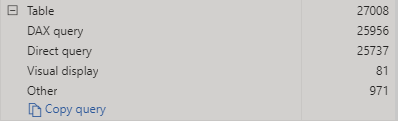
Screenshot_7.png


I have Dim3 and Dim4 as a filter on my page.
I don't want to make filter to my measure2 with this dimensions. Because of that I was used ALL function in my DAX formula.

The problem is starting over there.

If I don't use ALL function everything is fine.
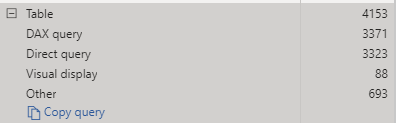
Screenshot_9.png


As I understand my DAX works like that;
Firstly select the ALL context and than show us in table by 'Customer'
It was facing with performance issue because of that.

I need something like that, 
Firstly it should get the customers and than start to calculate measure2.

How can i improve my DAX ? 
Is there anyone have any idea ? 
I'm sharing example pbix file. Actually it doesn't make much sense but anyways... 

1 ACCEPTED SOLUTION
Greg_Deckler
Community Champion
Community Champion

@Anonymous - Maybe try:


Measure2 = 
          CALCULATE(
                 SUM('TABLE'[Measure]),
                     FILTER(ALL('TABLE'),
                                 'TABLE'[Dim1] = "A"
                                 && 'TABLE'[Dim2] = "X"
                                )
                            )


Very hard to troubleshoot without understanding your data and what you are trying to do. I have an couple articles on DAX Performance Tuning.

https://community.powerbi.com/t5/Community-Blog/Performance-Tuning-DAX-Part-1/ba-p/976275

https://community.powerbi.com/t5/Community-Blog/Performance-Tuning-DAX-Part-2/ba-p/976813


Not really enough information to go on, please first check if your issue is a common issue listed here: https://community.powerbi.com/t5/Community-Blog/Before-You-Post-Read-This/ba-p/1116882

Also, please see this post regarding How to Get Your Question Answered Quickly: https://community.powerbi.com/t5/Community-Blog/How-to-Get-Your-Question-Answered-Quickly/ba-p/38490

The most important parts are:
1. Sample data as text, use the table tool in the editing bar
2. Expected output from sample data
3. Explanation in words of how to get from 1. to 2.


Follow on LinkedIn
@ me in replies or I'll lose your thread!!!
Instead of a Kudo, please vote for this idea
Become an expert!: Enterprise DNA
External Tools: MSHGQM
YouTube Channel!: Microsoft Hates Greg
Latest book!:
DAX For Humans

DAX is easy, CALCULATE makes DAX hard...

View solution in original post

4 REPLIES 4
mahoneypat
Microsoft Employee
Microsoft Employee

Why do you have nested CALCULATE()?  It shouldn't be necessary; you can put the ALL expression as another clause in the first/inner CALCULATE.


If this works for you, please mark it as the solution.  Kudos are appreciated too.  Please let me know if not.

Regards,

Pat


Did I answer your question? Mark my post as a solution! Kudos are also appreciated!

To learn more about Power BI, follow me on Twitter or subscribe on YouTube.


@mahoneypa HoosierBI on YouTube


Wow, @mahoneypat, we must have replied at the same exact time! 🙂


Follow on LinkedIn
@ me in replies or I'll lose your thread!!!
Instead of a Kudo, please vote for this idea
Become an expert!: Enterprise DNA
External Tools: MSHGQM
YouTube Channel!: Microsoft Hates Greg
Latest book!:
DAX For Humans

DAX is easy, CALCULATE makes DAX hard...

You post is first so you were faster on the draw.

Regards,

Pat


Did I answer your question? Mark my post as a solution! Kudos are also appreciated!

To learn more about Power BI, follow me on Twitter or subscribe on YouTube.


@mahoneypa HoosierBI on YouTube


Greg_Deckler
Community Champion
Community Champion

@Anonymous - Maybe try:


Measure2 = 
          CALCULATE(
                 SUM('TABLE'[Measure]),
                     FILTER(ALL('TABLE'),
                                 'TABLE'[Dim1] = "A"
                                 && 'TABLE'[Dim2] = "X"
                                )
                            )


Very hard to troubleshoot without understanding your data and what you are trying to do. I have an couple articles on DAX Performance Tuning.

https://community.powerbi.com/t5/Community-Blog/Performance-Tuning-DAX-Part-1/ba-p/976275

https://community.powerbi.com/t5/Community-Blog/Performance-Tuning-DAX-Part-2/ba-p/976813


Not really enough information to go on, please first check if your issue is a common issue listed here: https://community.powerbi.com/t5/Community-Blog/Before-You-Post-Read-This/ba-p/1116882

Also, please see this post regarding How to Get Your Question Answered Quickly: https://community.powerbi.com/t5/Community-Blog/How-to-Get-Your-Question-Answered-Quickly/ba-p/38490

The most important parts are:
1. Sample data as text, use the table tool in the editing bar
2. Expected output from sample data
3. Explanation in words of how to get from 1. to 2.


Follow on LinkedIn
@ me in replies or I'll lose your thread!!!
Instead of a Kudo, please vote for this idea
Become an expert!: Enterprise DNA
External Tools: MSHGQM
YouTube Channel!: Microsoft Hates Greg
Latest book!:
DAX For Humans

DAX is easy, CALCULATE makes DAX hard...

Helpful resources

Announcements
Power BI DataViz World Championships

Power BI Dataviz World Championships

The Power BI Data Visualization World Championships is back! Get ahead of the game and start preparing now!

November Power BI Update Carousel

Power BI Monthly Update - November 2025

Check out the November 2025 Power BI update to learn about new features.

FabCon Atlanta 2026 carousel

FabCon Atlanta 2026

Join us at FabCon Atlanta, March 16-20, for the ultimate Fabric, Power BI, AI and SQL community-led event. Save $200 with code FABCOMM.