cancel
Showing results for 
Search instead for 
Did you mean: 

The Power BI Data Visualization World Championships is back! Get ahead of the game and start preparing now! Learn more

Reply
RZ
Frequent Visitor

Datetime import issues

Hello,


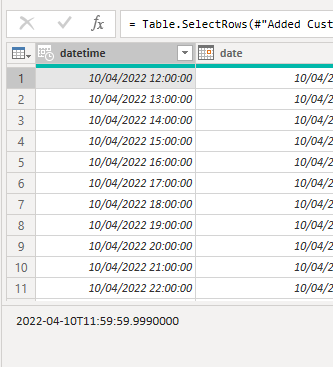
I am importing a datetime column from excel into PowerBI. However some entries are imported .001 seconds off. Meaning the datetime in excel is 10/04/2022 12:00:00 it comes into the PowerQuery as 2022-04-10T11:59:59.9990000.


And this does not happen to all rows. IN fact it starts at 10/04/2022 12:00:00 for my hourly data between 1/1/2022 00:00:00 - 31/12/2022 23:00:00.


Below is a screenshot from excel that shows the text value and the imported value in PowerBI. 


I needed the hour, minute values. So for now I am planning on creating the correct values in Excel before the import. But It would be good to know why that happens..


Thanks 

R+Z


RZ_0-1675769137808.png

RZ_1-1675769180461.png


2 REPLIES 2
Anonymous
Not applicable

Hi @RZ,

Did you mean these records are live changes when these records imported to power bi desktop side?
If that's the case, I'd like to suggest you use the static values on the sheet to import and update schedule, the live data may cause some issues to gett the latest data during import.
If you mean the records millisecond part has been rounded during the import operations, I'd like to suggest you use the text format to receive these records. (AFAIK, current power query datetime values seems not include milliseconds levels) Then you can extract millisecond part to a new column to keeping accuracy of these datetime values. (Power query will not apply any rounded operations with text values)

#datetime - PowerQuery M | Microsoft Learn

Regards,

Xiaoxin Sheng

RZ
Frequent Visitor

Hi Xiaoxin Sheng,


The issue is the imported values are not the same as the original values.


The first screenshot shows a cell value of 10/04/2022 12:00:00 in excel. When this gets in PowerQuery it is displayed as the same in the column view but when you click on the cell you see that the value has actually become 10/04/2022 11:59:59.9990000.  That I became aware when I used the a column to extract the Minute(). The funny thing is: I have a year worth of hourly data and  the values before 10/04/2022 12:00:00 import fine but the ones after all have the same issue.


I found a way around that, I extract the minute in excel and import afterwards. But the behaviour is strange and would like to understand why that happens. But as of now I will double check my datetime imports.

Helpful resources

Announcements
Power BI DataViz World Championships

Power BI Dataviz World Championships

The Power BI Data Visualization World Championships is back! Get ahead of the game and start preparing now!

December 2025 Power BI Update Carousel

Power BI Monthly Update - December 2025

Check out the December 2025 Power BI Holiday Recap!

FabCon Atlanta 2026 carousel

FabCon Atlanta 2026

Join us at FabCon Atlanta, March 16-20, for the ultimate Fabric, Power BI, AI and SQL community-led event. Save $200 with code FABCOMM.