cancel
Showing results for 
Search instead for 
Did you mean: 

The Power BI Data Visualization World Championships is back! Get ahead of the game and start preparing now! Learn more

Reply
Anonymous
Not applicable

Datetime Hierarchy

Hi everyone!


I want to built area chart comparing two years by months.

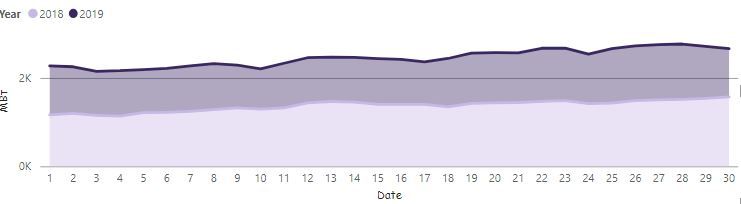
But I need to show my data not only by days (30 divisions) as it shown below:

1.JPG


But I need to have 720 divisions (30 days * 24 hours). Not necessarily shown on the x-axis title, but when I go throw visualization it will show points not only for days, but for hours also. 

1 ACCEPTED SOLUTION
v-xuding-msft
Community Support
Community Support

Hi @Anonymous ,

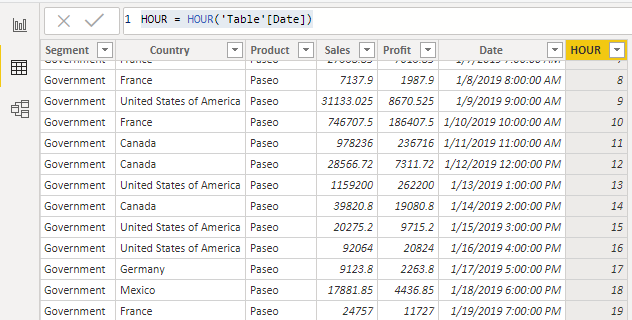
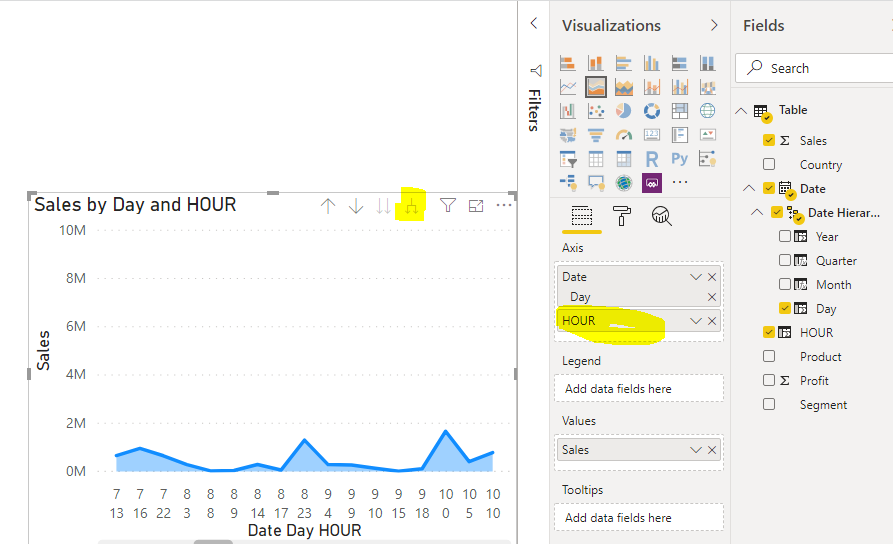
The data type of your date column is DateTime? If so, I think you could create an hour column, drag it to x axis and then expand Day and Hour.

HOUR = HOUR('Table'[Date])

3.PNG4.PNG 

Best Regards,

Xue Ding

If this post helps, then please consider Accept it as the solution to help the other members find it more quickly.

Best Regards,
Xue Ding
If this post helps, then please consider Accept it as the solution to help the other members find it more quickly.

View solution in original post

2 REPLIES 2
v-xuding-msft
Community Support
Community Support

Hi @Anonymous ,

Do you try to add an Hour column? Is the answer helpful? If so, can you please accept the answer as a solution? If not, can you please share more details or some sample data to us? Then we will understand your request clearly.


Best Regards,

Xue Ding

If this post helps, then please consider Accept it as the solution to help the other members find it more quickly.

Best Regards,
Xue Ding
If this post helps, then please consider Accept it as the solution to help the other members find it more quickly.
v-xuding-msft
Community Support
Community Support

Hi @Anonymous ,

The data type of your date column is DateTime? If so, I think you could create an hour column, drag it to x axis and then expand Day and Hour.

HOUR = HOUR('Table'[Date])

3.PNG4.PNG 

Best Regards,

Xue Ding

If this post helps, then please consider Accept it as the solution to help the other members find it more quickly.

Best Regards,
Xue Ding
If this post helps, then please consider Accept it as the solution to help the other members find it more quickly.

Helpful resources

Announcements
Power BI DataViz World Championships

Power BI Dataviz World Championships

The Power BI Data Visualization World Championships is back! Get ahead of the game and start preparing now!

December 2025 Power BI Update Carousel

Power BI Monthly Update - December 2025

Check out the December 2025 Power BI Holiday Recap!

FabCon Atlanta 2026 carousel

FabCon Atlanta 2026

Join us at FabCon Atlanta, March 16-20, for the ultimate Fabric, Power BI, AI and SQL community-led event. Save $200 with code FABCOMM.