cancel
Showing results for 
Search instead for 
Did you mean: 

Get Fabric Certified for FREE during Fabric Data Days. Don't miss your chance! Request now

Reply
Anonymous
Not applicable

Dates and Columns help!

Hi


I'm hoping I can get some help here!  I think this a fairly simple problem but I cant get my head around it!  I putting together a Power BI report that pulls data in from our timesheet system (replicon) and our resource planning system (an excel spreadsheet).  So I am comparing planned (or forecast) vs actual for staff time.


Our resource plan is fairly simple.  We plan number of days per resource per week by project looking forward about 18 months like this;


Project CodeProject NameResource Name01/06/202008/06/202015/06/202022/06/2020etc......
001Project1Dave3333 
001Project1Jim2222 
002Project2Dave1111 
003Project3Dave1111 
003Project3Jim2222 
003Project3Gary1111 


When I bring this into Power BI it sorts fields in this unhelpful manner.....


I want to be able to group these weeks into months and plot them onto a simple graph to show number of days in total per month.


I'm going mad trying to work out this problem.  Can anybody tell me what I am doing wrong?


Thanks!

1 ACCEPTED SOLUTION
Anonymous
Not applicable

Hi @Anonymous ,

You can follow the below steps to get it:

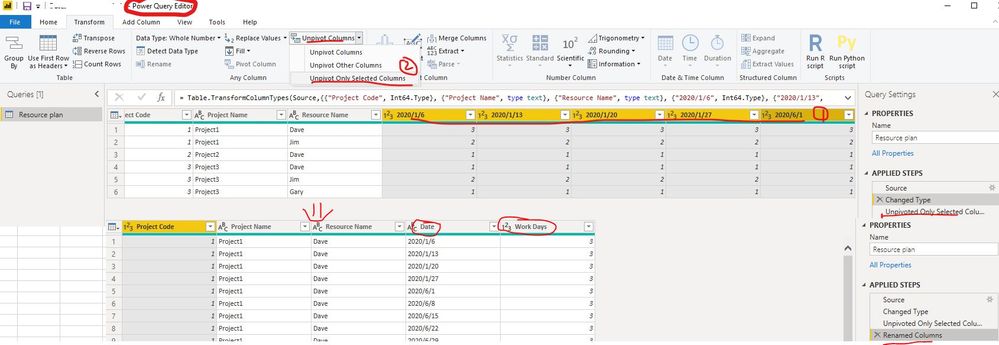
1. Unpivot all date columns(select all date columns and click "Unpivot columns" in Transform ribbon )

unpivot.jpg

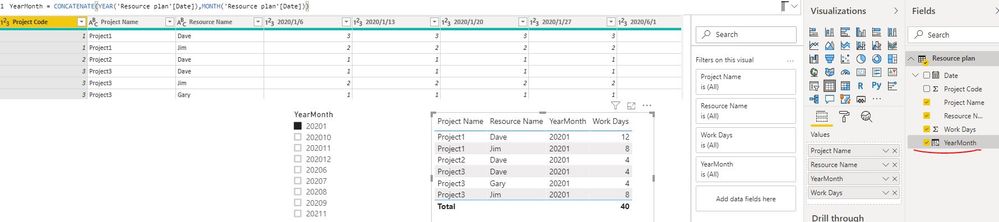
2. Create a calculated column to get the year and month of date column with below formula

YearMonth = CONCATENATE(YEAR('Resource plan'[Date]),MONTH('Resource plan'[Date]))

create calculated column.JPG

Best Regards

Rena

View solution in original post

3 REPLIES 3
Anonymous
Not applicable

Hi @Anonymous ,

You can follow the below steps to get it:

1. Unpivot all date columns(select all date columns and click "Unpivot columns" in Transform ribbon )

unpivot.jpg

2. Create a calculated column to get the year and month of date column with below formula

YearMonth = CONCATENATE(YEAR('Resource plan'[Date]),MONTH('Resource plan'[Date]))

create calculated column.JPG

Best Regards

Rena

amitchandak
Super User
Super User

@Anonymous , First unpivot the data

https://radacad.com/pivot-and-unpivot-with-power-bi
Create a date table and join dates with that

To get the best of the time intelligence function. Make sure you have a date calendar and it has been marked as the date in model view. Also, join it with the date column of your fact/s. Refer :
https://radacad.com/creating-calendar-table-in-power-bi-using-dax-functions
https://www.archerpoint.com/blog/Posts/creating-date-table-power-bi
https://www.sqlbi.com/articles/creating-a-simple-date-table-in-dax/

See if my webinar on Time Intelligence can help: https://community.powerbi.com/t5/Webinars-and-Video-Gallery/PowerBI-Time-Intelligence-Calendar-WTD-YTD-LYTD-Week-Over-Week/m-p/1051626#M184


Appreciate your Kudos.

Share with Power BI Enthusiasts: Full Power BI Video (20 Hours) YouTube
Microsoft Fabric Series 60+ Videos YouTube
Microsoft Fabric Hindi End to End YouTube
Anonymous
Not applicable

Do you have a separate date or calendar table?  You really need one.  Then in that table you can say what dates belong to what weeks.


For example,this is a pic of my calendar table.   You can add your own tables in a couple of ways.  You could build your own table in excel and import it.  Or you could create one in Power query (paste the below code into the advanced editor)


let CreateDateTable = (StartDate as date, EndDate as date, FiscalYearStartDate as date, optional Culture as nullable text) as table =>
  let
    DayCount = Duration.Days(Duration.From(EndDate - StartDate)),
    Source = List.Dates(StartDate,DayCount,#duration(1,0,0,0)),
    TableFromList = Table.FromList(Source, Splitter.SplitByNothing()),
    ChangedType = Table.TransformColumnTypes(TableFromList,{{"Column1", type date}}),
    RenamedColumns = Table.RenameColumns(ChangedType,{{"Column1", "Date"}}),
    InsertYear = Table.AddColumn(RenamedColumns, "Year", each Date.Year([Date])),
    InsertQuarter = Table.AddColumn(InsertYear, "QuarterOfYear", each Date.QuarterOfYear([Date])),
    InsertMonth = Table.AddColumn(InsertQuarter, "MonthOfYear", each Date.Month([Date])),
    InsertDay = Table.AddColumn(InsertMonth, "DayOfMonth", each Date.Day([Date])),
    InsertDayInt = Table.AddColumn(InsertDay, "DateInt", each [Year] * 10000 + [MonthOfYear] * 100 + [DayOfMonth]),
    InsertMonthName = Table.AddColumn(InsertDayInt, "MonthName", each Date.ToText([Date], "MMMM", Culture), type text),
    InsertCalendarMonth = Table.AddColumn(InsertMonthName, "MonthInCalendar", each (try(Text.Range([MonthName],0,3)) otherwise [MonthName]) & " " & Number.ToText([Year])),
    InsertCalendarQtr = Table.AddColumn(InsertCalendarMonth, "QuarterInCalendar", each Number.ToText([Year]) & " " & "Q" & Number.ToText([QuarterOfYear])),
    InsertDayWeek = Table.AddColumn(InsertCalendarQtr, "DayInWeek", each Date.DayOfWeek([Date])+1),
    InsertDayName = Table.AddColumn(InsertDayWeek, "DayOfWeekName", each Date.ToText([Date], "dddd", Culture), type text),
    InsertWeekEnding = Table.AddColumn(InsertDayName, "WeekEnding", each Date.EndOfWeek([Date]), type date),
    
    InsertFiscalMonth = Table.AddColumn(InsertWeekEnding, "FiscalMonth", 
        each ( if Date.Month([Date]) >= Date.Month(FiscalYearStartDate) then Date.Month([Date]) - Date.Month(FiscalYearStartDate) + 1
        else 12 - Date.Month(FiscalYearStartDate) + Date.Month([Date]) + 1 ), type number),
    
    InsertFiscalQuarter = Table.AddColumn(InsertFiscalMonth, "FiscalQuarter", each Number.ToText([FiscalYear]) & " FQ" & Number.ToText([FiscalCalendarQuarter])),

    InsertFiscalCalendarQuarter = Table.AddColumn(InsertFiscalQuarter, "FiscalCalendarQuarter", 
        each ( if Date.QuarterOfYear([Date]) >= Date.QuarterOfYear(FiscalYearStartDate) then Date.QuarterOfYear([Date]) - Date.QuarterOfYear(FiscalYearStartDate) + 1
        else 4 - Date.QuarterOfYear(FiscalYearStartDate) + Date.QuarterOfYear([Date]) + 1)),

    InsertFiscalYear = Table.AddColumn(InsertFiscalCalendarQuarter, "FiscalYear", each (if Date.Month([Date]) < Date.Month(FiscalYearStartDate) then Date.Year([Date]) else Date.Year([Date])+1), type number)
  in
    InsertFiscalYear,
    #"Invoked FunctionCreateDateTable" = CreateDateTable(#date(2017, 1, 1), #date(2020, 12, 31), #date(2013, 1, 1), null),
    #"Inserted Week of Year" = Table.AddColumn(#"Invoked FunctionCreateDateTable", "Week of Year", each (Date.WeekOfYear([Date], Day.Sunday)))
in
    #"Inserted Week of Year"
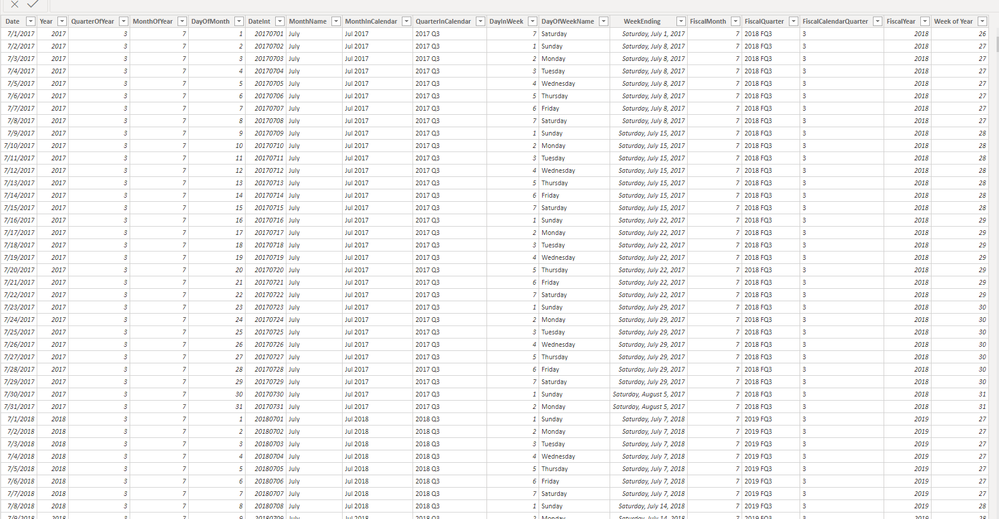


image.png

Helpful resources

Announcements
November Power BI Update Carousel

Power BI Monthly Update - November 2025

Check out the November 2025 Power BI update to learn about new features.

Fabric Data Days Carousel

Fabric Data Days

Advance your Data & AI career with 50 days of live learning, contests, hands-on challenges, study groups & certifications and more!

FabCon Atlanta 2026 carousel

FabCon Atlanta 2026

Join us at FabCon Atlanta, March 16-20, for the ultimate Fabric, Power BI, AI and SQL community-led event. Save $200 with code FABCOMM.

Top Solution Authors
Top Kudoed Authors