cancel
Showing results for 
Search instead for 
Did you mean: 

View all the Fabric Data Days sessions on demand. View schedule

Reply
Bumpy8732
Regular Visitor

Datediff measure with filters

Hello all,


I am going round in circles and need some help please.


I have a machine asset shift column and I need to work out how many hours per shift the machine was working.


If this calculation should only occur if the machine has both an arrive and leave record for the shift.


I have this measure, however it is not taking the MAX arrive - MAX leave time, just any other time records in the shift. The N/A in the arrive column are other activities such as lunch breaks.


Thank you for the help.


Measure:

Hours working=

SUMX(

    'Table DRAFT',

    IF(

        'Table DRAFT'[Arrive/Leave] = "Arrive",

    DIVIDE(


    DATEDIFF(

        MIN('Table DRAFT'[DatetimeStart]),

        MAX('Table DRAFT'[DatetimeStart]),

        MINUTE

    ),60

    )

))


Screen shots:


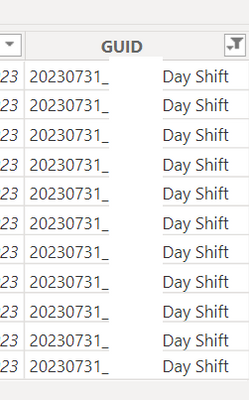
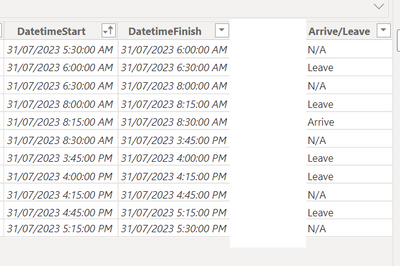
Bumpy8732_0-1691157871476.pngBumpy8732_1-1691157884419.png


1 ACCEPTED SOLUTION
v-zhangti
Community Support
Community Support

Hi, @Bumpy8732 


You can try the following methods.

Measure = 
Var _minarrive=CALCULATE(MIN('Table'[DatetimeStart]),FILTER(ALL('Table'),[Arrive/Leave]="Arrive"))
Var _maxleave=CALCULATE(MAX('Table'[DatetimeStart]),FILTER(ALL('Table'),[Arrive/Leave]="leave"))
Return
DATEDIFF(_minarrive,_maxleave,MINUTE)/60

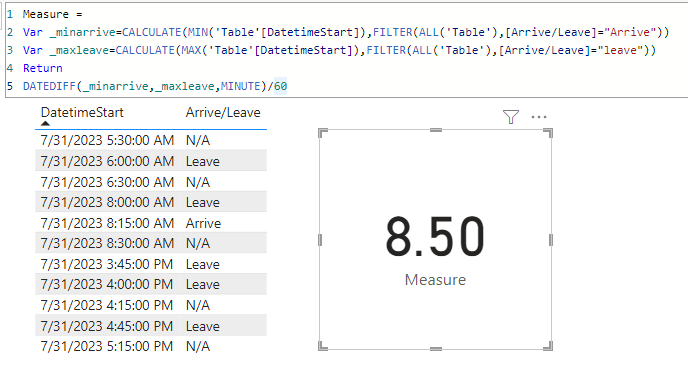
vzhangti_0-1692274403622.png

Is this the result you expect?


Best Regards,

Community Support Team _Charlotte

If this post helps, then please consider Accept it as the solution to help the other members find it more quickly.

View solution in original post

4 REPLIES 4
v-zhangti
Community Support
Community Support

Hi, @Bumpy8732 


You can try the following methods.

Measure = 
Var _minarrive=CALCULATE(MIN('Table'[DatetimeStart]),FILTER(ALL('Table'),[Arrive/Leave]="Arrive"))
Var _maxleave=CALCULATE(MAX('Table'[DatetimeStart]),FILTER(ALL('Table'),[Arrive/Leave]="leave"))
Return
DATEDIFF(_minarrive,_maxleave,MINUTE)/60

vzhangti_0-1692274403622.png

Is this the result you expect?


Best Regards,

Community Support Team _Charlotte

If this post helps, then please consider Accept it as the solution to help the other members find it more quickly.

amitchandak
Super User
Super User

@Bumpy8732 , Try like

SUMX(

filter( 'Table DRAFT','Table DRAFT'[Arrive/Leave] = "Arrive"),


DIVIDE(


DATEDIFF(

MIN('Table DRAFT'[DatetimeStart]),

MAX('Table DRAFT'[DatetimeStart]),

MINUTE

),60

)

)


Or push a visual row context

calculate(

SUMX(values('Table DRAFT'[Column])

,


DIVIDE(


DATEDIFF(

MIN('Table DRAFT'[DatetimeStart]),

MAX('Table DRAFT'[DatetimeStart]),

MINUTE

),60

)

), filter( 'Table DRAFT','Table DRAFT'[Arrive/Leave] = "Arrive") )

Share with Power BI Enthusiasts: Full Power BI Video (20 Hours) YouTube
Microsoft Fabric Series 60+ Videos YouTube
Microsoft Fabric Hindi End to End YouTube

Thank you for your response.

Unfortunately I am still getting a result that is unexpected. 


I could only get your first suggestion to display something (sorry I am new to this,) but it is still just taking the first record minus the last one. I need to filter out the N/A's in the query for that to work?


Any Ideas? Thank you 🙂

In this example, I am looking to return a result of 8.5 hours.


This is from 8:15 am from the first "arrive"record and then 4:45pm for the last "leave" record.
A complication with this one is that a leave event is before the arrive. This is because they use the same code to start and end the shift.

Thanks

Helpful resources

Announcements
November Power BI Update Carousel

Power BI Monthly Update - November 2025

Check out the November 2025 Power BI update to learn about new features.

Fabric Data Days Carousel

Fabric Data Days

Advance your Data & AI career with 50 days of live learning, contests, hands-on challenges, study groups & certifications and more!

FabCon Atlanta 2026 carousel

FabCon Atlanta 2026

Join us at FabCon Atlanta, March 16-20, for the ultimate Fabric, Power BI, AI and SQL community-led event. Save $200 with code FABCOMM.

Top Solution Authors
Top Kudoed Authors