Learn from the best! Meet the four finalists headed to the FINALS of the Power BI Dataviz World Championships! Register now
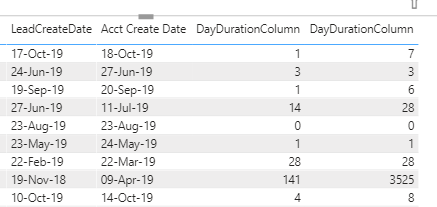
Hello - I would like to, using DAX or mquery, fix the issue I am having below. Trying to sum up the days between when a Lead is created by our salespeople....and when that actual account (from that Lead) gets created.
The 3rd column is correct - acheived by selecting the "do not sum" option in the visualization area. The far right column is what happens if I don't, and just leave it as "summarize".
Is there a way to achieve having this calculated column NOT sum, within the formula itself? Or perhaps can a measure be created instead? Thanks!
Solved! Go to Solution.
Hi @Anonymous ,
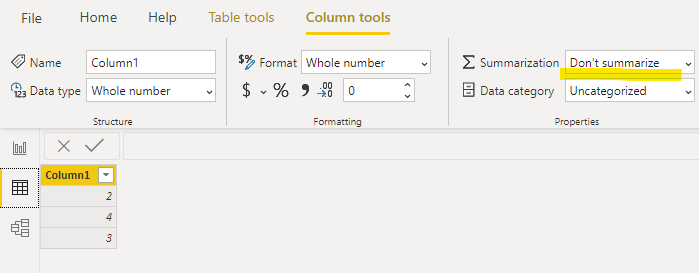
You can go to data view>select the calcualted column>column tools>"dont summarize":
And when you put the column value in a visual you will see:
The valued is not summed up automatically.
Hi @Anonymous ,
You can go to data view>select the calcualted column>column tools>"dont summarize":
And when you put the column value in a visual you will see:
The valued is not summed up automatically.
@Anonymous
this behaviour ais explained by that fact that you have a few rows with the same pair Lead - Acc dates.
you need to define business logic how do you want to calculate cases with two identical date's pairs
A new Power BI DataViz World Championship is coming this June! Don't miss out on submitting your entry.
Share feedback directly with Fabric product managers, participate in targeted research studies and influence the Fabric roadmap.
| User | Count |
|---|---|
| 46 | |
| 31 | |
| 29 | |
| 15 | |
| 15 |
| User | Count |
|---|---|
| 58 | |
| 56 | |
| 38 | |
| 21 | |
| 21 |