Get certified for free when you join Fabric Data Days 2026 and dive into Fabric, Power BI, SQL, AI, and other essential data skills.
Join nowTry your skills in the Power BI Dataviz World Championship! Round one ends June 26. Join now
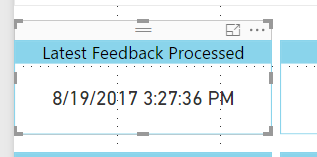
I created a measure that returns a date. In the power bi desktop it is being correctly displayed as a date.
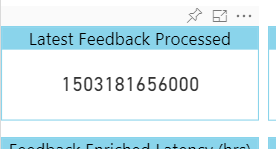
However when i publish the report the date is displayed as a long numeric value. Is this a known issue?
See images below.
I am using the card visual. Does this expect only a text or number? How do I convert the date to a text?
Solved! Go to Solution.
It works for me when setting Display units to Auto under Data label in the Format pane. To convert it to text, you could use FORMAT Function.
Don't miss out on Data Days, June 15 through August 7. Learn Fabric, Power BI, SQL, AI and more.
Check out the May 2026 Power BI update to learn about new features.
| User | Count |
|---|---|
| 22 | |
| 21 | |
| 21 | |
| 20 | |
| 13 |
| User | Count |
|---|---|
| 59 | |
| 53 | |
| 40 | |
| 31 | |
| 26 |