FabCon is coming to Atlanta
Join us at FabCon Atlanta from March 16 - 20, 2026, for the ultimate Fabric, Power BI, AI and SQL community-led event. Save $200 with code FABCOMM.
Register now!- Power BI forums
- Get Help with Power BI
- Desktop
- Service
- Report Server
- Power Query
- Mobile Apps
- Developer
- DAX Commands and Tips
- Custom Visuals Development Discussion
- Health and Life Sciences
- Power BI Spanish forums
- Translated Spanish Desktop
- Training and Consulting
- Instructor Led Training
- Dashboard in a Day for Women, by Women
- Galleries
- Data Stories Gallery
- Themes Gallery
- Contests Gallery
- QuickViz Gallery
- Quick Measures Gallery
- Visual Calculations Gallery
- Notebook Gallery
- Translytical Task Flow Gallery
- TMDL Gallery
- R Script Showcase
- Webinars and Video Gallery
- Ideas
- Custom Visuals Ideas (read-only)
- Issues
- Issues
- Events
- Upcoming Events
The Power BI Data Visualization World Championships is back! Get ahead of the game and start preparing now! Learn more
- Power BI forums
- Forums
- Get Help with Power BI
- Desktop
- Date type
- Subscribe to RSS Feed
- Mark Topic as New
- Mark Topic as Read
- Float this Topic for Current User
- Bookmark
- Subscribe
- Printer Friendly Page


- Mark as New
- Bookmark
- Subscribe
- Mute
- Subscribe to RSS Feed
- Permalink
- Report Inappropriate Content
Date type
Hi,
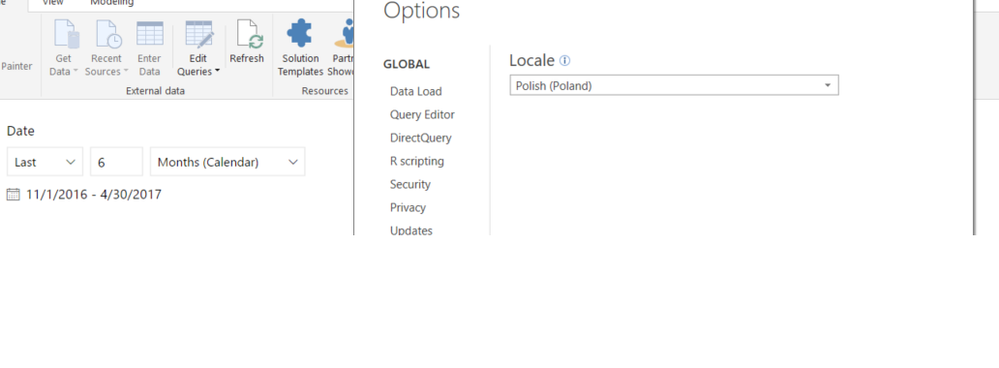
I have this problem that in some reports the date filter shows format as US ( MM-DD-YYYY) . My regional settings in Power BI Desktop are correct, on my computer also eventrtnhing looks like YYYY-MM-DD.

- Mark as New
- Bookmark
- Subscribe
- Mute
- Subscribe to RSS Feed
- Permalink
- Report Inappropriate Content
Hi @Marcin,
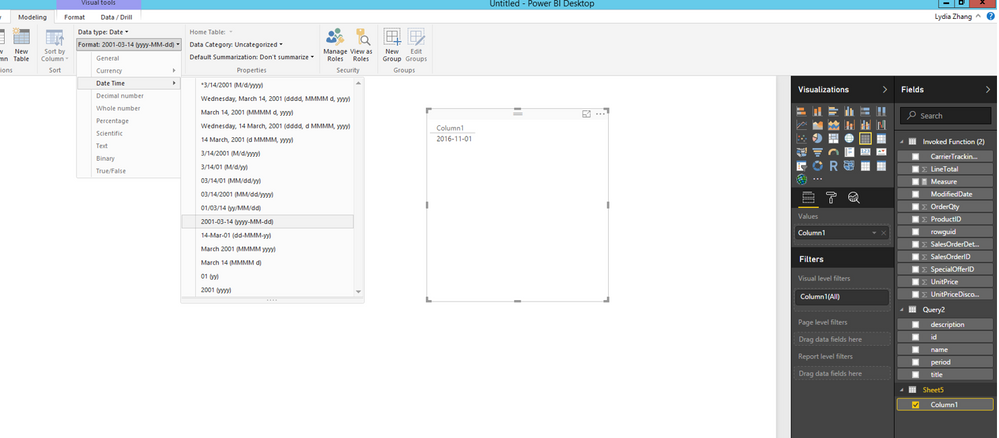
Click on your date column in Fields Pane, then change its format to yyyy-MM-dd under Modeling ribbon.
Regards,
Lydia Zhang
- Mark as New
- Bookmark
- Subscribe
- Mute
- Subscribe to RSS Feed
- Permalink
- Report Inappropriate Content
Hi @Anonymous
Unfortunately I am using data from SSAS with Live Connnection so I can't change this format in PowerBI desktop.
I forgot to add that the format date is changing after I publish my report to Power BI service.
- Mark as New
- Bookmark
- Subscribe
- Mute
- Subscribe to RSS Feed
- Permalink
- Report Inappropriate Content
Hi @Marcin,
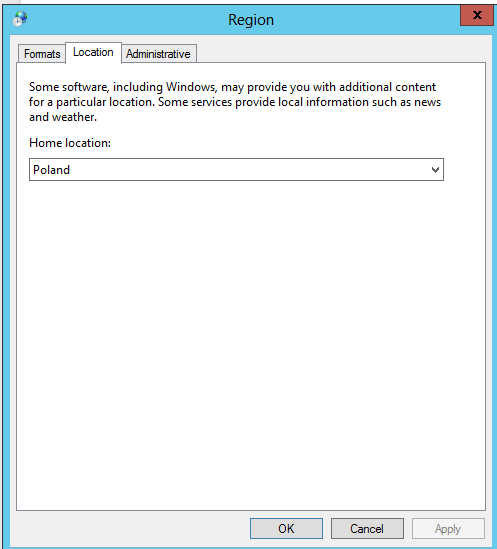
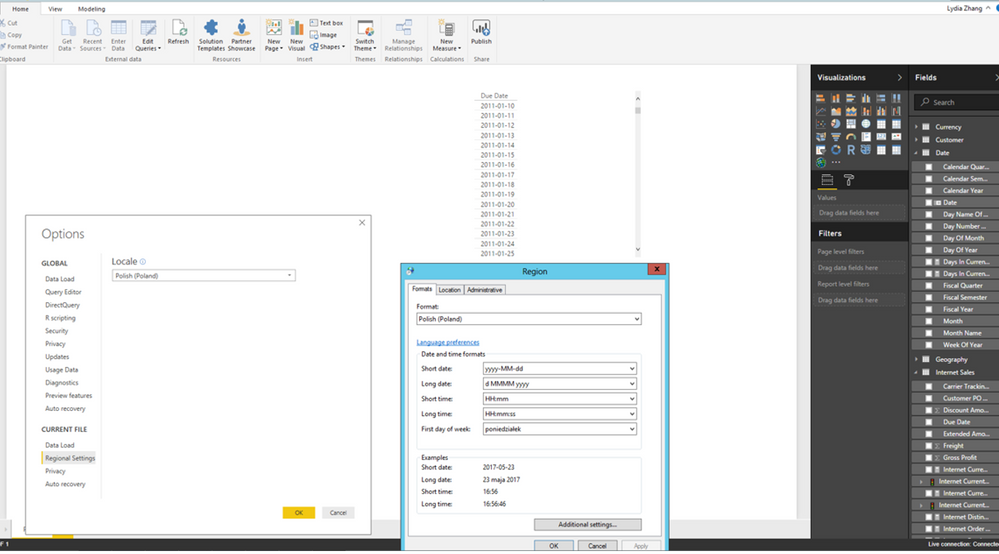
I am not able to reproduce your issue in the latest version of Power BI Desktop (2.46.4732.721), please check the region settings in my environment. I change regional setting in my computer and change regional setting to Polish(Poland) in Power BI Desktop, after I re-open Power BI Desktop file, everything works well.
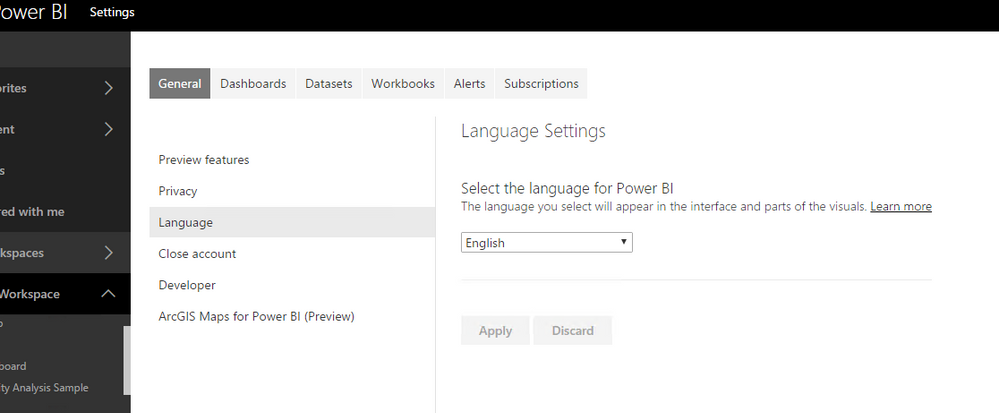
In addition, after you publish Power BI Desktop file to Power BI Service, the date format will change based on the language settings in Power BI Service.
Regards,
Lydia Zhang
- Mark as New
- Bookmark
- Subscribe
- Mute
- Subscribe to RSS Feed
- Permalink
- Report Inappropriate Content
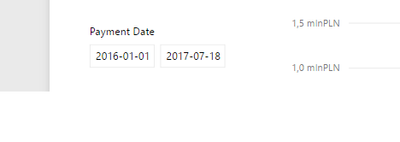
When I change language settings in Power BI service from English to Polish ( Polski ) then format is correct :
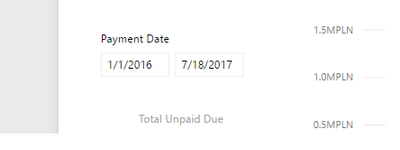
With English language selection is changed again, In my opinion there should be option like "US English "
- Mark as New
- Bookmark
- Subscribe
- Mute
- Subscribe to RSS Feed
- Permalink
- Report Inappropriate Content
@Marcin,
Has the issue been solved? To make the date display as YYYY-MM-DD, you would need to change language setting to Polish(Polski).
Regards,
Lydia Zhang
- Mark as New
- Bookmark
- Subscribe
- Mute
- Subscribe to RSS Feed
- Permalink
- Report Inappropriate Content
Thanks for help, unfortunately I am using english language in all of my applications so I will wait for next preview where will be ability to choose two types of english formats .
- Mark as New
- Bookmark
- Subscribe
- Mute
- Subscribe to RSS Feed
- Permalink
- Report Inappropriate Content
@Marcin,
You can submit an idea in this forum: https://ideas.powerbi.com/forums/265200.
Regards,
- Mark as New
- Bookmark
- Subscribe
- Mute
- Subscribe to RSS Feed
- Permalink
- Report Inappropriate Content
Have a look at the underlying Date data and its format. I'm always wrestling with the Data formatting of most microsoft products. Here in AUS we use DD/MM/YYYY. Sometimes i've had MS programs invert the DD/MM to MM/DD and often my solution is just to put my own data format inversion back in.
Helpful resources

Power BI Dataviz World Championships
The Power BI Data Visualization World Championships is back! Get ahead of the game and start preparing now!

Power BI Monthly Update - December 2025
Check out the December 2025 Power BI Holiday Recap!

FabCon Atlanta 2026
Join us at FabCon Atlanta, March 16-20, for the ultimate Fabric, Power BI, AI and SQL community-led event. Save $200 with code FABCOMM.

| User | Count |
|---|---|
| 41 | |
| 38 | |
| 36 | |
| 31 | |
| 28 |


| User | Count |
|---|---|
| 129 | |
| 88 | |
| 79 | |
| 68 | |
| 63 |


