cancel
Showing results for 
Search instead for 
Did you mean: 

Get Fabric Certified for FREE during Fabric Data Days. Don't miss your chance! Request now

Reply
Anonymous
Not applicable

Date slicer interpreting dates as it pleases (UK and US)

Hi there,

Hope you can help me out with this one. I've got a report connected to a tabular cube. This report contains a date slicer which was intended to serve as a filter, but instead it's only causing pain and suffering. It works as expected on PBI desktop on development time, but once it's published, it works as it pleases: sometimes interprets dates in UK format and, when possible, it interprets them in US format.

Check out these examples. On the top the report, and on the bottom a query to the underlying cube.

1st example: 13th of april. Everything looks fine, the data in the report matches that in the cube.

1.png


2nd example: I go back one day to the 12th of April. Now the report tells me there is no data for this date. But the underlying cube proves it wrong.
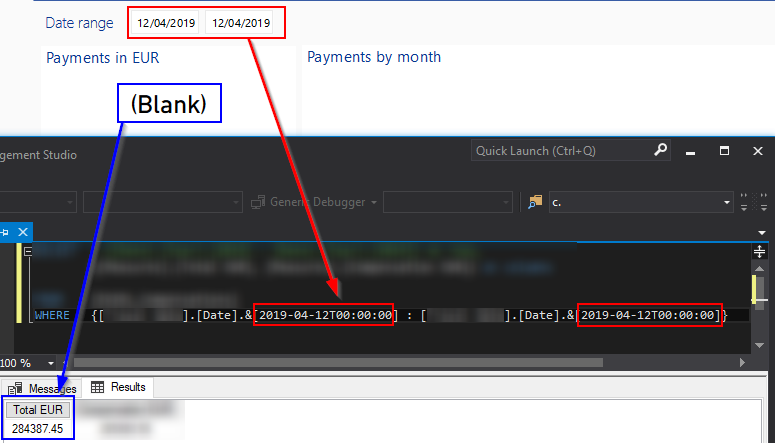
2.png


That's strange... now what a coincidence 12 is also a month, unlike 13. Let's go to December and see what's going on there:

3rd example: Going forward to the 4th of December displays data from the 12th of April as per the previous image query against the cube.
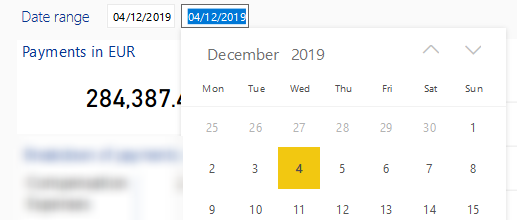
3.png


In short, despite having everything set up to display dates in dd/mm/yyyy format (Windows regional settings, PowerBI desktop regional settings and Chrome/Firefox language settings with PBI web language set as default) PowerBI still interprets the dates in US format. Sometimes. Because for dates not compatible with US format, it displays everything correctly.


Any help or hint will be appreciated.

Regards,

Martin.

1 ACCEPTED SOLUTION
v-frfei-msft
Community Support
Community Support

Hi @Anonymous ,


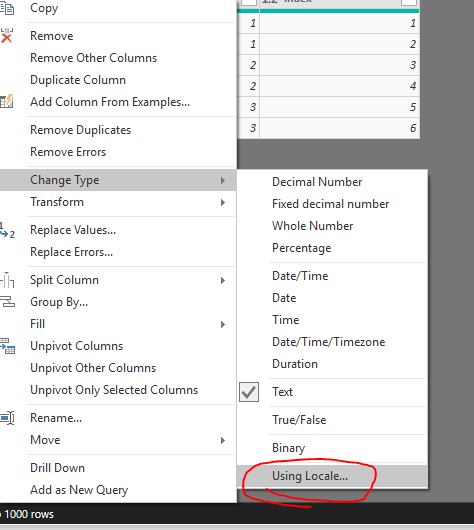
Please change your date in Power query to your local one as below.


chan.PNG

Community Support Team _ Frank
If this post helps, then please consider Accept it as the solution to help the others find it more quickly.

View solution in original post

2 REPLIES 2
v-frfei-msft
Community Support
Community Support

Hi @Anonymous ,


Please change your date in Power query to your local one as below.


chan.PNG

Community Support Team _ Frank
If this post helps, then please consider Accept it as the solution to help the others find it more quickly.
Anonymous
Not applicable

Thanks Frank, that worked!

Helpful resources

Announcements
November Power BI Update Carousel

Power BI Monthly Update - November 2025

Check out the November 2025 Power BI update to learn about new features.

Fabric Data Days Carousel

Fabric Data Days

Advance your Data & AI career with 50 days of live learning, contests, hands-on challenges, study groups & certifications and more!

FabCon Atlanta 2026 carousel

FabCon Atlanta 2026

Join us at FabCon Atlanta, March 16-20, for the ultimate Fabric, Power BI, AI and SQL community-led event. Save $200 with code FABCOMM.

Top Solution Authors
Top Kudoed Authors