cancel
Showing results for 
Search instead for 
Did you mean: 

Get Fabric Certified for FREE during Fabric Data Days. Don't miss your chance! Request now

Reply
Anonymous
Not applicable

Date on y-axis

Hey Community, 


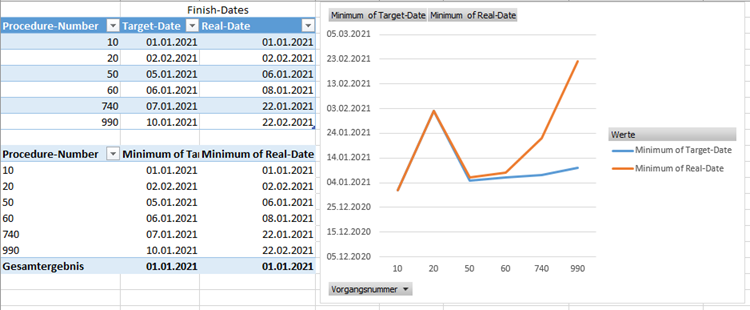
I am trying to build an dashboard to watch our production. We already realized it with Excel as you can see in the attached image. What I would like to see in the graph is the difference between the planned-process and the target-process, so an evaluation of production orders. Now I am trying to realize it in PowerBI but I am not able to put the date on the y-axis and the procedure-numbers on the x-axis. 

In Excel I already had to "fake" the data and choose the "minimum of target-date", otherwise excel always wanted to "sum" or "number of.." the dates. 


Hope you can help me, already searched a lot but never found someone with the same problem.

Thank you!!

 image001.png

10

01.01.202101.01.2021
2002.02.202102.02.2021
5005.01.202106.01.2021
6006.01.202108.01.2021
74007.01.202122.01.2021
99010.01.202122.02.2021
1 ACCEPTED SOLUTION
amitchandak
Super User
Super User

@Anonymous , In power bi you can not have columns in both axis. Check for some X-Y visual in custom visual

https://appsource.microsoft.com/en-us/marketplace/apps?product=power-bi-visuals

Share with Power BI Enthusiasts: Full Power BI Video (20 Hours) YouTube
Microsoft Fabric Series 60+ Videos YouTube
Microsoft Fabric Hindi End to End YouTube

View solution in original post

3 REPLIES 3
Anonymous
Not applicable

@amitchandak thank you for your answer! I alreday expected something like that and already searched for some custom visuals but did not found anything. So there is no other option? 

amitchandak
Super User
Super User

@Anonymous , In power bi you can not have columns in both axis. Check for some X-Y visual in custom visual

https://appsource.microsoft.com/en-us/marketplace/apps?product=power-bi-visuals

Share with Power BI Enthusiasts: Full Power BI Video (20 Hours) YouTube
Microsoft Fabric Series 60+ Videos YouTube
Microsoft Fabric Hindi End to End YouTube
Anonymous
Not applicable

Just found this one for anybody who has the same struggle:  Plotting dates on Y axis 


Thanks.

Helpful resources

Announcements
November Power BI Update Carousel

Power BI Monthly Update - November 2025

Check out the November 2025 Power BI update to learn about new features.

Fabric Data Days Carousel

Fabric Data Days

Advance your Data & AI career with 50 days of live learning, contests, hands-on challenges, study groups & certifications and more!

FabCon Atlanta 2026 carousel

FabCon Atlanta 2026

Join us at FabCon Atlanta, March 16-20, for the ultimate Fabric, Power BI, AI and SQL community-led event. Save $200 with code FABCOMM.

Top Solution Authors
Top Kudoed Authors