cancel
Showing results for 
Search instead for 
Did you mean: 

The Power BI Data Visualization World Championships is back! Get ahead of the game and start preparing now! Learn more

Reply
Anonymous
Not applicable

Date filtering - Getting last 5 calendar years plus this year to date

Hello! I'm trying to create a simple filter in my reports using the "filter-pane" in PBI Desktop, using relative filtering. There are two options, either last x calendar years OR last x years. What I need however is a combination of the two. I want the filter to include five calendar years back PLUS current year to date. In other words, I need it to count from 1.1.2015 TO "TODAY" (then after new years, the relative filtering moves earliest date to 1.1.2016). Is this achievable?
1 ACCEPTED SOLUTION
amitchandak
Super User
Super User

@Anonymous , Try with a date table

5 Yr YTD =
var _max = today()
// or // maxx(allselected('Date'),[date])
var _min = date(year(_max)-5,1,1)
return
CALCULATE(Sum('Table'[Column]),filter(all('Date'),'Date'[Date]<=_max && 'Date'[Date]>=_min))


To get the best of the time intelligence function. Make sure you have a date calendar and it has been marked as the date in model view. Also, join it with the date column of your fact/s. Refer :
https://radacad.com/creating-calendar-table-in-power-bi-using-dax-functions
https://www.archerpoint.com/blog/Posts/creating-date-table-power-bi
https://www.sqlbi.com/articles/creating-a-simple-date-table-in-dax/

See if my webinar on Time Intelligence can help: https://community.powerbi.com/t5/Webinars-and-Video-Gallery/PowerBI-Time-Intelligence-Calendar-WTD-YTD-LYTD-Week-Over-Week/m-p/1051626#M184


Appreciate your Kudos.

Share with Power BI Enthusiasts: Full Power BI Video (20 Hours) YouTube
Microsoft Fabric Series 60+ Videos YouTube
Microsoft Fabric Hindi End to End YouTube

View solution in original post

3 REPLIES 3
Anonymous
Not applicable

Hi,

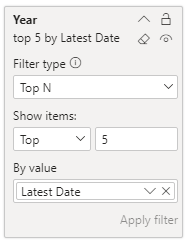
I think the better option is to use a top N filter rather than the relative date filter for your scenario...
If you filter the top N year by the latest date I think you get the results you're wanting.

image.png
image.png

Anonymous
Not applicable

Thanks for this solution. I bet this sloves the case for many, but in my case I get no such option as "top n" to chose from. Must be some reason for that. 


Not to worry though. A version of solution above solved the matter. 


Best, PJ

amitchandak
Super User
Super User

@Anonymous , Try with a date table

5 Yr YTD =
var _max = today()
// or // maxx(allselected('Date'),[date])
var _min = date(year(_max)-5,1,1)
return
CALCULATE(Sum('Table'[Column]),filter(all('Date'),'Date'[Date]<=_max && 'Date'[Date]>=_min))


To get the best of the time intelligence function. Make sure you have a date calendar and it has been marked as the date in model view. Also, join it with the date column of your fact/s. Refer :
https://radacad.com/creating-calendar-table-in-power-bi-using-dax-functions
https://www.archerpoint.com/blog/Posts/creating-date-table-power-bi
https://www.sqlbi.com/articles/creating-a-simple-date-table-in-dax/

See if my webinar on Time Intelligence can help: https://community.powerbi.com/t5/Webinars-and-Video-Gallery/PowerBI-Time-Intelligence-Calendar-WTD-YTD-LYTD-Week-Over-Week/m-p/1051626#M184


Appreciate your Kudos.

Share with Power BI Enthusiasts: Full Power BI Video (20 Hours) YouTube
Microsoft Fabric Series 60+ Videos YouTube
Microsoft Fabric Hindi End to End YouTube

Helpful resources

Announcements
Power BI DataViz World Championships

Power BI Dataviz World Championships

The Power BI Data Visualization World Championships is back! Get ahead of the game and start preparing now!

December 2025 Power BI Update Carousel

Power BI Monthly Update - December 2025

Check out the December 2025 Power BI Holiday Recap!

FabCon Atlanta 2026 carousel

FabCon Atlanta 2026

Join us at FabCon Atlanta, March 16-20, for the ultimate Fabric, Power BI, AI and SQL community-led event. Save $200 with code FABCOMM.