cancel
Showing results for 
Search instead for 
Did you mean: 

The Power BI Data Visualization World Championships is back! Get ahead of the game and start preparing now! Learn more

Reply
Anonymous
Not applicable

Date difference in same column for different stage

Hi,

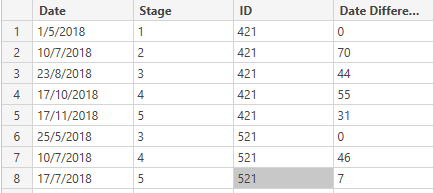
  I need a Calculated column for Date difference of same date based on different stages and ID.The stage will start at any level, for initial stage date difference should be 0 for each ID. The Final column value should as in Date Difference

Capture.PNG

2 ACCEPTED SOLUTIONS
PattemManohar
Community Champion
Community Champion

@Anonymous Please try this as a "New Column"


DateDiff = 
VAR _PrevDate = LOOKUPVALUE(Test48CummDateDiff[Date],Test48CummDateDiff[ID],Test48CummDateDiff[ID],Test48CummDateDiff[Stage],Test48CummDateDiff[Stage]-1) 
VAR _PrevDateClean = IF(_PrevDate=BLANK(),Test48CummDateDiff[Date],_PrevDate)
RETURN DATEDIFF(_PrevDateClean,Test48CummDateDiff[Date],DAY)

image.png


Did I answer your question? Mark my post as a solution!

Proud to be a PBI Community Champion


View solution in original post

@Anonymous 🙂 It's working fine, As per the screenshot - Your data contains 23-Aug-2017 for Stage 3, ID 421 (Row 3) that's why you are seeing huge date difference. But where as your initial sample data contains 23-Aug-2018.


Did I answer your question? Mark my post as a solution!

Proud to be a PBI Community Champion


View solution in original post

4 REPLIES 4
PattemManohar
Community Champion
Community Champion

@Anonymous Please try this as a "New Column"


DateDiff = 
VAR _PrevDate = LOOKUPVALUE(Test48CummDateDiff[Date],Test48CummDateDiff[ID],Test48CummDateDiff[ID],Test48CummDateDiff[Stage],Test48CummDateDiff[Stage]-1) 
VAR _PrevDateClean = IF(_PrevDate=BLANK(),Test48CummDateDiff[Date],_PrevDate)
RETURN DATEDIFF(_PrevDateClean,Test48CummDateDiff[Date],DAY)

image.png


Did I answer your question? Mark my post as a solution!

Proud to be a PBI Community Champion


Anonymous
Not applicable

@PattemManohar Thanks for the effort. But as output am getting different values as below. I need a date difference of previous stages for each ID

Capture.PNG


@Anonymous 🙂 It's working fine, As per the screenshot - Your data contains 23-Aug-2017 for Stage 3, ID 421 (Row 3) that's why you are seeing huge date difference. But where as your initial sample data contains 23-Aug-2018.


Did I answer your question? Mark my post as a solution!

Proud to be a PBI Community Champion


Anonymous
Not applicable

@PattemManohar Thanks:-)

Helpful resources

Announcements
November Power BI Update Carousel

Power BI Monthly Update - November 2025

Check out the November 2025 Power BI update to learn about new features.

Fabric Data Days Carousel

Fabric Data Days

Advance your Data & AI career with 50 days of live learning, contests, hands-on challenges, study groups & certifications and more!

FabCon Atlanta 2026 carousel

FabCon Atlanta 2026

Join us at FabCon Atlanta, March 16-20, for the ultimate Fabric, Power BI, AI and SQL community-led event. Save $200 with code FABCOMM.

Top Kudoed Authors