Party with Power BI’s own Guy in a Cube
Power BI is turning 10! Tune in for a special live episode on July 24 with behind-the-scenes stories, product evolution highlights, and a sneak peek at what’s in store for the future.
Save the date- Power BI forums
- Get Help with Power BI
- Desktop
- Service
- Report Server
- Power Query
- Mobile Apps
- Developer
- DAX Commands and Tips
- Custom Visuals Development Discussion
- Health and Life Sciences
- Power BI Spanish forums
- Translated Spanish Desktop
- Training and Consulting
- Instructor Led Training
- Dashboard in a Day for Women, by Women
- Galleries
- Data Stories Gallery
- Themes Gallery
- Contests Gallery
- Quick Measures Gallery
- Notebook Gallery
- Translytical Task Flow Gallery
- TMDL Gallery
- R Script Showcase
- Webinars and Video Gallery
- Ideas
- Custom Visuals Ideas (read-only)
- Issues
- Issues
- Events
- Upcoming Events
Enhance your career with this limited time 50% discount on Fabric and Power BI exams. Ends August 31st. Request your voucher.
- Power BI forums
- Forums
- Get Help with Power BI
- Desktop
- Date column doesn't seem to be recognized as Date ...
- Subscribe to RSS Feed
- Mark Topic as New
- Mark Topic as Read
- Float this Topic for Current User
- Bookmark
- Subscribe
- Printer Friendly Page


- Mark as New
- Bookmark
- Subscribe
- Mute
- Subscribe to RSS Feed
- Permalink
- Report Inappropriate Content
Date column doesn't seem to be recognized as Date type in calculation
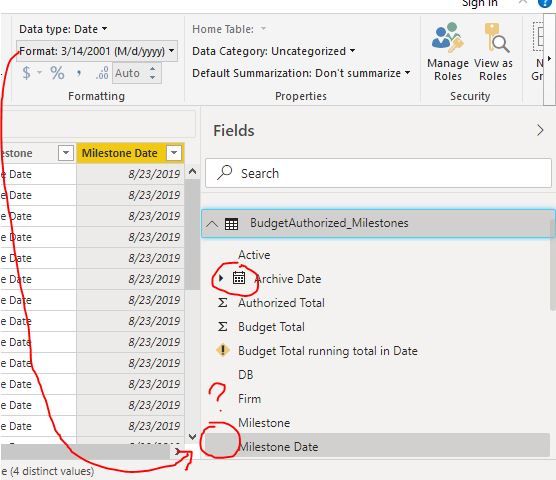
I have a reshaped table which has a date type column that I want to use in a calculated running total formula. The problem is that my "Milestone Date" column looks like a date column but it's not behaving as one (no date heiarchy, for example) and it's giving me a the following error when I try to use it in a FILTER/ALLEXCEPT type calculation: "EARLIER/EARLIEST refers to an earlier row context which doesn't exist."
Something seems fishy here!

- Mark as New
- Bookmark
- Subscribe
- Mute
- Subscribe to RSS Feed
- Permalink
- Report Inappropriate Content
1. Duplicate the column three times
2. Extract the Day/Month/Year from, one from each of the above columns
3. Merge the columns and give your new column a name
4. Close and Load

- Mark as New
- Bookmark
- Subscribe
- Mute
- Subscribe to RSS Feed
- Permalink
- Report Inappropriate Content
I have the same problem. I tried to upload the same file and the icon appears, but of course a method to fix this on already connected tables when it happens would be great
- Mark as New
- Bookmark
- Subscribe
- Mute
- Subscribe to RSS Feed
- Permalink
- Report Inappropriate Content
Hi @kbuckvol did you ever find a solution to this problem? I have the exact same problem and am looking for a solution. Thanks in advance!

- Mark as New
- Bookmark
- Subscribe
- Mute
- Subscribe to RSS Feed
- Permalink
- Report Inappropriate Content
Hi,
I had the same issue and found a solution (in my case). It was just a parameter in the options of PBI Desktop which was not activated.
The trick is that this parameter exists at a global level and for each pbix file as well.
You can verify in
- option>global>data load>time intelligence> auto date/time
- option>current file>data load>time intelligence> auto date/time
In my case, the option was simply deactivated at the file level.


- Mark as New
- Bookmark
- Subscribe
- Mute
- Subscribe to RSS Feed
- Permalink
- Report Inappropriate Content
Hi ,
It looks like data type for this columns in generic in power query ,
Power Query
If you change data type to Date ( right click on the column-->change type--> Date) in power query , would fix this issue.
Give it a try mate.
Thanks,
Sukhi
- Mark as New
- Bookmark
- Subscribe
- Mute
- Subscribe to RSS Feed
- Permalink
- Report Inappropriate Content
Thanks for your reply, Sukhi!
The native column is definitely a date type in the source table. In the query editor, it also shows as a date type as well. As I understand it, PowerQuery is an Excel add-in which I’m not using.


- Mark as New
- Bookmark
- Subscribe
- Mute
- Subscribe to RSS Feed
- Permalink
- Report Inappropriate Content
Do you have a date table and is 'milestone date' related to it? If so, the features of the date 'jump' to the date table, if that makes sense.
- Mark as New
- Bookmark
- Subscribe
- Mute
- Subscribe to RSS Feed
- Permalink
- Report Inappropriate Content
It is not a related. It IS, however, a combination of two other date columns created from both an unpivot and an append of two tables. But each step of the query shows these columns as a date type column in the query editor.

- Mark as New
- Bookmark
- Subscribe
- Mute
- Subscribe to RSS Feed
- Permalink
- Report Inappropriate Content
If possible please share a sample pbix file after removing sensitive information.Thanks.
My Recent Blog -
https://community.powerbi.com/t5/Community-Blog/HR-Analytics-Active-Employee-Hire-and-Termination-tr...
- Mark as New
- Bookmark
- Subscribe
- Mute
- Subscribe to RSS Feed
- Permalink
- Report Inappropriate Content
I'd really like to share the tbale but since it's a financial table, the amount of editing/cleaning would render the table something really different than what I'm actually working with.

Helpful resources

Fabric Community Update - July 2025
Find out what's new and trending in the Fabric community.

Power BI Monthly Update - July 2025
Check out the July 2025 Power BI update to learn about new features.

| User | Count |
|---|---|
| 77 | |
| 75 | |
| 46 | |
| 31 | |
| 28 |


| User | Count |
|---|---|
| 99 | |
| 93 | |
| 50 | |
| 49 | |
| 46 |


