Get certified for free when you join Fabric Data Days 2026 and dive into Fabric, Power BI, SQL, AI, and other essential data skills.
Join nowJuly 7 - July 17 | Round 2 of the Power BI Dataviz World Championships. Don't miss your chance! Learn more
Hello,
I created a Calendar table using this expression:
Date = CALENDAR(min(Recruitment[Hire Summary Date Range]),max(Recruitment[Hire Summary Date Range]))
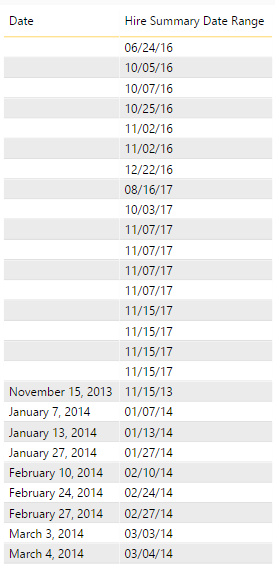
Then I created a many to one relationship between "Date" and "Hire Date Summary Range".
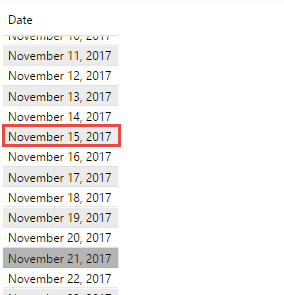
However, there are a handful of dates in the "Hire Summary Range" column that do not return a corresonding value from "Date", even though the dates DO exist in the "Date" column. I can't seem to figure what is special about these dates which would cause this to happen. Hoping someone has an idea I can work with to troubleshoot.
>>>>>>>>
Hi @Anonymous,
Could you share a sample pbix file(with just some mock data) which can reproduce the issue, so that we can help further investigate on it? You can upload it to OneDrive or Dropbox and post the link here. Do mask sensitive data before uploading. ![]()
Regards
Thanks for the offer, but I have figured it out.
My "Hire Summary Date" column is a calculated column combining two date columns. One of those columns is in the 'Date' format, the other is in 'Date Time" format.
I set the data type to 'Date' for this new calculated column, and created a relationship between it and the other column. I don't understand why, but the values that originally came from a Date Time format were not finding a match through the relationship even though they were appearing as though they were in 'Date' format.
Once I changed the original column from 'Date Time' to 'Date' everything matched up through the relationship. I would have thought that I could just change the Data type on the newly combined column. I didn't think the original columns would matter.
Is there a difference between changing Data Type 'Date' and 'Date Time' via the Modeling tab vs in the Query itself?
Join us in Barcelona for FabCon and SQLCon, the Fabric, Power BI, SQL, and AI community event. Save €200 with code FABCMTY200.
Join Fabric Data Days 2026: 60 days of free live/on-demand sessions, challenges, study groups, and certification opportunities.
| User | Count |
|---|---|
| 23 | |
| 22 | |
| 18 | |
| 17 | |
| 13 |
| User | Count |
|---|---|
| 63 | |
| 44 | |
| 42 | |
| 40 | |
| 40 |