Join us at FabCon Atlanta from March 16 - 20, 2026, for the ultimate Fabric, Power BI, AI and SQL community-led event. Save $200 with code FABCOMM.
Register now!The Power BI Data Visualization World Championships is back! Get ahead of the game and start preparing now! Learn more
Hi guys,
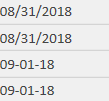
Here is my problem, I've got a column filled with same date format (August 31st and September 1st) but different delimiters. I'd like to standardize those format and put it in dd-mm-yy format since it seems to be in US 😕
I've tried the tool "split column" but since I have different delimiters I can't use more than one (/ & -). And also tried the "replace value" tool (works but don't want spend my time doing all days in a month..).
Looking forward your answers,
Thanks,
Solved! Go to Solution.
Hi @Anonymous,
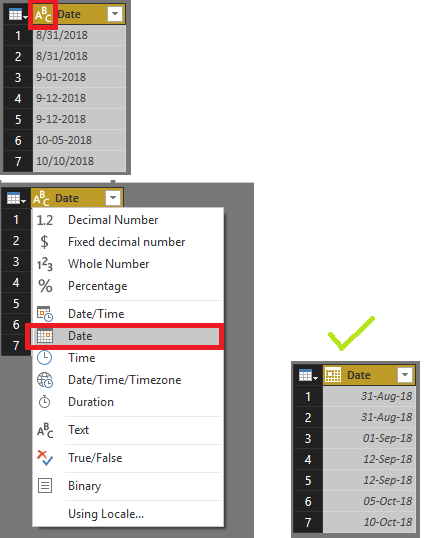
You can simply go to edit queries and then change the 'Data Type' of the column it will automatically adjust your data
Further you can also change the date format whatever you prefer.
Please mark this post as an accepted solution if this helped you.
Regards,
Affan
Hi @Anonymous,
You can simply go to edit queries and then change the 'Data Type' of the column it will automatically adjust your data
Further you can also change the date format whatever you prefer.
Please mark this post as an accepted solution if this helped you.
Regards,
Affan
The Power BI Data Visualization World Championships is back! Get ahead of the game and start preparing now!
| User | Count |
|---|---|
| 39 | |
| 37 | |
| 33 | |
| 32 | |
| 29 |
| User | Count |
|---|---|
| 133 | |
| 88 | |
| 85 | |
| 68 | |
| 64 |