cancel
Showing results for 
Search instead for 
Did you mean: 

The Power BI Data Visualization World Championships is back! It's time to submit your entry. Live now!

Reply
tputnam
Regular Visitor

Datan summarize vs count issue

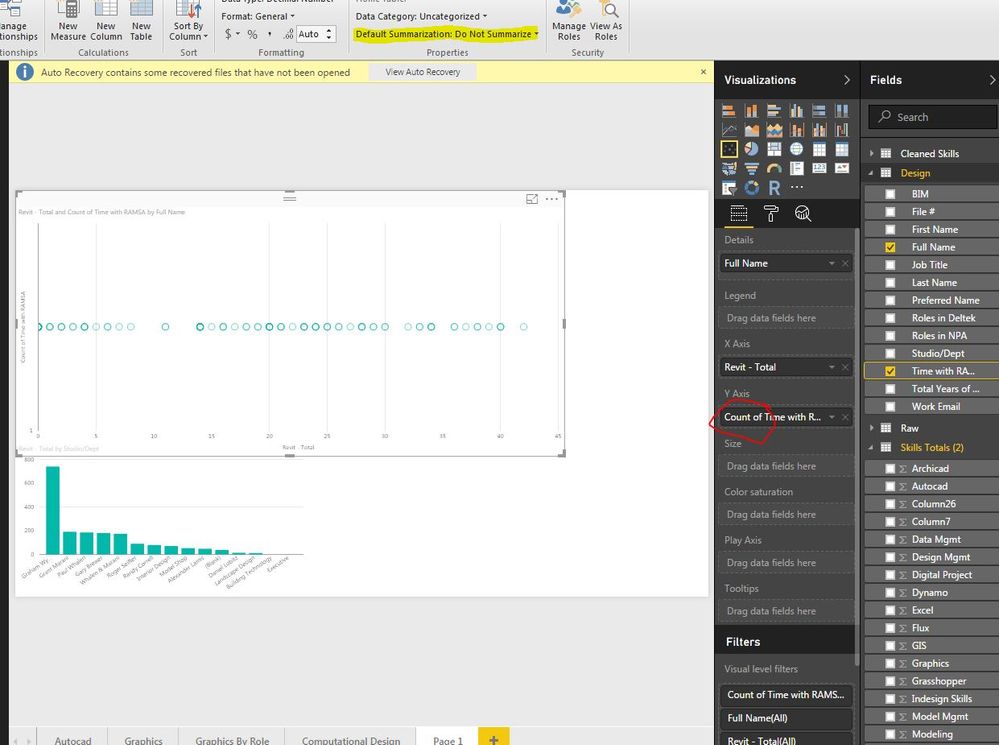
For some reason I cannot get some of my data to "not Summarize" and its driving me crazy. I format all of my numbers as numbers make sure they are not summarized and yet I still get a "Count" of that number, which of course is just going to be 1. What am I doing wrong here? I have them formatted in both excel and powerbi as numbers.


Capture.JPG

2 ACCEPTED SOLUTIONS
Greg_Deckler
Community Champion
Community Champion

I hate to tell you this, but you do not have your Y-Axis field formatted as a number. I can say this with some degree of certainty because your field over on the right does not have the summation sign to the left of it. If it were truly a number, it would have that symbol like all of the fields in the last table that you have expanded. Go to your data model, click the column and make sure that the Data Type is set to Whole Number or Decimal Number.


Follow on LinkedIn
@ me in replies or I'll lose your thread!!!
Instead of a Kudo, please vote for this idea
Become an expert!: Enterprise DNA
External Tools: MSHGQM
YouTube Channel!: Microsoft Hates Greg
Latest book!:
DAX For Humans

DAX is easy, CALCULATE makes DAX hard...

View solution in original post

v-micsh-msft
Microsoft Employee
Microsoft Employee

Hi toutnam,


It should be the data type issue.

Please check the article below and see if it would help to resolve this:

Aggregates in Power BI

And as smoupre suggested, change the data type to Whole number or Decimal Number to check out.

If you need any further assistance on this, please post back.

Regards

View solution in original post

2 REPLIES 2
v-micsh-msft
Microsoft Employee
Microsoft Employee

Hi toutnam,


It should be the data type issue.

Please check the article below and see if it would help to resolve this:

Aggregates in Power BI

And as smoupre suggested, change the data type to Whole number or Decimal Number to check out.

If you need any further assistance on this, please post back.

Regards

Greg_Deckler
Community Champion
Community Champion

I hate to tell you this, but you do not have your Y-Axis field formatted as a number. I can say this with some degree of certainty because your field over on the right does not have the summation sign to the left of it. If it were truly a number, it would have that symbol like all of the fields in the last table that you have expanded. Go to your data model, click the column and make sure that the Data Type is set to Whole Number or Decimal Number.


Follow on LinkedIn
@ me in replies or I'll lose your thread!!!
Instead of a Kudo, please vote for this idea
Become an expert!: Enterprise DNA
External Tools: MSHGQM
YouTube Channel!: Microsoft Hates Greg
Latest book!:
DAX For Humans

DAX is easy, CALCULATE makes DAX hard...

Helpful resources

Announcements
Power BI DataViz World Championships

Power BI Dataviz World Championships

The Power BI Data Visualization World Championships is back! It's time to submit your entry.

January Power BI Update Carousel

Power BI Monthly Update - January 2026

Check out the January 2026 Power BI update to learn about new features.

FabCon Atlanta 2026 carousel

FabCon Atlanta 2026

Join us at FabCon Atlanta, March 16-20, for the ultimate Fabric, Power BI, AI and SQL community-led event. Save $200 with code FABCOMM.