Join us at FabCon Atlanta from March 16 - 20, 2026, for the ultimate Fabric, Power BI, AI and SQL community-led event. Save $200 with code FABCOMM.
Register now!The Power BI Data Visualization World Championships is back! It's time to submit your entry. Live now!
Hello,
I am trying to connect PowerBI desktop to Azure Cosmos DB. When I am opening the interested dataset, it is unable to load and generate error "DataFormat.Error: Duplicate name 'privacyEntityType'"
I checked the entries in this collection in Cosmos DB and couldnt find any duplicates in any of the document. There is only one field with name "privacyEntityType".
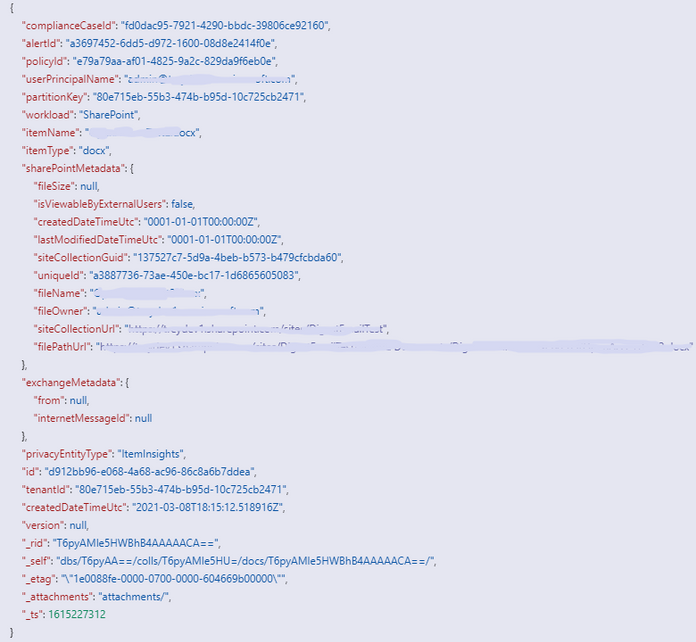
Can someone tell what is the real problem here? Does it mean that among N number of documents there could be one which has 2 "privacyEntityType"? It is highly unlikely.
Is there a way to bypass this or there is some issue on cosmos DB side?
Hi @Anonymous
Thanks for looking into this. I have already gone through above links to solve the problem but couldnt figure it out yet.
As far as the duplicate name is concerned, I manually checked all the items of a cosmos db container for which I was getting the error and none of the item contained duplicate name.
In fact tried creating a record with duplicate key and cosmosdb does not allow it. It dedupes as soon as well save it.
Can it be occuring because of any other issue?
Hi @akasthan
I think get data from ItemInsightsV2 will show you many Records. There may be duplicate names 'privacyEntityType' in same record. So this will cause error. I sugget you to check column names in your data source and rename duplicate names.
Here is the offical blog about how to get data from Azure Cosmos DB.
For reference: Visualize Azure Cosmos DB data by using the Power BI connector
And you may refer to this post with similar problem like yours.
For reference: JSON Record with Duplicate Column Names: DataFormat.Error: Duplicate name 'value'.
Best Regards,
Rico Zhou
If this post helps, then please consider Accept it as the solution to help the other members find it more quickly.
Hi @RicoZhou
Thanks for looking into this. I have already gone through above links to solve the problem but couldnt figure it out yet.
As far as the duplicate name is concerned, I manually checked all the items of a cosmos db container for which I was getting the error and none of the item contained duplicate name.
In fact tried creating a record with duplicate key and cosmosdb does not allow it. It dedupes as soon as well save it.
Can it be occuring because of any other issue?
| User | Count |
|---|---|
| 53 | |
| 40 | |
| 35 | |
| 24 | |
| 22 |
| User | Count |
|---|---|
| 135 | |
| 109 | |
| 57 | |
| 43 | |
| 38 |