Join us at FabCon Atlanta from March 16 - 20, 2026, for the ultimate Fabric, Power BI, AI and SQL community-led event. Save $200 with code FABCOMM.
Register now!The Power BI Data Visualization World Championships is back! Get ahead of the game and start preparing now! Learn more
Hi everyone!
I'm having some problems with my data update. I have an excel data base where I added some new columns and I'm not being sucessful to update then to PBI. When I try to refresh PBI there's a message: "Column number 50 not found".
Thanks!
Solved! Go to Solution.
Hi @Anonymous ,
By my tests and research, we will not get the error message for updating data in power bi desktop when we only add columns in the underlying data source.
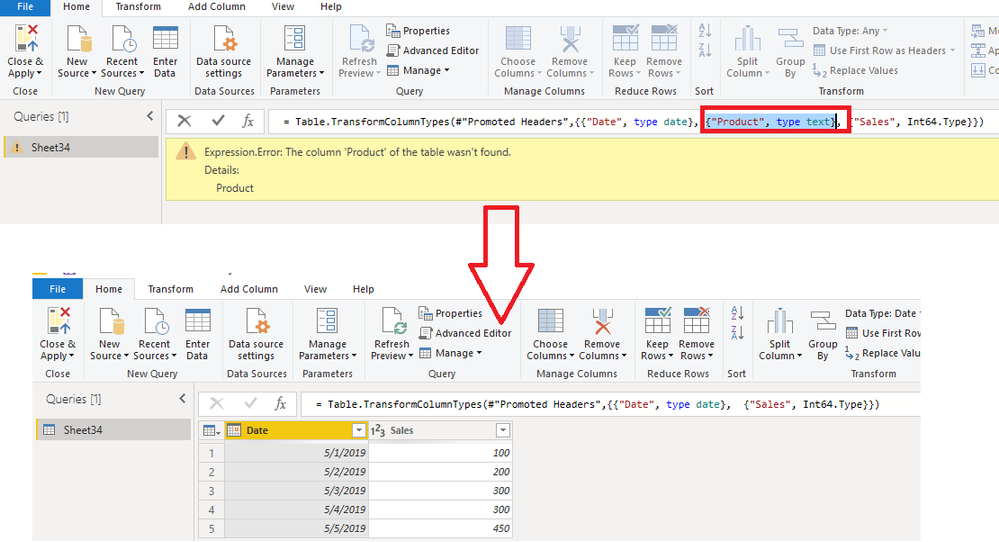
Do you get the error message like below?
If that is the case, this error normally occur when you delete the column which in the visual in your underlying source. For my example, I delete the Product column in my excel, so it will show this error when I click refresh button in power bi desktop.
If you get the error message, you could delete the column in the change type step in query editor to fix it.
Best Regards,
Cherry
Hi @Anonymous ,
Have you solved your problem?
If you have solved, please always accept the replies making sense as solution to your question so that people who may have the same question can get the solution directly.
If you still need help, please feel free to ask.
Best Regards,
Cherry
Hi @Anonymous ,
Have you solved your problem?
If you have solved, please always accept the replies making sense as solution to your question so that people who may have the same question can get the solution directly.
If you still need help, please feel free to ask.
Best Regards,
Cherry
Hi @Anonymous ,
By my tests and research, we will not get the error message for updating data in power bi desktop when we only add columns in the underlying data source.
Do you get the error message like below?
If that is the case, this error normally occur when you delete the column which in the visual in your underlying source. For my example, I delete the Product column in my excel, so it will show this error when I click refresh button in power bi desktop.
If you get the error message, you could delete the column in the change type step in query editor to fix it.
Best Regards,
Cherry
The Power BI Data Visualization World Championships is back! Get ahead of the game and start preparing now!
| User | Count |
|---|---|
| 39 | |
| 37 | |
| 33 | |
| 32 | |
| 29 |
| User | Count |
|---|---|
| 133 | |
| 88 | |
| 85 | |
| 68 | |
| 64 |