cancel
Showing results for 
Search instead for 
Did you mean: 

Learn from the best! Meet the four finalists headed to the FINALS of the Power BI Dataviz World Championships! Register now

Reply
mateoc15
Advocate II
Advocate II

Data source migration considerations

My team has a few hundred reports, the vast majority of which connect via ODBC to a Cloudera Hadoop database.  We are migrating everything to Azure Synapse Analytics, and all reports will need to be updated accordingly.  Obviously this is no small undertaking.  I'm looking for guidance on any specific do's and don't's that others may have encountered.


I have found a few times that Power BI doesn't seem to do a great job of looking for solutions or giving you specific errors about what's missing.  So if a column name were to change, it just says "that's no good" instead of "can't find column first_name".


If there's a systematic way to do this I'd love to learn more about it.


Thanks!

2 REPLIES 2
v-chenwuz-msft
Community Support
Community Support

Hi @mateoc15 ,


I think you can go to power query. I have tried MSSQL to SSAS(import mode).

1 click the old table and select one shape step in applied steps ( close to "Source" step).

vchenwuzmsft_0-1636700123561.png


2 change new table view like the table of 1 view. Both the date type and column name, also the order of columns.

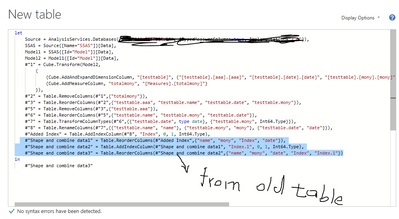
3 copy the old table advanced editor code from step you select in 1 to the end And paste to the new table( to apply the same shape data steps as old table).

vchenwuzmsft_1-1636700574175.png


some articles you can refer:

https://www.c-sharpcorner.com/article/how-to-change-data-source-of-existing-report-in-power-bi/ 

https://community.powerbi.com/t5/Desktop/Change-Data-Source/td-p/1399909 


Best Regards

Community Support Team _ chenwu zhu


If this post helps, then please consider Accept it as the solution to help the other members find it more quickly.

lbendlin
Super User
Super User

You may want to look into ALM Toolkit and/or Tabular Editor.  These allow you some scripting of your meta data swaps.


Pay special attention to measures, groups and sorts.  These tend to be corrupted when you swap out data sources and the Power Query output is not exactly the same.


Helpful resources

Announcements
Join our Fabric User Panel

Join our Fabric User Panel

Share feedback directly with Fabric product managers, participate in targeted research studies and influence the Fabric roadmap.

February Power BI Update Carousel

Power BI Monthly Update - February 2026

Check out the February 2026 Power BI update to learn about new features.

FabCon Atlanta 2026 carousel

FabCon Atlanta 2026

Join us at FabCon Atlanta, March 16-20, for the ultimate Fabric, Power BI, AI and SQL community-led event. Save $200 with code FABCOMM.