FabCon is coming to Atlanta
Join us at FabCon Atlanta from March 16 - 20, 2026, for the ultimate Fabric, Power BI, AI and SQL community-led event. Save $200 with code FABCOMM.
Register now!- Power BI forums
- Get Help with Power BI
- Desktop
- Service
- Report Server
- Power Query
- Mobile Apps
- Developer
- DAX Commands and Tips
- Custom Visuals Development Discussion
- Health and Life Sciences
- Power BI Spanish forums
- Translated Spanish Desktop
- Training and Consulting
- Instructor Led Training
- Dashboard in a Day for Women, by Women
- Galleries
- Data Stories Gallery
- Themes Gallery
- Contests Gallery
- QuickViz Gallery
- Quick Measures Gallery
- Visual Calculations Gallery
- Notebook Gallery
- Translytical Task Flow Gallery
- TMDL Gallery
- R Script Showcase
- Webinars and Video Gallery
- Ideas
- Custom Visuals Ideas (read-only)
- Issues
- Issues
- Events
- Upcoming Events
Get Fabric Certified for FREE during Fabric Data Days. Don't miss your chance! Request now
- Power BI forums
- Forums
- Get Help with Power BI
- Desktop
- Data source Error when connecting Opportunity obje...
- Subscribe to RSS Feed
- Mark Topic as New
- Mark Topic as Read
- Float this Topic for Current User
- Bookmark
- Subscribe
- Printer Friendly Page


- Mark as New
- Bookmark
- Subscribe
- Mute
- Subscribe to RSS Feed
- Permalink
- Report Inappropriate Content
Data source Error when connecting Opportunity object from Salesforce
Hi All,
I have been facing this issue for the past 1 year that when I connect Opportunity object from Salesforce it is throwing me this error. I contacted Salesforce and they told me that this error is coming from Power BI side and that their API version is 29. When I asked power BI they said they don't have work around for this. This is really annoying as everytime I had to extract the Opportunity object into a excel and connect it with power BI and hence it's useless even if auto refresh is enabled. Is there any work around to fix this ? Kindly help.


- Mark as New
- Bookmark
- Subscribe
- Mute
- Subscribe to RSS Feed
- Permalink
- Report Inappropriate Content
Hi @Kolumam were you able to find a solution? As a workaround, maybe you can try to test your connection with a 3rd party connector, which pulls data from SF objects API. I've tried windsor.ai, supermetrics and funnel.io. I stayed with Windsor because it is much cheaper so just to let you know other options. In case you wonder, to make the connection first search for the Salesforce connector in the data sources list:
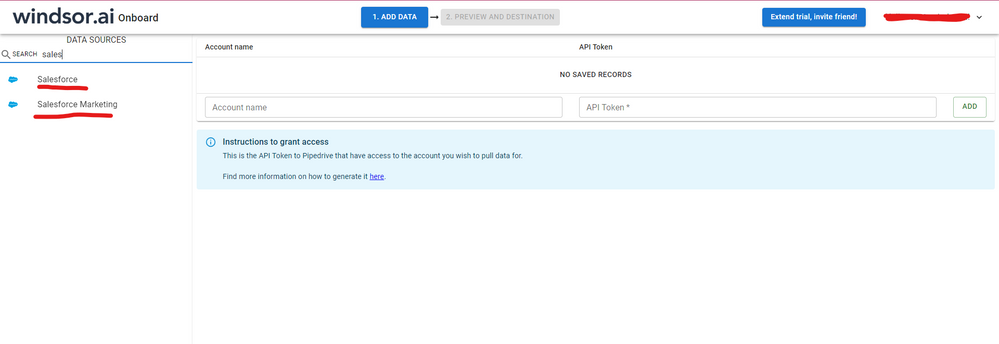
After that, just grant access to your Salesforce account using your credentials, then on preview and destination page you will see a preview of your Salesforce fields:

There just select the fields you need. It is also compatible with custom fields and custom objects, so you'll be able to export them through windsor. Finally, just select PBI as your data destination and finally just copy and paste the url on PBI --> Get Data --> Web --> Paste the url.


- Mark as New
- Bookmark
- Subscribe
- Mute
- Subscribe to RSS Feed
- Permalink
- Report Inappropriate Content
Hi @Kolumam
Are you able to get data from other objects?
Have you tried with Sandbox?
Please try with:
In Power BI, Gest data, Blank Query
In query editor go to View, Advanced Editor
Copy the following:
let
Source = Salesforce.Data("https://login.salesforce.com/"),
#"Filtered Rows" = Table.SelectRows(Source, each ([Name] = "Opportunity")),
#"Expanded Data" = Table.ExpandTableColumn(#"Filtered Rows", "Data", {"Id", "RecordTypeId", "Name", "StageName"}, {"Id", "RecordTypeId", "Name.1", "StageName"})
in
#"Expanded Data"
Thanks
Pablo
- Mark as New
- Bookmark
- Subscribe
- Mute
- Subscribe to RSS Feed
- Permalink
- Report Inappropriate Content
Hi @pablobarra
I copy pasted your command in query editor. IT gave me the same error.

Kindly help me with this. Thanks
Kolumam
- Mark as New
- Bookmark
- Subscribe
- Mute
- Subscribe to RSS Feed
- Permalink
- Report Inappropriate Content
Hi @Kolumam
Are you able to get data from other objects, like account, contacts, etc?
Have you tried connecting to opportunities in Sandbox (Prelive/test)?
You are connecting to an standard object, there shlould not be issues.
You can try with the same command but first:
- In Power BI delete cache
- copy code to query editor
- if you get the same error, try "Refresh Preview"
Thanks
Pablo
- Mark as New
- Bookmark
- Subscribe
- Mute
- Subscribe to RSS Feed
- Permalink
- Report Inappropriate Content
Hi @pablobarra
Even after clearing the cache the same error prevails. I can connect to other objects like accounts, leads etc.. The reason this is not working is because of the API version 29 for Opportunity object. Please see the screenshot even after clicking refresh all.

Thanks
Krishnamurthy
- Mark as New
- Bookmark
- Subscribe
- Mute
- Subscribe to RSS Feed
- Permalink
- Report Inappropriate Content
- Mark as New
- Bookmark
- Subscribe
- Mute
- Subscribe to RSS Feed
- Permalink
- Report Inappropriate Content
- Mark as New
- Bookmark
- Subscribe
- Mute
- Subscribe to RSS Feed
- Permalink
- Report Inappropriate Content


- Mark as New
- Bookmark
- Subscribe
- Mute
- Subscribe to RSS Feed
- Permalink
- Report Inappropriate Content
I had a tremendous amount of lag and issues with loading data from SFDC in the beginnig and it turned out that our instance had a TON of validation rules causing the issues... so we added 'View All' to my user profile to bypass SFDC having to go through and check through validation rules before it served up data - and it instantly made pulling objects a lot smoother...
Do you have the ability to get 'view all' added as a permission set to your user profile in SFDC?
- Mark as New
- Bookmark
- Subscribe
- Mute
- Subscribe to RSS Feed
- Permalink
- Report Inappropriate Content
- Mark as New
- Bookmark
- Subscribe
- Mute
- Subscribe to RSS Feed
- Permalink
- Report Inappropriate Content
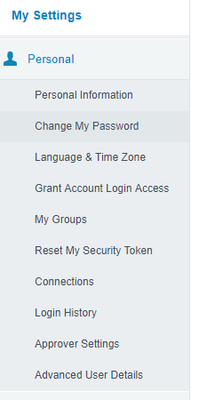
Not sure if you are sysadmin or have the right access to add it yourself - but it would be in 'Advanced User Details' and then navigate down to 'permission sets' and add the 'View All Data' permission set.

- Mark as New
- Bookmark
- Subscribe
- Mute
- Subscribe to RSS Feed
- Permalink
- Report Inappropriate Content
Hi @anktaggrwl
It was in Read and I enabled View all and then tried connecting to Power Bi. Still the same error.
Thanks
Krishna

Helpful resources

Power BI Monthly Update - November 2025
Check out the November 2025 Power BI update to learn about new features.

Fabric Data Days
Advance your Data & AI career with 50 days of live learning, contests, hands-on challenges, study groups & certifications and more!

FabCon Atlanta 2026
Join us at FabCon Atlanta, March 16-20, for the ultimate Fabric, Power BI, AI and SQL community-led event. Save $200 with code FABCOMM.


