This is best Fabric, Power BI, SQL and AI community event. How do we know? The last event sold out! Save €200 with code FABCMTY200.
Register nowA new Data Days event is coming soon! This time we’re going bigger than ever. Fabric, Power BI, SQL, AI and more. Don't miss out.
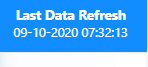
In my report am showing one button with data as date value Currently date is showing in UTC time zone.My system/sever zone is in UTC.But in my report i want to show America,Chicago time zone date and time.How can i do that.Plse help me.
Hi @nisha_deepak ,
Sorry to disturb you...
Could you tell me if your problem has been solved? If it is, kindly Accept it as the solution. More people will benefit from it. Or you are still confused about it, please provide me with more details about your table and your problem or share me with your pbix file from your Onedrive for Business.
Best Regards,
Eyelyn Qin
Hi @nisha_deepak ,
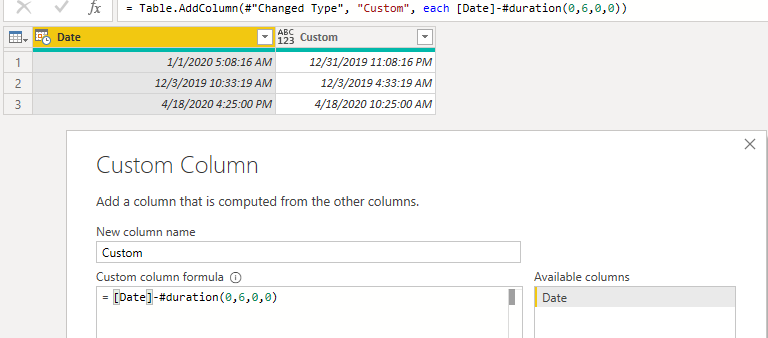
Refer to this page https://www.rapidtables.com/calc/time/chicago-time.html , the Time offset is -6. Then you could use the following M code to add a new column:
=[Date]-#duration(0,6,0,0)Did I answer your question ? Please mark my reply as solution. Thank you very much.
If not, please upload some insensitive data samples and expected output.
Best Regards,
Eyelyn Qin
@nisha_deepak You can use DateTime.AddZone function to achieve your requirement. This function adds the timezonehours as an offset to the input datetime value and returns a new datetimezone value.
You can do that in the query editor with one of the DateTimeZone functions or by subtracting a duration value with #duration(0,5,0,0) or in DAX by subtracting from your UTC value with TIME(0,5,0,0).
Regards,
Pat
To learn more about Power BI, follow me on Twitter or subscribe on YouTube.
Check out the May 2026 Power BI update to learn about new features.
Sign up to receive a private message when registration opens and key events begin.
If you have recently started exploring Fabric, we'd love to hear how it's going. Your feedback can help with product improvements.
| User | Count |
|---|---|
| 30 | |
| 28 | |
| 23 | |
| 19 | |
| 17 |
| User | Count |
|---|---|
| 49 | |
| 47 | |
| 40 | |
| 21 | |
| 18 |