cancel
Showing results for 
Search instead for 
Did you mean: 

The Power BI Data Visualization World Championships is back! Get ahead of the game and start preparing now! Learn more

Reply
NAOS
Advocate III
Advocate III

Data modelling - visualisations Challenge

Hi all,

I have something like the following tables.

let
Source = Table.FromRows(Json.Document(Binary.Decompress(Binary.FromText("TcyxDQAxCEPRXajTAMkAuYwRZf81DllGULh40pfvlaMyZMdU5Q36i1nziTlt2VsZfTN62tlPL6NvRk/P/J9l9M3o6ZX9KqNvRh9+Pw==", BinaryEncoding.Base64), Compression.Deflate)), let _t = ((type text) meta [Serialized.Text = true]) in type table [Country = _t, ResourceType = _t, Amount = _t]),
#"Changed Type" = Table.TransformColumnTypes(Source,{{"Country", type text}, {"ResourceType", type text}, {"Amount", Int64.Type}})
in
#"Changed Type"


let
Source = Table.FromRows(Json.Document(Binary.Decompress(Binary.FromText("i45WcjZUitUBUkYQyhhCmUAoU6XYWAA=", BinaryEncoding.Base64), Compression.Deflate)), let _t = ((type text) meta [Serialized.Text = true]) in type table [Country = _t]),
#"Changed Type" = Table.TransformColumnTypes(Source,{{"Country", type text}})
in
#"Changed Type"


let
Source = Table.FromRows(Json.Document(Binary.Decompress(Binary.FromText("i45WcjZU0lFyCQaRjgUFRfllqSlKsTpwcSMg6ZdfooBNzhiHHhMMcSO4HZhmGcHtwSZujEePCVY5Yxz+McZhjzEee4xx+McEhx0meMLMBEeYmeDxiymecDPF4R9THPaY4rAnFgA=", BinaryEncoding.Base64), Compression.Deflate)), let _t = ((type text) meta [Serialized.Text = true]) in type table [Country = _t, Division = _t, Evaluation = _t])
in
Source


They relate through a one to many relationship from the "CountryTable" to each of the other two tables.

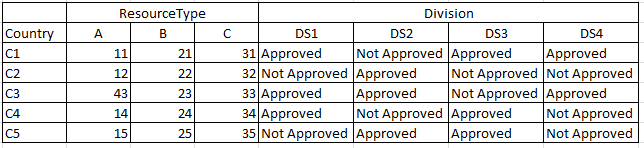
What I need to do is to put together a visual looking like the following image.
 
Capture.PNG

Does someone know how to do that? A custom visual I dont know about may be? Or is someone 100% sure that it can not be done?
Any comments would be appreciate.

Thanks,

4 REPLIES 4
v-piga-msft
Resident Rockstar
Resident Rockstar

Hi @NAOS,


By my tests, there is no visual which would meet your requirement directly in Power BI currently.


There is a workaround which may help you. It is not the best but that's a choice.


Since your desired output seems to be the matrix visuals. We could use two matrix visuals and two text boxes to achieve that.


matrix.PNG

More details, you could refer to my attachement.


Best  Regards,

Cherry

Community Support Team _ Cherry Gao
If this post helps, then please consider Accept it as the solution to help the other members find it more quickly.

Hi @v-piga-msft,

First of all, thanks for the reply!
Strangely tho, Im trying to access your file and I cant. It says I need to update to the latest version of PBI, which is the one I currently have (October 2018, 64x).

Any idea why this is happening? Im really interested to see the file and your proposed solution!

Thanks,

Hi @NAOS,


My desktop is store version which is the latest version 2.64.5285.361 64-bit (November 2018).


I have attached the pbix file you could open. 


In addition, you should note if you want to hide the Column, you should turn off the word warp of Row header and Column header.


Best  Regards,

Cherry

Community Support Team _ Cherry Gao
If this post helps, then please consider Accept it as the solution to help the other members find it more quickly.

Got it. I saw the example but it isnt what I was looking for.
I think the correct way to solve it is leveraging DAX and calculate the resource value only for totals. That way if I put the Country and Divisions as rows in the same matrix I get the resources only for the total row per country.

Thanks for your help tho, much appreciated.

Helpful resources

Announcements
Power BI DataViz World Championships

Power BI Dataviz World Championships

The Power BI Data Visualization World Championships is back! Get ahead of the game and start preparing now!

December 2025 Power BI Update Carousel

Power BI Monthly Update - December 2025

Check out the December 2025 Power BI Holiday Recap!

FabCon Atlanta 2026 carousel

FabCon Atlanta 2026

Join us at FabCon Atlanta, March 16-20, for the ultimate Fabric, Power BI, AI and SQL community-led event. Save $200 with code FABCOMM.