cancel
Showing results for 
Search instead for 
Did you mean: 

The Power BI Data Visualization World Championships is back! Get ahead of the game and start preparing now! Learn more

Reply
nanma94
Helper III
Helper III

Data model question


 Capture.PNG


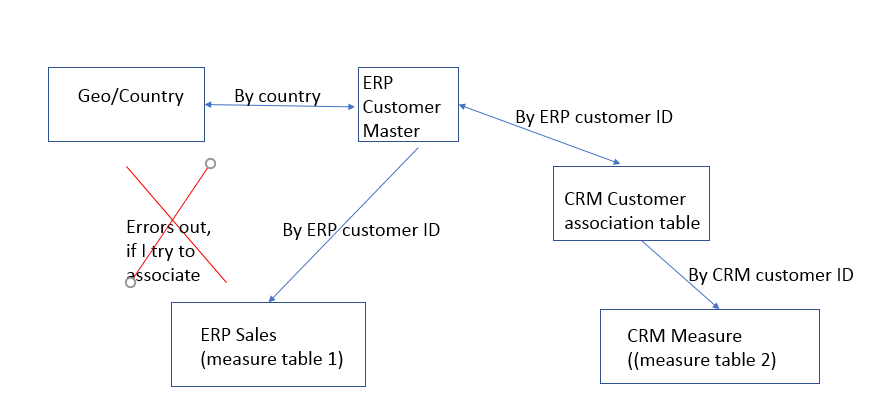
I have this simplified model (its a lot messier than this:) where on one report, geo country slicer drives visualizations that take measure from both measure tables down below, while on the other report, Customer slicer drives visualization thats also takes measure from both measure tables. 


My current data model kind of works but if I can have sales table to associate with Geo/country table  directly, my result is slightly different from my current model, as the current model's sales by geo depends on customer/geo associations. Due to some data quality issues, there might be sales identified by geo, but the customer is not correctly associated with geo. 


So whats a good way to solve it so I can associate sales with GEO/country directly, now it errors out as it forms a loop. 


Thank you so much!
NM

2 REPLIES 2
Anonymous
Not applicable

Hi


Since Your Geo table should be connected to both fact tables ,


1.  Remove the Join between Customer and Sales fact table 1

2. Copy Geo and Customer table using 'Reference' in Power Query and join Geo-> Customer-> Fact table 1.


So, in this case you will have the below joins:


Geo_copy -> Customer_Copy-> Facttable1

Geo -> Customer -> CRM Customer-> Facttable2


SInce you use 'Reference', Power BI will hit DB once and no performance issue as well.Hope this helps.


Thanks

Raj

Thejeswar
Super User
Super User

@nanma94,

You can remove the join between Customer and Geo and Join Geo/Country with Sales. In that means, you can achieve a direct join between Geo and Sales.


You don't really need a join between your geo table and Customer Table unless you have a hirearchy of Geo and Customer.


If you really need a join between Geo and Customer, then keeping the join between them untouched, create an inactive relationship between your Geo and Sales Table based on your key.


Then when ever you are using a combination of these tables, you should create column/measure using USERELATIONSHIP() DAX Function


There's also another way to solve it. Just Duplicate you Geo table, and join the new Geo table with your Sales table. So in report where Geo table drives, use from the one that is not connected to the Customer and in report where Customer table drives, use the Geo table joined with the customer


Hope this clarifies your question!!!

Helpful resources

Announcements
Power BI DataViz World Championships

Power BI Dataviz World Championships

The Power BI Data Visualization World Championships is back! Get ahead of the game and start preparing now!

December 2025 Power BI Update Carousel

Power BI Monthly Update - December 2025

Check out the December 2025 Power BI Holiday Recap!

FabCon Atlanta 2026 carousel

FabCon Atlanta 2026

Join us at FabCon Atlanta, March 16-20, for the ultimate Fabric, Power BI, AI and SQL community-led event. Save $200 with code FABCOMM.