Join us at FabCon Atlanta from March 16 - 20, 2026, for the ultimate Fabric, Power BI, AI and SQL community-led event. Save $200 with code FABCOMM.
Register now!The Power BI Data Visualization World Championships is back! Get ahead of the game and start preparing now! Learn more
I have a table visualization that is behaving strangely when i add a field from a related table to it.
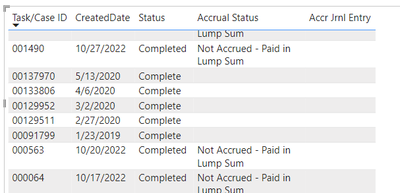
below are the results before adding, all of these fields are from the same table.
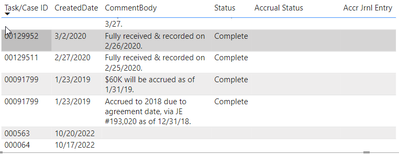
and then after
The data disappears from the 563 and 64 records. There is no data in the table Comment Body related to those two records, but i would just expect it to show that particular field as blank, not all of them. i have show items with blank data turned on.
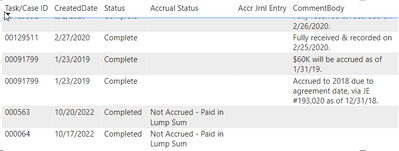
I was just messing around and moved that CommentBody field to the last column, and all of a sudden the data came back?
The relationship is one to many, filtering is single direction. any idea what might be happening here?
has anyone found the solution for this, please advoice .
Hi. Like you, I had a situation where information from a related table would not appera in a table where I was trying to combine the inforamtion from multile tables. After reading your 'trial' of moving the column to the end of the new table that seemed to work I thought I'd give that a go (as nothing else worked).... and bingo.... success. It seems that the the data needs to be AFTER any other data in the new visual from the source table or it blocks/blanks all the subsequent data. Looks like a bug.....
Hi @MikeBresnan ,
It is strange... I just tried to create two fake tables with the same scenario as yours, but I can't reproduce your problem. As far as I know and from my testing result, the display of data does not vary depending on the position of the field. Could you please provide your sample pbix file(exclude sensitive info)? Later I will make troubleshooting and give you some explanation. Thank you.
Best Regards
That particular PBIX is really complex, and it would be hard for me to redact the data.
I created another and am getting a similar issue (though i can't duplicate the position of the data issue either) with a much simpler dataset. However, i did notice something. When i add the amount, it's summarizing it (which it doesn't need to, as each row is unique), when i remove the summarization, the amount for unmatched records displays again.
is that by design? i can't imagine why it would do that. I'll try it with my other dashboard as well, and see if it improves things.
The Power BI Data Visualization World Championships is back! Get ahead of the game and start preparing now!
Check out the November 2025 Power BI update to learn about new features.
| User | Count |
|---|---|
| 66 | |
| 44 | |
| 40 | |
| 29 | |
| 19 |
| User | Count |
|---|---|
| 200 | |
| 130 | |
| 102 | |
| 72 | |
| 55 |