cancel
Showing results for 
Search instead for 
Did you mean: 

The Power BI Data Visualization World Championships is back! Get ahead of the game and start preparing now! Learn more

Reply
liuy70
New Member

Data Viewing Function in Visualization

Hi! I am transferring from Tableau to Power Bi and have some questions regarding extracting data from visualizations. In Tableau, there is the function where when you click on the point/bar/line on the visualizations, you can view the underlying data in the filtered columanized format, like this viewdata_customize.png
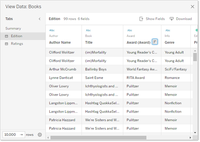
 

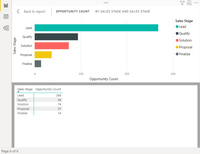
I am wondering if we can achieve this in Power Bi. For now, I have only learned that the 'show as a table' which will only gives me the calculated (summary) table, not the original lists. See example power-bi-show-data-below.png. I am aware that I can achieve this by building a separate panel which displays the raw data with filters I want. But I am wondering can Power BI achieve the same thing as Tableau do? Click on the point/lin/bar in the plots and extract those groups of raw data. 
 

Thank you so much!


1 ACCEPTED SOLUTION
Anonymous
Not applicable

Hi @liuy70 ,
Thanks to @_AAndrade  for the solution,
Based on your description, as mentioned, you can drill down to return the original list with filters after clicking on a single piece of data. Of course, you can also redirect to another page by using bookmarks. Or use a synchronized slicer to achieve something similar to the functionality in tableau. Here's some documentation you can refer to
Create report bookmarks in Power BI to share insights and build stories - Power BI | Microsoft Learn
Enable the Sync Slicers feature in Power BI visuals - Power BI | Microsoft Learn
Set up drillthrough in Power BI reports - Power BI | Microsoft Learn


Best regards,

Albert He


If this post helps, then please consider Accept it as the solution to help the other members find it more quickly

View solution in original post

2 REPLIES 2
Anonymous
Not applicable

Hi @liuy70 ,
Thanks to @_AAndrade  for the solution,
Based on your description, as mentioned, you can drill down to return the original list with filters after clicking on a single piece of data. Of course, you can also redirect to another page by using bookmarks. Or use a synchronized slicer to achieve something similar to the functionality in tableau. Here's some documentation you can refer to
Create report bookmarks in Power BI to share insights and build stories - Power BI | Microsoft Learn
Enable the Sync Slicers feature in Power BI visuals - Power BI | Microsoft Learn
Set up drillthrough in Power BI reports - Power BI | Microsoft Learn


Best regards,

Albert He


If this post helps, then please consider Accept it as the solution to help the other members find it more quickly

_AAndrade
Super User
Super User

Hi,

You can build a tooltip with this kind of information or use drill through option.
Take a look at this video: https://www.youtube.com/watch?v=BbplhqDCWOM


Did I answer your question? Mark my post as a solution! Kudos are welcome.

Proud to be a Super User!


Helpful resources

Announcements
Power BI DataViz World Championships

Power BI Dataviz World Championships

The Power BI Data Visualization World Championships is back! Get ahead of the game and start preparing now!

December 2025 Power BI Update Carousel

Power BI Monthly Update - December 2025

Check out the December 2025 Power BI Holiday Recap!

FabCon Atlanta 2026 carousel

FabCon Atlanta 2026

Join us at FabCon Atlanta, March 16-20, for the ultimate Fabric, Power BI, AI and SQL community-led event. Save $200 with code FABCOMM.

Top Solution Authors