cancel
Showing results for 
Search instead for 
Did you mean: 

July 7 - July 17 | Round 2 of the Power BI Dataviz World Championships. Don't miss your chance! Learn more

Reply
tvaishnav
Helper IV
Helper IV

Data View and Data Query show different data

Hello everyone,


I have a dashboard that is created by someone else. I am trying to convert all the transformation into sql query so that I do not have to do that transormation in PowerBI. I followed all the steps and finally my SQL query output matches with that of the edit query final result. However, my data view of that dashboard shows different data.


In edit query, I have a column called Department. When I put filter on that column for value 'Estimating', the actual cost column is always null. However, in the data view I can see rows that has actual cost with non null values. I am not able to understand how actual cost values are showing up when they are null in edit query tab. In fact, they being null makes more sense to me.


Any ideas on what I might be missing here?


3 REPLIES 3
v-chuncz-msft
Community Support
Community Support

@tvaishnav,


You may also click the filter drop down arrow on the column and select Remove Empty to have a check.

Community Support Team _ Sam Zha
If this post helps, then please consider Accept it as the solution to help the other members find it more quickly.

Thank you everyone for the response.


So here is what I did. I just looked at the advanced editor and saw all the transformations. I created a sql query out of that and I am getting the results that I want. So my problem is solved for now.


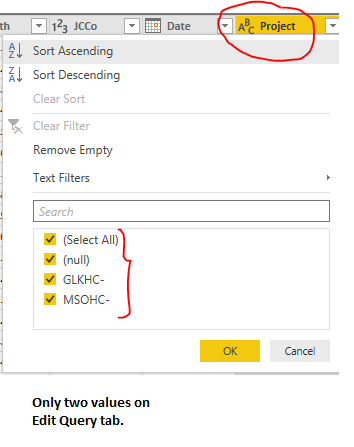
However, I am still strugging to understand this. I can see only limited information on PowerBI edit query tab but everything in data view at report level. For instance, when I see a filter in particular column in edit query tab, I see only two values. However, in dataview tab I see many more.


Please note that this PowerBI file was created by someone else with their credentials to connect to SQL server database via import mode. My understanding is that in import mode, security on views in database does not work. Because data is already imported. So everyone will be able to see the same information that the person whose credentials were used to connect to the database can see. Do you think on edit query tab sql database security is still working?
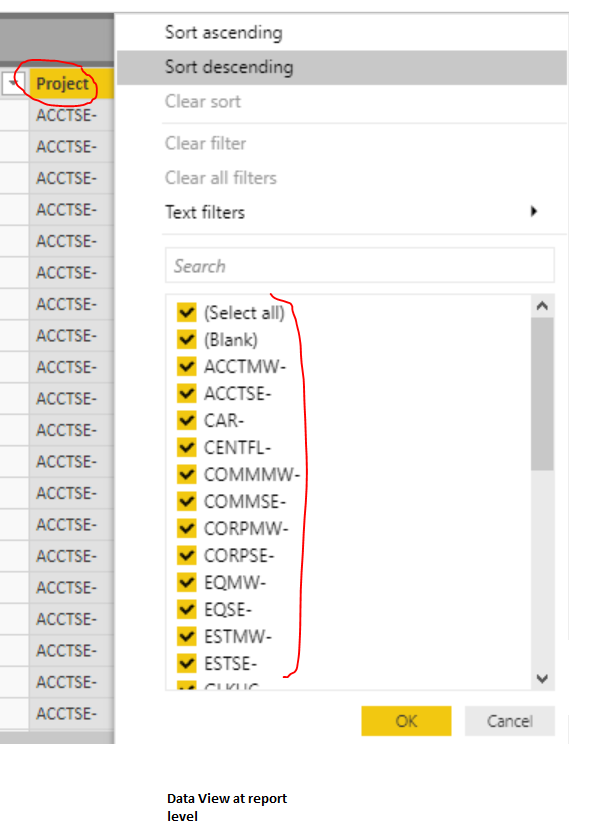
 

So many values for project comlumn in dataview.So many values for project comlumn in dataview.Only two values in Edit Query.Only two values in Edit Query.
CR
Resolver II
Resolver II

Hi @tvaishnav


I'm not sure it will help you but, in the query editor, only part of the data are displayed (and hence loaded) by default. I mean that, if you have for instance 3000 lines, only the values of the first 1000 lines will be displayed and hence selectable. To display all the data, you need to click on View All.


If it is not the case, please share your PBIX online to see what is wrong (or at least printscreens).


Regards,

CR

Helpful resources

Announcements
FabCon and SQLCon Barcelona 2026

FabCon & SQLCon – Barcelona 2026

Join us in Barcelona for FabCon and SQLCon, the Fabric, Power BI, SQL, and AI community event. Save €200 with code FABCMTY200.

60 days of Data Days Carousel

Data Days 2026

Join Data Days 2026: 60 days of free live/on-demand sessions, challenges, study groups, and certification opportunities.

Power BI DataViz World Championships carousel

Power BI DataViz World Championships - June 2026

A new Power BI DataViz World Championship is coming this June! Don't miss out on submitting your entry.

Top Solution Authors