Learn from the best! Meet the four finalists headed to the FINALS of the Power BI Dataviz World Championships! Register now
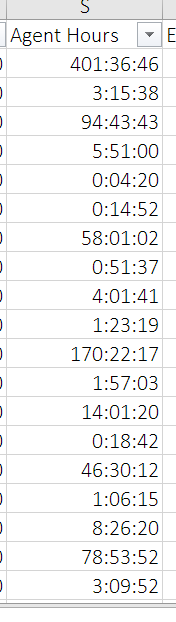
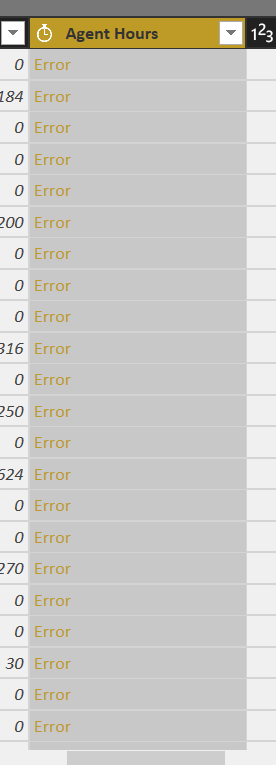
I have a duration column in excel, what data type should i use when import into power bi? it's all 'Error' when i select 'duration' in power bi.
Solved! Go to Solution.
Hi there, you would have to change it to Text, due to it having the ":" which is seen as text.
What I would suggest is if you want to calculate the duration in Power BI is to have the Source Date Time in order to do this, can modify it all to be seconds. Then from there you can then roll it up to Hours, Days etc.
Here is another link referencing how they did it with Date and Times
http://community.powerbi.com/t5/Desktop/Sum-of-H-MM-SS/m-p/124007
Hi there, you would have to change it to Text, due to it having the ":" which is seen as text.
What I would suggest is if you want to calculate the duration in Power BI is to have the Source Date Time in order to do this, can modify it all to be seconds. Then from there you can then roll it up to Hours, Days etc.
Here is another link referencing how they did it with Date and Times
http://community.powerbi.com/t5/Desktop/Sum-of-H-MM-SS/m-p/124007
Your link is invalid.
If you have recently started exploring Fabric, we'd love to hear how it's going. Your feedback can help with product improvements.
A new Power BI DataViz World Championship is coming this June! Don't miss out on submitting your entry.
Share feedback directly with Fabric product managers, participate in targeted research studies and influence the Fabric roadmap.
| User | Count |
|---|---|
| 57 | |
| 33 | |
| 33 | |
| 19 | |
| 18 |
| User | Count |
|---|---|
| 67 | |
| 67 | |
| 45 | |
| 30 | |
| 26 |