Get Fabric or SQL Certified for Free.
Get certified for free when you join Fabric Data Days 2026 and dive into Fabric, Power BI, SQL, AI, and other essential data skills.
Join now- Power BI forums
- Get Help with Power BI
- Desktop
- Service
- Report Server
- Power Query
- Mobile Apps
- Developer
- DAX Commands and Tips
- Custom Visuals Development Discussion
- Health and Life Sciences
- Power BI Spanish forums
- Translated Spanish Desktop
- Training and Consulting
- Instructor Led Training
- Dashboard in a Day for Women, by Women
- Galleries
- Data Stories Gallery
- Themes Gallery
- Contests Gallery
- QuickViz Gallery
- Quick Measures Gallery
- Visual Calculations Gallery
- Fabric Apps Gallery
- Notebook Gallery
- Translytical Task Flow Gallery
- TMDL Gallery
- R Script Showcase
- Webinars and Video Gallery
- Ideas
- Custom Visuals Ideas (read-only)
- Issues
- Issues
- Events
- Upcoming Events
July 28 - August 9 | Final Round of the Power BI Dataviz World Championships. This is your chance. Learn more
- Power BI forums
- Forums
- Get Help with Power BI
- Desktop
- Data Storage
- Subscribe to RSS Feed
- Mark Topic as New
- Mark Topic as Read
- Float this Topic for Current User
- Bookmark
- Subscribe
- Printer Friendly Page

- Mark as New
- Bookmark
- Subscribe
- Mute
- Subscribe to RSS Feed
- Permalink
- Report Inappropriate Content
Data Storage
Hi everyone!
We are new to Power BI and would like to visualise our results with the option of a monthly update based on the new data fed in.
The issue we are facing is the data being stored in human-friendly excel files (which are later converted to pdf reports) in an unstructured manner.
I am looking for your tips/advice on how to proceed with organising/storing my data to meet my end-goal of automatic monthly updates.
Thank you in advance
Peter
Solved! Go to Solution.


- Mark as New
- Bookmark
- Subscribe
- Mute
- Subscribe to RSS Feed
- Permalink
- Report Inappropriate Content
Hi,
if i understood your problem, you need to create an excel file for each month and store them in a folder. In this folder each month you add a new file.
Then instead of loading the single file you load the folder.
- Mark as New
- Bookmark
- Subscribe
- Mute
- Subscribe to RSS Feed
- Permalink
- Report Inappropriate Content
PowerQuery would automatically "APPEND" data from all the Monthly Files to the same table. It becomes easier if you have a name pattern for the files like "SalesDate_YYYYMM.xlsx".
- Mark as New
- Bookmark
- Subscribe
- Mute
- Subscribe to RSS Feed
- Permalink
- Report Inappropriate Content
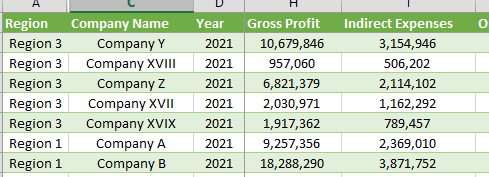
Hi Serpiva,
Thanks for your response. Above is a screenshot of a table I am preparing from the unstructured excel files. I understand it needs to be in flat format before being loaded to Power Bi. I am not sure how to take it from here so monthly data is added resulting in a dashboard update.
- Mark as New
- Bookmark
- Subscribe
- Mute
- Subscribe to RSS Feed
- Permalink
- Report Inappropriate Content
Hi,
if i understood your problem, you need to create an excel file for each month and store them in a folder. In this folder each month you add a new file.
Then instead of loading the single file you load the folder.
- Mark as New
- Bookmark
- Subscribe
- Mute
- Subscribe to RSS Feed
- Permalink
- Report Inappropriate Content
Hi Serpiva,
Thanks a lot for the solution I will definitely try this. I was wondering if it's possible to create one table and adding the new data to it through the "Append Queries".
- Mark as New
- Bookmark
- Subscribe
- Mute
- Subscribe to RSS Feed
- Permalink
- Report Inappropriate Content
PowerQuery would automatically "APPEND" data from all the Monthly Files to the same table. It becomes easier if you have a name pattern for the files like "SalesDate_YYYYMM.xlsx".

- Mark as New
- Bookmark
- Subscribe
- Mute
- Subscribe to RSS Feed
- Permalink
- Report Inappropriate Content
You have various options with PowerBI for the updates (based on the license you have - Pro or Premium).
You could use Data Alerts or your users can use Monthly Subscription to the report or you can use APIs to push the Reports to your users.
- Mark as New
- Bookmark
- Subscribe
- Mute
- Subscribe to RSS Feed
- Permalink
- Report Inappropriate Content
Hi, if you can provide some sample data it would be easier to evaluete if there is the necessity to modify excel files and in which direction
Helpful resources

FabCon & SQLCon – Barcelona 2026
Join us in Barcelona for FabCon and SQLCon, the Fabric, Power BI, SQL, and AI community event. Save €200 with code FABCMTY200.

Fabric Community Sticker Challenge - Barcelona 2026
If you love stickers, then you will definitely want to check out our community sticker challenge, Barcelona edition!

Power BI Monthly Update - July 2026
Check out the July 2026 Power BI update to learn about new features.

Power BI DataViz World Championships - June 2026
A new Power BI DataViz World Championship is coming this June! Don't miss out on submitting your entry.

| User | Count |
|---|---|
| 26 | |
| 23 | |
| 22 | |
| 19 | |
| 17 |


| User | Count |
|---|---|
| 35 | |
| 29 | |
| 21 | |
| 19 | |
| 17 |


