cancel
Showing results for 
Search instead for 
Did you mean: 

The Power BI Data Visualization World Championships is back! Get ahead of the game and start preparing now! Learn more

Reply
JChris
Helper II
Helper II

Data Modelling question: same data through time

I have the following case (not real, but ilustrates the real deal):


I have a CSV dump of softwares installed on employees machines which consists of Hostname, Software, Version, Publisher, ID (unique for each combination of Software + Publisher, I don't care about Version). This CSV gets dumped in a network path weekly, overwriting the last dump. I have a script that copies this CSV to my team's folder weekly and put the filename as the original date of that CSV dump. Something like that:


  1. SOFT_INVT_DUMP
    1. Software_Inventory.csv
  2. TEAM_FOLDER
    1. 2017-08-04.csv
    2. 2017-08-09.csv
    3. 2017-08-17.csv
    4. and so on...


I have two queries inside PBI Desktop:


  1. Software (most recent): where the source is the CSV file SOFT_INVT_DUMP\Software_Inventory.csv
  2. Software (recent and history): where the source is the folder TEAM_FOLDER and I merge all the CSVs into one, having one column "Software Extraction Date" to know from which file that row came. I then use "Append query" to append "Software (most recent)" here, all rows that came from this append will have the column "Software Extraction Date" as null, which is great in my case, so I know it came from Software_Inventory.csv.


This is what I have right now. I need to get this kind of information, this is the real question:


  1. Using Software (recent and history) in the Report panel, is there any visualization that will show only the most recent instance of a given Software and will only show the history instances when I click it, like a drill down?
  2. Is there a way to generate a column that will inform me if the Software is inside all the CSV files? For example, if I have 5 CSVs inside my TEAM_FOLDER + the SOFT_INVT_DUMP\Software_Inventory.csv, that sums up to 6 CSV files. If a given software that is installed in a given hostname appears in all of them I would get 6, if it's only inside 3, I would get 3, and so on...
2 REPLIES 2
v-ljerr-msft
Microsoft Employee
Microsoft Employee

Hi @JChris,


  1. Using Software (recent and history) in the Report panel, is there any visualization that will show only the most recent instance of a given Software and will only show the history instances when I click it, like a drill down?

I'm sure a measure can be created to show only the most recent instance of a given Software on the report. However, I don't think there is way to implement the other part(drill down) currently.


2. Is there a way to generate a column that will inform me if the Software is inside all the CSV files? For example, if I have 5 CSVs inside my TEAM_FOLDER + the SOFT_INVT_DUMP\Software_Inventory.csv, that sums up to 6 CSV files. If a given software that is installed in a given hostname appears in all of them I would get 6, if it's only inside 3, I would get 3, and so on...

If I understand you correctly, I think it could be done, and the key may be the use of  the column "Software Extraction Date". But without your table structures with some sample data, it's hard for us to write the formula for you. 


Could you post your table structures with some sample data, and the expected result? So that we can better assist on this issue. Smiley Happy


Regards


> I'm sure a measure can be created to show only the most recent instance of a given Software on the report. However, I don't think there is way to implement the other part(drill down) currently.


Yes, I can use the "most recent" on report, but I wanted the drill down part 😞


> Could you post your table structures with some sample data, and the expected result? So that we can better assist on this issue. Smiley Happy


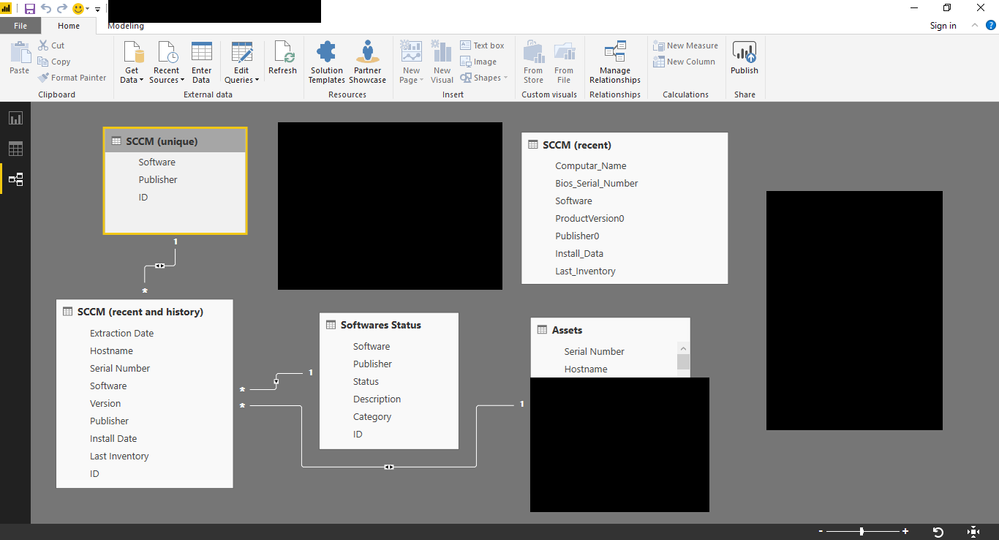
Untitled.png

This is my structure. Everything is linked using ID, but "SCCM (recent and history) vs Assets", which I use Hostname.


  1. SCCM (recent)
    1. Source: Database
  2. SCCM (recent and history)
    1. Source: TEAM_FOLDER
    2. Then "Append Query", the query I append is "SCCM (recent)"
  3. SCCM (unique)
    1. Source: SCCM (recent and history)
    2. Removed dups
  4. Softwares Status
    1. Source: SoftwaresStatus.xslx (the file where I manually write the status, category and description [if needed])
    2. I have a report where I compare SCCM (unique) vs Softwares Status, so I can spot new entries in SCCM (unique) that aren't in Softwares Status already, dump them to a CSV file and copy-paste inside my SoftwaresStatus.xslx
  5. Assets
    1. Source: Database


Hope that's enough.

Helpful resources

Announcements
Power BI DataViz World Championships

Power BI Dataviz World Championships

The Power BI Data Visualization World Championships is back! Get ahead of the game and start preparing now!

December 2025 Power BI Update Carousel

Power BI Monthly Update - December 2025

Check out the December 2025 Power BI Holiday Recap!

FabCon Atlanta 2026 carousel

FabCon Atlanta 2026

Join us at FabCon Atlanta, March 16-20, for the ultimate Fabric, Power BI, AI and SQL community-led event. Save $200 with code FABCOMM.