FabCon is coming to Atlanta
Join us at FabCon Atlanta from March 16 - 20, 2026, for the ultimate Fabric, Power BI, AI and SQL community-led event. Save $200 with code FABCOMM.
Register now!- Power BI forums
- Get Help with Power BI
- Desktop
- Service
- Report Server
- Power Query
- Mobile Apps
- Developer
- DAX Commands and Tips
- Custom Visuals Development Discussion
- Health and Life Sciences
- Power BI Spanish forums
- Translated Spanish Desktop
- Training and Consulting
- Instructor Led Training
- Dashboard in a Day for Women, by Women
- Galleries
- Data Stories Gallery
- Themes Gallery
- Contests Gallery
- QuickViz Gallery
- Quick Measures Gallery
- Visual Calculations Gallery
- Notebook Gallery
- Translytical Task Flow Gallery
- TMDL Gallery
- R Script Showcase
- Webinars and Video Gallery
- Ideas
- Custom Visuals Ideas (read-only)
- Issues
- Issues
- Events
- Upcoming Events
The Power BI Data Visualization World Championships is back! Get ahead of the game and start preparing now! Learn more
- Power BI forums
- Forums
- Get Help with Power BI
- Desktop
- Data Alerts for each row
- Subscribe to RSS Feed
- Mark Topic as New
- Mark Topic as Read
- Float this Topic for Current User
- Bookmark
- Subscribe
- Printer Friendly Page

- Mark as New
- Bookmark
- Subscribe
- Mute
- Subscribe to RSS Feed
- Permalink
- Report Inappropriate Content
Data Alerts for each row
Hi everyone!
I need to create an alert for each row in my dataset, whenever any of them goes below 5.
Currently i have 85 rows, i could create 85 visuals for each, but how to handle when there is a new row in the dataset?
I know it's a bit weird approach, maybe someone has a better idea?
Many thanks!
Gazi
Solved! Go to Solution.


- Mark as New
- Bookmark
- Subscribe
- Mute
- Subscribe to RSS Feed
- Permalink
- Report Inappropriate Content
Create a measure like this and set a notification for > 0
BelowFive =
VAR myCount = COUNTROWS(FILTER(Table,[Column]<5)
RETURN IF(ISBLANK(myCount),0,myCount)
Follow on LinkedIn
@ me in replies or I'll lose your thread!!!
Instead of a Kudo, please vote for this idea
Become an expert!: Enterprise DNA
External Tools: MSHGQM
YouTube Channel!: Microsoft Hates Greg
Latest book!: DAX For Humans
DAX is easy, CALCULATE makes DAX hard...

- Mark as New
- Bookmark
- Subscribe
- Mute
- Subscribe to RSS Feed
- Permalink
- Report Inappropriate Content
How could we apply this at a monthly level for eg. sales at monthly level with alerts for a salersperson if the number dips below a certain threshold ?
Name Jan Feb Mar
A 100 125 85
A 110 105 95
A 100 95 100

- Mark as New
- Bookmark
- Subscribe
- Mute
- Subscribe to RSS Feed
- Permalink
- Report Inappropriate Content
Hi I am just wondering is that possible to set an alert and get the relevant project name?
Thanks a lot!
- Mark as New
- Bookmark
- Subscribe
- Mute
- Subscribe to RSS Feed
- Permalink
- Report Inappropriate Content
Create a measure like this and set a notification for > 0
BelowFive =
VAR myCount = COUNTROWS(FILTER(Table,[Column]<5)
RETURN IF(ISBLANK(myCount),0,myCount)
Follow on LinkedIn
@ me in replies or I'll lose your thread!!!
Instead of a Kudo, please vote for this idea
Become an expert!: Enterprise DNA
External Tools: MSHGQM
YouTube Channel!: Microsoft Hates Greg
Latest book!: DAX For Humans
DAX is easy, CALCULATE makes DAX hard...
- Mark as New
- Bookmark
- Subscribe
- Mute
- Subscribe to RSS Feed
- Permalink
- Report Inappropriate Content
Not the solution I would have thought of at all, but I have to say this would do the trick nicely. Thanks!
- Mark as New
- Bookmark
- Subscribe
- Mute
- Subscribe to RSS Feed
- Permalink
- Report Inappropriate Content
Thank you @Greg_Deckler!
It actually worked! 🙂
But is there any way to see relevant row's data? i mean which row triggered it (it contains project names)
- Mark as New
- Bookmark
- Subscribe
- Mute
- Subscribe to RSS Feed
- Permalink
- Report Inappropriate Content
I believe that you can only set alerts on numeric data so it wouldn't work to concatenate all the project names rows together which was my first thought. Glad it worked though!! If I come up with something I'll let you know.
Follow on LinkedIn
@ me in replies or I'll lose your thread!!!
Instead of a Kudo, please vote for this idea
Become an expert!: Enterprise DNA
External Tools: MSHGQM
YouTube Channel!: Microsoft Hates Greg
Latest book!: DAX For Humans
DAX is easy, CALCULATE makes DAX hard...
- Mark as New
- Bookmark
- Subscribe
- Mute
- Subscribe to RSS Feed
- Permalink
- Report Inappropriate Content
Hi Greg,
do you have already a workaround regarding the data alert with data name (like the project name in this example)?
Thank you in advance.


- Mark as New
- Bookmark
- Subscribe
- Mute
- Subscribe to RSS Feed
- Permalink
- Report Inappropriate Content
Hi Greg @Greg_Deckler , I need some help regarding these data alerts. I've also started a new topic for my issue here.
I've made a measure following your help.
Notification =
VAR myCount = COUNTROWS(FILTER(SickEmployees;([Days sick]>=2)))
RETURN IF(ISBLANK(myCount);"None";myCount)
What I think it should do: it counts all rows where 'days sick' >= 2. I get 'none' beceause it's blank. If I change the measure to >=1 it gives me 74. The sum of days sick.
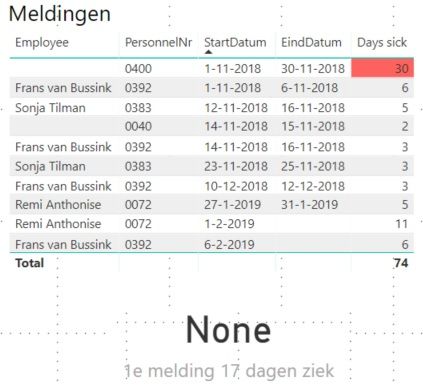
What I expect / want: I want to get a notification when someone is sick for >= 17 days. So the measure should be changed to
VAR myCount = COUNTROWS(FILTER(SickEmployees;([Days sick]>=2)))
RETURN IF(ISBLANK(myCount);"None";myCount). But like I said, this gives me 'none'.
You can find the sample file here in my Dropbox.
- Mark as New
- Bookmark
- Subscribe
- Mute
- Subscribe to RSS Feed
- Permalink
- Report Inappropriate Content
@Greg_Deckler Yeah I am also trying to think about any possible way to show the relevant project names, which triger an alert, that would be an amazing workaround the current limitation of the Data Alert in PowerBI.
Thanks a lot! 🙂
Helpful resources

Power BI Dataviz World Championships
The Power BI Data Visualization World Championships is back! Get ahead of the game and start preparing now!

Power BI Monthly Update - November 2025
Check out the November 2025 Power BI update to learn about new features.

FabCon Atlanta 2026
Join us at FabCon Atlanta, March 16-20, for the ultimate Fabric, Power BI, AI and SQL community-led event. Save $200 with code FABCOMM.

| User | Count |
|---|---|
| 65 | |
| 44 | |
| 40 | |
| 29 | |
| 19 |


| User | Count |
|---|---|
| 200 | |
| 130 | |
| 102 | |
| 72 | |
| 55 |


