
cancel
Showing results for 
Search instead for 
Did you mean: 

The Power BI Data Visualization World Championships is back! Get ahead of the game and start preparing now! Learn more

Reply
Anonymous
Not applicable

Dashboard info changing when updating

Greetings, 

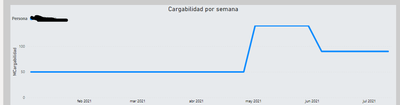
I have a simple dashboard with a relation on users and their % of loadwork (Each project has a % assigned and the SUM of it is what is showing) through time. It looks like this in PowerBI Desktop (For one specific user):


JRR_0-1620730086307.png

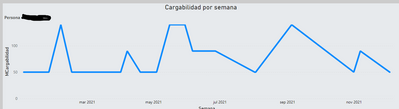
Once I publish it it looks correct. The problem is when I use the Update button on My Work Space or an automatic Update happens (I made it so everyday it updates), when this happens the dashboard looks like this:

JRR_1-1620730253888.png

As you can see, the % of work is nowhere near normal and it's impossible to use.


Does someone know what might be causing those issues?

3 REPLIES 3
MFelix
Super User
Super User

Hi @Anonymous ,


Do you have any filter on your report or changes in slicers that can affect this chart? 


Be aware that the changes in slicers of filtering are saved on the service so when you reopen your report it picks up the previous slicers settings. You can reset to default by clickin on top:


MFelix_0-1620820487443.png

If this is not the case what is the type of data source you are using?


Regards

Miguel Félix


Did I answer your question? Mark my post as a solution!

Proud to be a Super User!

Check out my blog: Power BI em Português


Anonymous
Not applicable

Greetings @MFelix !!

Sadly, reseting filters didn't help.


My data source is a SharePoint list, with the following columns:


Workload: Int (Coming from SHP as a String and changing it on transform data)

User: String

Date: Date dd/MM/yyyy (Coming from SHP as a String and changing it on transform data)

Project: String


It might be that the date is being changed due to the origin being a string?


Thanks!


Regards,

Joan


Hi @Anonymous ,


That can be hapenning, have you tried and change the list column to a date field?


Be aware that making this change if you field has an incorrect input you will loose your information.


Another option can be to use a dataflow to make your transformation.

For example if you have 13/05/2021 and the sharepoint list has a US regional setting the values need to be 5/13/2021 in order the change be correctly made.


Regards

Miguel Félix


Did I answer your question? Mark my post as a solution!

Proud to be a Super User!

Check out my blog: Power BI em Português


Helpful resources

Announcements
Power BI DataViz World Championships

Power BI Dataviz World Championships

The Power BI Data Visualization World Championships is back! Get ahead of the game and start preparing now!

November Power BI Update Carousel

Power BI Monthly Update - November 2025

Check out the November 2025 Power BI update to learn about new features.

FabCon Atlanta 2026 carousel

FabCon Atlanta 2026

Join us at FabCon Atlanta, March 16-20, for the ultimate Fabric, Power BI, AI and SQL community-led event. Save $200 with code FABCOMM.