Join us at FabCon Atlanta from March 16 - 20, 2026, for the ultimate Fabric, Power BI, AI and SQL community-led event. Save $200 with code FABCOMM.
Register now!Get Fabric Certified for FREE during Fabric Data Days. Don't miss your chance! Request now
Hi,
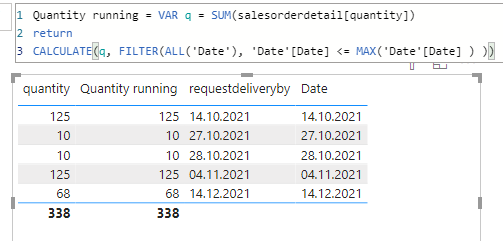
I tried the following DAX formula to calculate the cumulative quantity, but the values to remain the same in "Quantity Running". In 2nd row it should be 135 (125 + 10).
There is a relationship between Date[Date] and Salesorderdetail[requestdeliveryby].
Thanks.
Solved! Go to Solution.
Your dax should correct if you are creating a measure. If you want a calculated column, it should be:
Columns = calculate(sum[quantity]),filter(date, [date]<=earlier[date]))
Paul Zheng _ Community Support Team
If this post helps, please Accept it as the solution to help the other members find it more quickly.
Hi,
Assuming the Date column in the visual has been dragged from the Date Table, write these measures:
Quantity sold = sum(salesorderdetail[Quantity])
Quantity sold YTD = calculate([Quantity sold],datesytd(calendar[date),"31/12")
Hope this helps.
Your dax should correct if you are creating a measure. If you want a calculated column, it should be:
Columns = calculate(sum[quantity]),filter(date, [date]<=earlier[date]))
Paul Zheng _ Community Support Team
If this post helps, please Accept it as the solution to help the other members find it more quickly.
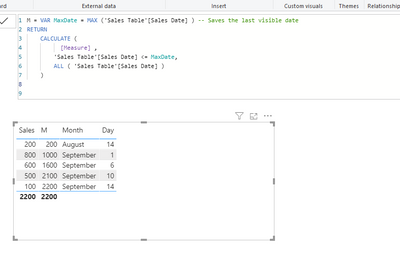
Try this
Quntity Running : =
VAR MaxDate = MAX ( 'Date'[Date] ) -- Saves the last visible date
RETURN
CALCULATE (
[Quantity], -- Computes sales amount
'Date'[Date] <= MaxDate, -- Where date is before the last visible date
ALL ( Date ) -- Removes any other filters from Date
)
Still same result:
I think you doing something wrong- check again
send me your file if possible
Check out the November 2025 Power BI update to learn about new features.
Advance your Data & AI career with 50 days of live learning, contests, hands-on challenges, study groups & certifications and more!