cancel
Showing results for 
Search instead for 
Did you mean: 

The Power BI Data Visualization World Championships is back! Get ahead of the game and start preparing now! Learn more

Reply
Anonymous
Not applicable

DAX percentage column

Hi,

how to get a percentage column as NotOverdue. Example formula given below.

 Need help on this. 


IDCountryNotOverdue       Overdue          NotOverdue % ???
1Germany62Example formula:  (NotOverdue/Notoverdue+Overdue )*100
2India72
3Norway53
4Italy31
5Canada80
6USA70
7UAE61
8UK52
9France44
1 ACCEPTED SOLUTION
Mikelytics
Resident Rockstar
Resident Rockstar

Hi MuraliPrasathS,


Please fin below y possible solution.


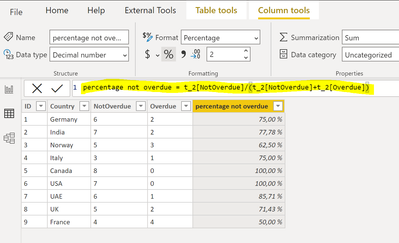
Step 1) Create a calculcated column with the following formula (my table is named t_2).


percentage not overdue = t_2[NotOverdue]/(t_2[NotOverdue]+t_2[Overdue])
 
picture 1.PNG


Step 2) Change the format of the column to percentage.

picture 2.PNG


I hope this helps. 


Best regards

Mikelytics


----------------------------------------------------------------------------------


Did I answer your questions? Please mark my post as solution.


Appreciate your Kudos

------------------------------------------------------------------
Visit my blog datenhungrig which I recently started with content about business intelligence and Power BI in German and English or follow me on LinkedIn!

View solution in original post

2 REPLIES 2
themistoklis
Community Champion
Community Champion

@Anonymous 


You can also use the divide function in a calculated column:

Column = DIVIDE('Table'[NotOverdue], 'Table'[Notoverdue]+'Table'[Overdue])


In a measure you can use the following formula:

Column = DIVIDE(SUM('Table'[NotOverdue]), SUM('Table'[Notoverdue])+SUM('Table'[Overdue]))


And then change the format of the column to Percentage


Mikelytics
Resident Rockstar
Resident Rockstar

Hi MuraliPrasathS,


Please fin below y possible solution.


Step 1) Create a calculcated column with the following formula (my table is named t_2).


percentage not overdue = t_2[NotOverdue]/(t_2[NotOverdue]+t_2[Overdue])
 
picture 1.PNG


Step 2) Change the format of the column to percentage.

picture 2.PNG


I hope this helps. 


Best regards

Mikelytics


----------------------------------------------------------------------------------


Did I answer your questions? Please mark my post as solution.


Appreciate your Kudos

------------------------------------------------------------------
Visit my blog datenhungrig which I recently started with content about business intelligence and Power BI in German and English or follow me on LinkedIn!

Helpful resources

Announcements
Power BI DataViz World Championships

Power BI Dataviz World Championships

The Power BI Data Visualization World Championships is back! Get ahead of the game and start preparing now!

December 2025 Power BI Update Carousel

Power BI Monthly Update - December 2025

Check out the December 2025 Power BI Holiday Recap!

FabCon Atlanta 2026 carousel

FabCon Atlanta 2026

Join us at FabCon Atlanta, March 16-20, for the ultimate Fabric, Power BI, AI and SQL community-led event. Save $200 with code FABCOMM.