Join us at FabCon Atlanta from March 16 - 20, 2026, for the ultimate Fabric, Power BI, AI and SQL community-led event. Save $200 with code FABCOMM.
Register now!The Power BI Data Visualization World Championships is back! Get ahead of the game and start preparing now! Learn more
There has to be a simple solution to this, how do I continue the orange line to show 0's?
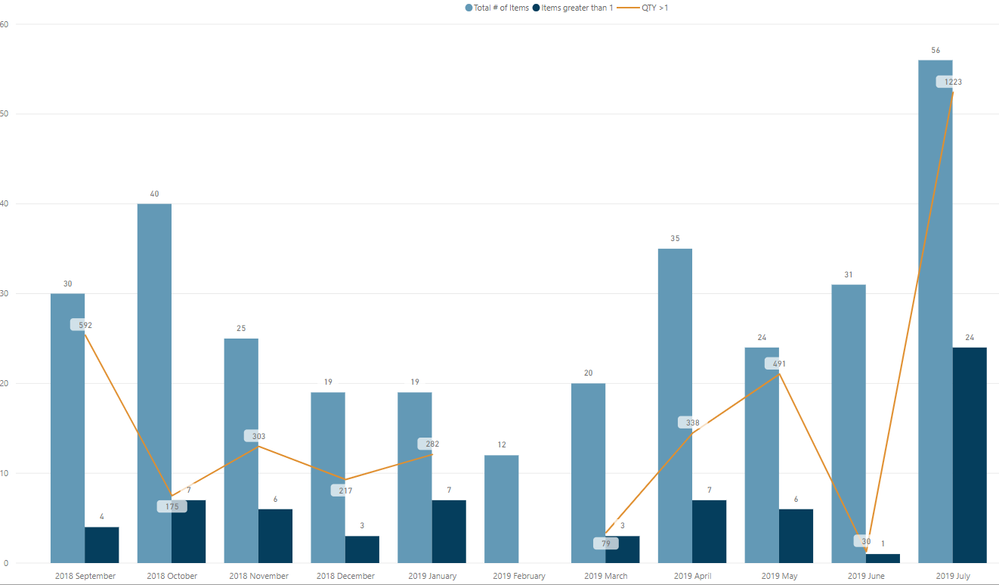
This graph is showing the # of Items and the # of items who have a QTY greater than 1.
The line graph is a measure to calcuate the total QTY if the QTY is greater than 1.
How do I get it to show the zeros? Ex: the line for feb should not break, it should continue to the bottom and then back up for March.
My measure is this:
Solved! Go to Solution.
@Anonymous try updaing your measure like this
MEASURE =
(CALCULATE(SUM('Table'[QTY]), 'Table'[QTY]>1) + 0 ) *
DIVIDE( [Total # of Items], [Total # of Items] )
Assuming you have [Total # of Items] measure in your model that you are using for bar
Subscribe to the @PowerBIHowTo YT channel for an upcoming video on List and Record functions in Power Query!!
Learn Power BI and Fabric - subscribe to our YT channel - Click here: @PowerBIHowTo
If my solution proved useful, I'd be delighted to receive Kudos. When you put effort into asking a question, it's equally thoughtful to acknowledge and give Kudos to the individual who helped you solve the problem. It's a small gesture that shows appreciation and encouragement! ❤
Did I answer your question? Mark my post as a solution. Proud to be a Super User! Appreciate your Kudos 🙂
Feel free to email me with any of your BI needs.
Hi @Anonymous
Can you share the pbix, or a simplified version that reproduces the problem?
@Anonymous try updaing your measure like this
MEASURE =
(CALCULATE(SUM('Table'[QTY]), 'Table'[QTY]>1) + 0 ) *
DIVIDE( [Total # of Items], [Total # of Items] )
Assuming you have [Total # of Items] measure in your model that you are using for bar
Subscribe to the @PowerBIHowTo YT channel for an upcoming video on List and Record functions in Power Query!!
Learn Power BI and Fabric - subscribe to our YT channel - Click here: @PowerBIHowTo
If my solution proved useful, I'd be delighted to receive Kudos. When you put effort into asking a question, it's equally thoughtful to acknowledge and give Kudos to the individual who helped you solve the problem. It's a small gesture that shows appreciation and encouragement! ❤
Did I answer your question? Mark my post as a solution. Proud to be a Super User! Appreciate your Kudos 🙂
Feel free to email me with any of your BI needs.
The Power BI Data Visualization World Championships is back! Get ahead of the game and start preparing now!
| User | Count |
|---|---|
| 63 | |
| 55 | |
| 42 | |
| 41 | |
| 23 |
| User | Count |
|---|---|
| 171 | |
| 136 | |
| 119 | |
| 79 | |
| 54 |