Join us at FabCon Atlanta from March 16 - 20, 2026, for the ultimate Fabric, Power BI, AI and SQL community-led event. Save $200 with code FABCOMM.
Register now!The Power BI Data Visualization World Championships is back! Get ahead of the game and start preparing now! Learn more
Hi Expert
The Following Measure is not working when i try and filter my data using Product in the a Silcer, cannot see how to incorporate Product into the measure, all columns are in one FACT Table no othe rsupporting or bridging tables
Measure
Solved! Go to Solution.
Hi @Invesco ,
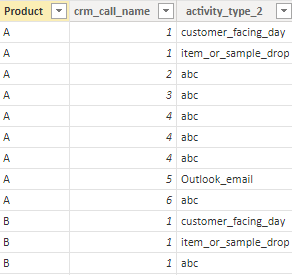
I created some data:
Here are the steps you can follow:
1. Create measure.
Measure =
CALCULATE(
DISTINCTCOUNT('act_rates_activity_volume_and_cf_days'[crm_call_name]),
FILTER(ALLSELECTED('act_rates_activity_volume_and_cf_days'), 'act_rates_activity_volume_and_cf_days'[Product]=MAX('act_rates_activity_volume_and_cf_days'[Product])&&
NOT('act_rates_activity_volume_and_cf_days'[activity_type_2]) IN {"customer_facing_day","item_or_sample_drop","blank_call_type","Outlook_email"}))
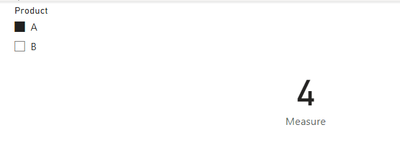
2. Result:
Can you share sample data and sample output in table format? Or a sample pbix after removing sensitive data. We can better understand the problem and help you.
Best Regards,
Liu Yang
If this post helps, then please consider Accept it as the solution to help the other members find it more quickly
Hi @Invesco ,
I created some data:
Here are the steps you can follow:
1. Create measure.
Measure =
CALCULATE(
DISTINCTCOUNT('act_rates_activity_volume_and_cf_days'[crm_call_name]),
FILTER(ALLSELECTED('act_rates_activity_volume_and_cf_days'), 'act_rates_activity_volume_and_cf_days'[Product]=MAX('act_rates_activity_volume_and_cf_days'[Product])&&
NOT('act_rates_activity_volume_and_cf_days'[activity_type_2]) IN {"customer_facing_day","item_or_sample_drop","blank_call_type","Outlook_email"}))
2. Result:
Can you share sample data and sample output in table format? Or a sample pbix after removing sensitive data. We can better understand the problem and help you.
Best Regards,
Liu Yang
If this post helps, then please consider Accept it as the solution to help the other members find it more quickly
thank you prefect sir
The Power BI Data Visualization World Championships is back! Get ahead of the game and start preparing now!
Check out the November 2025 Power BI update to learn about new features.
| User | Count |
|---|---|
| 59 | |
| 43 | |
| 42 | |
| 23 | |
| 17 |
| User | Count |
|---|---|
| 190 | |
| 122 | |
| 96 | |
| 66 | |
| 47 |