FabCon is coming to Atlanta
Join us at FabCon Atlanta from March 16 - 20, 2026, for the ultimate Fabric, Power BI, AI and SQL community-led event. Save $200 with code FABCOMM.
Register now!- Power BI forums
- Get Help with Power BI
- Desktop
- Service
- Report Server
- Power Query
- Mobile Apps
- Developer
- DAX Commands and Tips
- Custom Visuals Development Discussion
- Health and Life Sciences
- Power BI Spanish forums
- Translated Spanish Desktop
- Training and Consulting
- Instructor Led Training
- Dashboard in a Day for Women, by Women
- Galleries
- Data Stories Gallery
- Themes Gallery
- Contests Gallery
- QuickViz Gallery
- Quick Measures Gallery
- Visual Calculations Gallery
- Notebook Gallery
- Translytical Task Flow Gallery
- TMDL Gallery
- R Script Showcase
- Webinars and Video Gallery
- Ideas
- Custom Visuals Ideas (read-only)
- Issues
- Issues
- Events
- Upcoming Events
View all the Fabric Data Days sessions on demand. View schedule
- Power BI forums
- Forums
- Get Help with Power BI
- Desktop
- DAX help needed - count of records on filtered dat...
- Subscribe to RSS Feed
- Mark Topic as New
- Mark Topic as Read
- Float this Topic for Current User
- Bookmark
- Subscribe
- Printer Friendly Page
- Mark as New
- Bookmark
- Subscribe
- Mute
- Subscribe to RSS Feed
- Permalink
- Report Inappropriate Content
DAX help needed - count of records on filtered dates
Right - So I have a table similar to this
| Name | client | policy | Year Opened | Month Opened | Year Closed | Month Closed |
| Jim | 1 | 1 | 2017 | 5 | NULL | NULL |
| Bob | 2 | 1 | 2017 | 5 | 2018 | 2 |
| Bob | 2 | 2 | 2017 | 6 | NULL | NULL |
| Harry | 3 | 1 | 2017 | 5 | 2018 | 2 |
| Tim | 4 | 1 | 2017 | 5 | 2017 | 8 |
How can I code a measure to say how many policies were open at a certain point in time?
Thanks in advance!
Solved! Go to Solution.


- Mark as New
- Bookmark
- Subscribe
- Mute
- Subscribe to RSS Feed
- Permalink
- Report Inappropriate Content
Hello,
so let's try to translate your SQL term:
COUNTROWS(
 FILTER(Table,
  AND([DateSelected]>=[DateOpened],
   OR([DateSelected]<=DateClosed,ISBLANK(DateClosed))
  )
 )
)
- Mark as New
- Bookmark
- Subscribe
- Mute
- Subscribe to RSS Feed
- Permalink
- Report Inappropriate Content
Hello, you should create a column DateOpened and DateClosed.
Then you can use something like:
Measure= COUNTROWS(FILTER(Table,[DateSelected]>=[DateOpened]&&[DateSelected]<=DateClosed))
DateSelected=MAX([DateList])
DateList has to a table with distinct dates, first of month should be enough. No relationship necessary.
- Mark as New
- Bookmark
- Subscribe
- Mute
- Subscribe to RSS Feed
- Permalink
- Report Inappropriate Content
Where does the Dateselected get defined?
I have created the datelist and posted the following into a new Measure but it's saying the syntax for DateDelected is incorrect
Is DateSelected it's own measure?
Measure = COUNTROWS(FILTER(OpenMattersatPointinTime,[DateSelected]>=[Open Date]&&[DateSelected]<=[Closed Date]))
DateSelected=MAX(Year_Month[Datelist])
Thanks for the assist.
- Mark as New
- Bookmark
- Subscribe
- Mute
- Subscribe to RSS Feed
- Permalink
- Report Inappropriate Content
Can you make a screenshot of your DateList?
- Mark as New
- Bookmark
- Subscribe
- Mute
- Subscribe to RSS Feed
- Permalink
- Report Inappropriate Content

- Mark as New
- Bookmark
- Subscribe
- Mute
- Subscribe to RSS Feed
- Permalink
- Report Inappropriate Content
Thanks for you help so far onm this but I don't think your solution will do what I need.
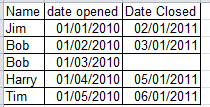
What I am trying to achieve using my example table above as a visual aid is if I select 04/01/2011 it will tell me I had 3 policies still open (Bob2, Harry and Tim)
If I select 07/01/2011 it will say 1 (Bob2)
In simple SQL terms:
@Dateselected = my date filter
if date_opened < @Dateselected
AND (date_Closed IS NULL
OR date_closed > @Dateselected)
- Mark as New
- Bookmark
- Subscribe
- Mute
- Subscribe to RSS Feed
- Permalink
- Report Inappropriate Content
Hello,
so let's try to translate your SQL term:
COUNTROWS(
 FILTER(Table,
  AND([DateSelected]>=[DateOpened],
   OR([DateSelected]<=DateClosed,ISBLANK(DateClosed))
  )
 )
)
- Mark as New
- Bookmark
- Subscribe
- Mute
- Subscribe to RSS Feed
- Permalink
- Report Inappropriate Content
Sorry for being a little slow on the uptake - When you say [DateSelected] is that the Datelist we created earlier in another table?
Is so I have created this following from your example
OpenMatters = COUNTROWS(
FILTER(OpenMattersatPointinTime,
AND(year_month[Datelist]>=OpenMattersatPointinTime[Open Date],
OR(year_month[Datelist]<=OpenMattersatPointinTime[Closed Date],
ISBLANK(OpenMattersatPointinTime[Closed Date]])
)
)
)
)
OpenmattersatPointinTime is table1 containing our date
Year_Month is table2 containing our date list in field [Datelist]
This returns the error "The end of the input was reached" and when I accept the formual it adds a bunch of close brackets to the end but still shows the error.
Accept the formula again and you get yet more close brackets.
I googled the error and it says it's because of missing brackets but I pasted into notepad.net and everything matches up.
Thanks.
- Mark as New
- Bookmark
- Subscribe
- Mute
- Subscribe to RSS Feed
- Permalink
- Report Inappropriate Content
Ignore me - I think I found the problem (tjhere was a mysterious square bracket floating in the syntax)
It now looks looks like this:

As a learning exercise I am also trying to do the same thing using nested Filters

Just struggeling to get the Or statement into the second Filter.

Helpful resources

Power BI Monthly Update - November 2025
Check out the November 2025 Power BI update to learn about new features.

Fabric Data Days
Advance your Data & AI career with 50 days of live learning, contests, hands-on challenges, study groups & certifications and more!

FabCon Atlanta 2026
Join us at FabCon Atlanta, March 16-20, for the ultimate Fabric, Power BI, AI and SQL community-led event. Save $200 with code FABCOMM.


