This time we’re going bigger than ever. Fabric, Power BI, SQL, AI and more. We're covering it all. You won't want to miss it.
Learn moreLevel up your Power BI skills this month - build one visual each week and tell better stories with data! Get started
Hi,
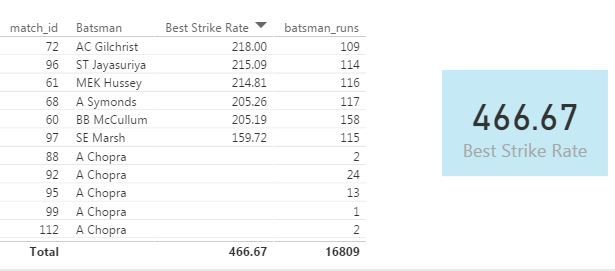
I am using Cricket related data for one of my report. I would like to find out Maximum Strike Rate batsmans with more than 100 runs. I am using below formula
Best Strike Rate =
var temp = FILTER(
SUMMARIZE(deliveries,
deliveries[match_id],
deliveries[Batsman],
"StrikeRate", 100* SUM(deliveries[batsman_runs])/COUNT(deliveries[Batsman])
),SUM(deliveries[batsman_runs]) >= 100)
return
MAXX(temp, [StrikeRate])
It's showing total strike rate & not the max stike rate. Kindly advise. Attached screenshot for your reference.
Solved! Go to Solution.
Hi @ajinkya1907
How about this one?
Best Strike Rate =
VAR temp =
FILTER (
SUMMARIZE (
deliveries,
deliveries[match_id],
deliveries[Batsman],
"StrikeRate", 100 * SUM ( deliveries[batsman_runs] )
/ COUNT ( deliveries[Batsman] )
),
CALCULATE ( SUM ( deliveries[batsman_runs] ) ) >= 100
)
RETURN
MAXX ( temp, [StrikeRate] )
Hi @ajinkya1907
How about this one?
Best Strike Rate =
VAR temp =
FILTER (
SUMMARIZE (
deliveries,
deliveries[match_id],
deliveries[Batsman],
"StrikeRate", 100 * SUM ( deliveries[batsman_runs] )
/ COUNT ( deliveries[Batsman] )
),
CALCULATE ( SUM ( deliveries[batsman_runs] ) ) >= 100
)
RETURN
MAXX ( temp, [StrikeRate] )
Well That works just fine. @Zubair_Muhammad, I am your fan buddy.
Could you please explain why calculate function made the difference? I am not able to understand that part.
Hi @ajinkya1907
Wow I have 2 fans now... Other is my 3 year old son
Actually FILTER function is an ITERATOR.... it creates a ROW context and not a FILTER context
thats why you have to use Calculate
Check out the April 2026 Power BI update to learn about new features.
Sign up to receive a private message when registration opens and key events begin.
If you have recently started exploring Fabric, we'd love to hear how it's going. Your feedback can help with product improvements.
| User | Count |
|---|---|
| 35 | |
| 27 | |
| 26 | |
| 22 | |
| 18 |
| User | Count |
|---|---|
| 67 | |
| 36 | |
| 32 | |
| 26 | |
| 23 |