FabCon is coming to Atlanta
Join us at FabCon Atlanta from March 16 - 20, 2026, for the ultimate Fabric, Power BI, AI and SQL community-led event. Save $200 with code FABCOMM.
Register now!- Power BI forums
- Get Help with Power BI
- Desktop
- Service
- Report Server
- Power Query
- Mobile Apps
- Developer
- DAX Commands and Tips
- Custom Visuals Development Discussion
- Health and Life Sciences
- Power BI Spanish forums
- Translated Spanish Desktop
- Training and Consulting
- Instructor Led Training
- Dashboard in a Day for Women, by Women
- Galleries
- Data Stories Gallery
- Themes Gallery
- Contests Gallery
- QuickViz Gallery
- Quick Measures Gallery
- Visual Calculations Gallery
- Notebook Gallery
- Translytical Task Flow Gallery
- TMDL Gallery
- R Script Showcase
- Webinars and Video Gallery
- Ideas
- Custom Visuals Ideas (read-only)
- Issues
- Issues
- Events
- Upcoming Events
The Power BI Data Visualization World Championships is back! Get ahead of the game and start preparing now! Learn more
- Power BI forums
- Forums
- Get Help with Power BI
- Desktop
- DAX for dynamic last entry in audit table? I want...
- Subscribe to RSS Feed
- Mark Topic as New
- Mark Topic as Read
- Float this Topic for Current User
- Bookmark
- Subscribe
- Printer Friendly Page


- Mark as New
- Bookmark
- Subscribe
- Mute
- Subscribe to RSS Feed
- Permalink
- Report Inappropriate Content
DAX for dynamic last entry in audit table? I want to use EARLIER...?
Hi - I have the following audit table, which shows every time the [VendorID] [PaymentType] changes.
Though, what I want to track is the calculated column [Simplifed Acceptance], which is just a SWITCH statement that...simplifies, the [PaymentType] column a bit.

What I want to do in a Measure - say if a filter were set for 10/31/18 - it would show how many VendorID's last entry for that VendorID, on or prior to 10/31/18 were 'Check'. So hey, as of date <X>, the last entry for 1,000 VendorIDs was "check", so check = 1000.
The Measure would I guess, just be calculating the number of "Check" ones that are the most recent entry for tha VendorID, while the filter context would take care of the dates.
Right now I'm accomplishing all this by using SQL to create monthly snapshots of this table, then pull those tables into Power BI, have my SWITCH column, etc.
It works great, but it's a bit of a burden in terms of disk space. Example of that query to grab a snapshot.
select
	Vendorid
	,sq.PaymentType

from (
	select
		VendorId
		,PaymentType
        ,row_number() over (partition by vendorid order by createdateutc desc) as rn

	from
		ZpCustomers_Kim.dbo.VendorListPaymentTypeChangeAudit

	WHERE
		CreateDateUTC < '2018-11-01'
     ) sq

where
	sq.rn = 1
I'd love to just import the Audit table itself though, and have a DAX forumla. I feel like EARLIER is a candiate for this (then again, maybe not)...but I'm haivng trouble thinking how to work it....
Solved! Go to Solution.


- Mark as New
- Bookmark
- Subscribe
- Mute
- Subscribe to RSS Feed
- Permalink
- Report Inappropriate Content
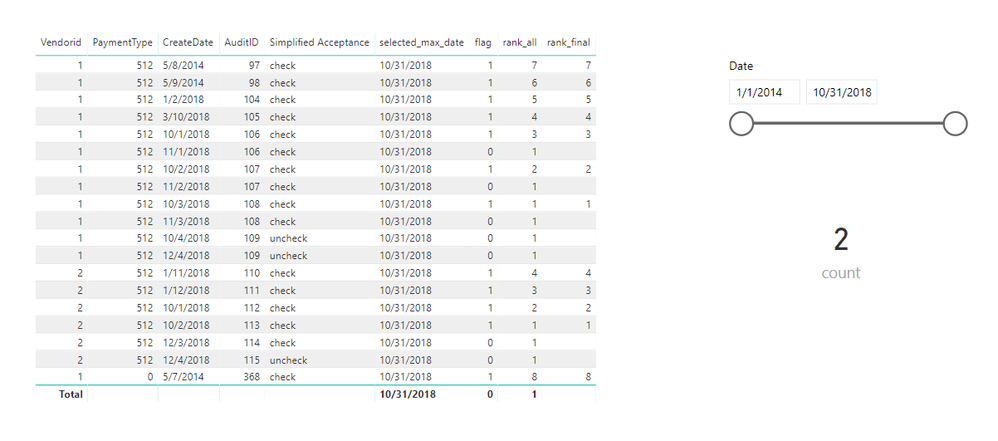
Hi @mmace1
A workaround, also the "calendar" table doesn't connect to your data table.
measure_createdate = MAX(Sheet1[CreateDate])

if_check = IF(MAX(Sheet1[Simplified Acceptance])="check",1,0)

if_date = IF(MAX(Sheet1[CreateDate])<=[selected_max_date],1,0)

flag = IF([if_date]=1&&[if_check]=1,1,0)

rank_all = RANKX(FILTER(ALL(Sheet1),[flag]=1&&Sheet1[Vendorid]=MAX(Sheet1[Vendorid])),[measure_createdate],,DESC)

rank_final = IF([flag]=1,[rank_all])

count = COUNTROWS(FILTER(ALL(Sheet1),[rank_final]=1))
Best Regards
Maggie
- Mark as New
- Bookmark
- Subscribe
- Mute
- Subscribe to RSS Feed
- Permalink
- Report Inappropriate Content
Hi @mmace1
A workaround, also the "calendar" table doesn't connect to your data table.
measure_createdate = MAX(Sheet1[CreateDate])

if_check = IF(MAX(Sheet1[Simplified Acceptance])="check",1,0)

if_date = IF(MAX(Sheet1[CreateDate])<=[selected_max_date],1,0)

flag = IF([if_date]=1&&[if_check]=1,1,0)

rank_all = RANKX(FILTER(ALL(Sheet1),[flag]=1&&Sheet1[Vendorid]=MAX(Sheet1[Vendorid])),[measure_createdate],,DESC)

rank_final = IF([flag]=1,[rank_all])

count = COUNTROWS(FILTER(ALL(Sheet1),[rank_final]=1))
Best Regards
Maggie
- Mark as New
- Bookmark
- Subscribe
- Mute
- Subscribe to RSS Feed
- Permalink
- Report Inappropriate Content
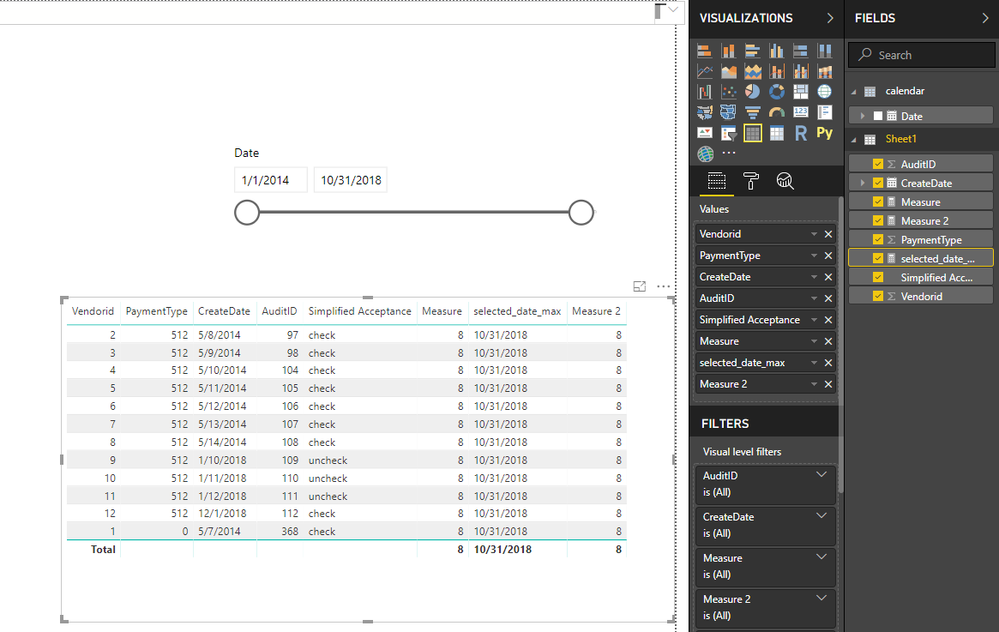
Hi @mmace1
If you create a Calendar Date table, add "date" in a slicer
Please don't connect the Calendar Date table with your audit table (don't create relationship between them),
Then create measures
selected_date_max = MAX('calendar'[Date])

Measure 2 =
CALCULATE (
    COUNT ( Sheet1[Vendorid] ),
    FILTER (
        ALL ( Sheet1 ),
        Sheet1[CreateDate] <= [selected_date_max]
            && Sheet1[Simplified Acceptance] = "check"
    )
)
Best Regards
Maggie
- Mark as New
- Bookmark
- Subscribe
- Mute
- Subscribe to RSS Feed
- Permalink
- Report Inappropriate Content
Thanks - that would give the number of "Check" entries before a prior date, but the tricky part is only counting the *last entry* for that VendorID. If a given VendorID appeared as "Check" 10 times prior to 2018-10-31, then that measure would count all 10 times.
It's an Audit table, so say, a given VendorID could appear 100 times on it. I'm looking at what the "Simplified Acceptance" for every vendorID was on say, 2018-10-31: That would be the last "Simplified Acceptance" in the audit table, on or before 2018-10-31, which, for a given VendorID, would be the VendorID's "Simplified Acceptance" as of 2018-10-31.
I want the number of VendorIDs whose *last entry* on or prior to the selected date, was check.
Do I make sense? I kind of having trouble phrasing this.
- Mark as New
- Bookmark
- Subscribe
- Mute
- Subscribe to RSS Feed
- Permalink
- Report Inappropriate Content
Hi @mmace1
When you use "EARLIER", It need to be used in a column, also it use more memory than measure.
Best Regards
Maggie
- Mark as New
- Bookmark
- Subscribe
- Mute
- Subscribe to RSS Feed
- Permalink
- Report Inappropriate Content
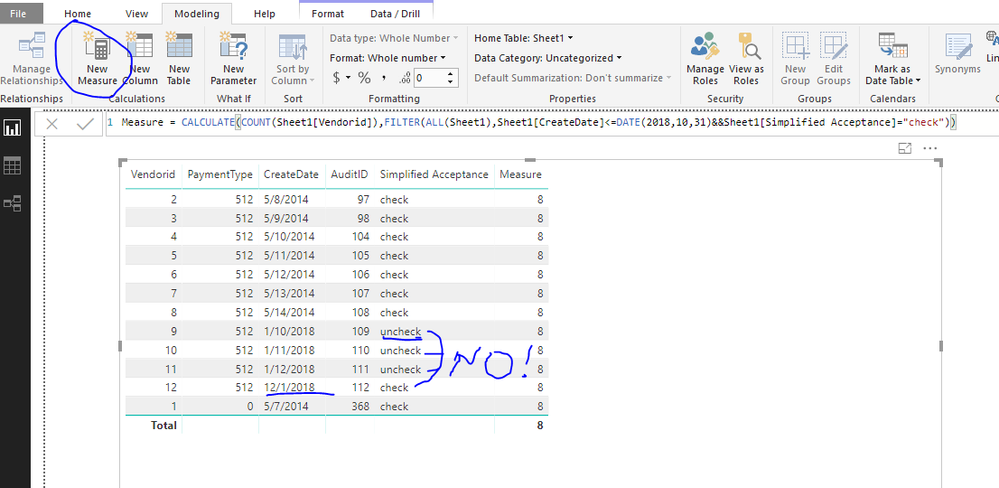
Hi @mmace1
You could create a measure
Measure =
CALCULATE (
    COUNT ( Sheet1[Vendorid] ),
    FILTER (
        ALL ( Sheet1 ),
        Sheet1[CreateDate] <= DATE ( 2018, 10, 31 )
            && Sheet1[Simplified Acceptance] = "check"
    )
)
Best Regards
Maggie

Helpful resources

Power BI Monthly Update - November 2025
Check out the November 2025 Power BI update to learn about new features.

Fabric Data Days
Advance your Data & AI career with 50 days of live learning, contests, hands-on challenges, study groups & certifications and more!

FabCon Atlanta 2026
Join us at FabCon Atlanta, March 16-20, for the ultimate Fabric, Power BI, AI and SQL community-led event. Save $200 with code FABCOMM.


