This time we’re going bigger than ever. Fabric, Power BI, SQL, AI and more. We're covering it all. You won't want to miss it.
Learn moreLevel up your Power BI skills this month - build one visual each week and tell better stories with data! Get started
Hi All,
I have one fact table (Sales) and one dimension Tables (dimTime)
Fact table structure:
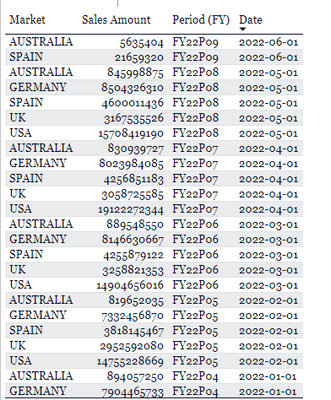
dimTime Structure:
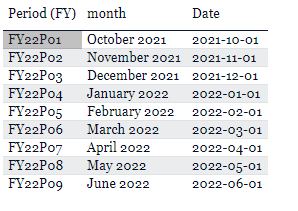
Join is one to Many and primary key is 'Date' column
Requirement is -
We are working on 3 months, 6 months latest period selection based on markets which in this screnario should be
For 3 Month Selecting the Sales Data should reflect as below:
Market Selection
For Australia -> Apr 2022 to Jun 2022
For Germany -> Mar 2022 to May 2022
I have formula for latest date but it is returning Commonn Latest Date for all Markets and then my 3 month calculation is working accurately.
Filter Measure =
VAR CurrentDate =
SELECTEDVALUE ( Sales[Date] )
VAR T1 =
CALCULATETABLE ( SUMMARIZE ( Sales, Sales[Market], Sales[Date] ), ALL ( Sales[Market], Sales[Date] ) )
VAR T2 =
ADDCOLUMNS ( T1, "@MaxDate", CALCULATE ( MAX ( Sales[Date] ), ALL ( Sales[Date] ) ) )
VAR T3 =
FILTER ( T2, [Date] = [@MaxDate] )
VAR LastCommonDate =
MINX ( T3, [Date] )
VAR Result =
IF ( CurrentDate <= LastCommonDate, 1 )
RETURN
Result
Created a Calculated Column in dimTime table to find out 3 months
Latest 3 Months =
VAR _CurrentDate = CALCULATE ( MAX ('Sales'[Date]), ALLEXCEPT ('Sales','Sales'[Market]) )
VAR _Result =
IF(
[Filter Measure] = 1 && DATEDIFF([Date],_CurrentDate,MONTH) <= 3,
[DAte],BLANK()
)
Return _Result
This formula is currently returning Mar 2022 to May 2022 for All Markets.
Request someone to help me to make it Market specific.
Solved! Go to Solution.
Hi @Anonymous ,
Here are the steps you can follow:
1. Create measure.
Flag =
var _select=SELECTEDVALUE('Sales'[Market])
var _maxdate=MAXX(FILTER(ALL(Sales),'Sales'[Market]=_select),[Date])
return
IF(
MAX('Sales'[Date]) > EOMONTH(_maxdate,-4) &&MAX('Sales'[Date])<=_maxdate,1,0)
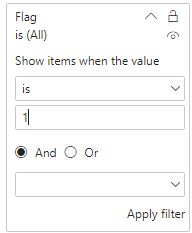
2. Place [Flag]in Filters, set is=1, apply filter.
3. Result:
When no slicer is selected, a 3-month interval is displayed for each market
Select slicers to display the interval for the specified Market for 3 months
Best Regards,
Liu Yang
If this post helps, then please consider Accept it as the solution to help the other members find it more quickly
Hi @Anonymous ,
Here are the steps you can follow:
1. Create measure.
Flag =
var _select=SELECTEDVALUE('Sales'[Market])
var _maxdate=MAXX(FILTER(ALL(Sales),'Sales'[Market]=_select),[Date])
return
IF(
MAX('Sales'[Date]) > EOMONTH(_maxdate,-4) &&MAX('Sales'[Date])<=_maxdate,1,0)
2. Place [Flag]in Filters, set is=1, apply filter.
3. Result:
When no slicer is selected, a 3-month interval is displayed for each market
Select slicers to display the interval for the specified Market for 3 months
Best Regards,
Liu Yang
If this post helps, then please consider Accept it as the solution to help the other members find it more quickly
@Anonymous , based on what I got. If I have country and Date dimension and I create a measure like
Rolling 6 = CALCULATE(sum(Sales[Sales Amount]),DATESINPERIOD('Date'[Date ],MAX(Sales[Sales Date]),-6,MONTH))
then it should take max country date when we display it by country
or try like
Rolling 6 =
Var _max = maxx(filter(allselected(Sales), [Country] = max(Sales[Country])) , Sales[Sales date])
return
CALCULATE(sum(Sales[Sales Amount]),DATESINPERIOD('Date'[Date ],_amx,-6,MONTH))
Hi @amitchandak
I do not need Sales Amount Calculation, rather 3 and 6 month time period selection which will be dependent on Market selection.
Check out the April 2026 Power BI update to learn about new features.
Sign up to receive a private message when registration opens and key events begin.
If you have recently started exploring Fabric, we'd love to hear how it's going. Your feedback can help with product improvements.
| User | Count |
|---|---|
| 36 | |
| 29 | |
| 29 | |
| 21 | |
| 18 |
| User | Count |
|---|---|
| 69 | |
| 39 | |
| 33 | |
| 24 | |
| 23 |