cancel
Showing results for 
Search instead for 
Did you mean: 

The Power BI Data Visualization World Championships is back! Get ahead of the game and start preparing now! Learn more

Reply
Anonymous
Not applicable

DAX evaluate table : how to remove table name from columns name

Hi,


I'm using this great post (https://biinsight.com/exporting-data-from-power-bi-desktop-to-excel-and-csv-part-2-importing-power-b...) to export table data from Power Bi directly to Excel.

Using EVALUATE 'Table' returns columns named TABLENAME[ColumnName].

Is there a way to get rid of the TABLENAME[] in each column name?


Thanks for your help.


Sincerely,


JM

3 REPLIES 3
v-danhe-msft
Microsoft Employee
Microsoft Employee

Hi @Anonymous,

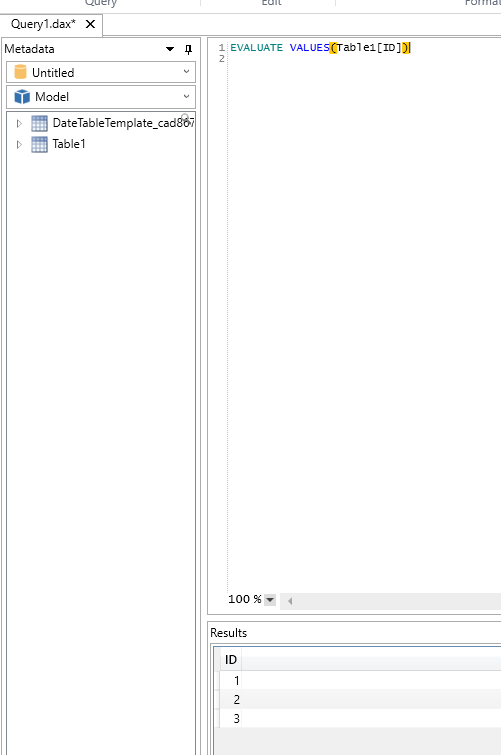
I have tested the evaluate function in Dax studio, you could use the formula to test if it could get column data:

EVALUATE 
	VALUES(Table1[Column1])

1.PNG


I hope it could help you.


Regards,

Daniel He

Community Support Team _ Daniel He
If this post helps, then please consider Accept it as the solution to help the other members find it more quickly.
Anonymous
Not applicable

Thank you for your answer Daniel.

Unfortunately, from excel SSAS connection, using EVALUATE VALUES(Table1) still brings Table1[] around the names of the columns.


Reagards,


JM

Hi @Anonymous,

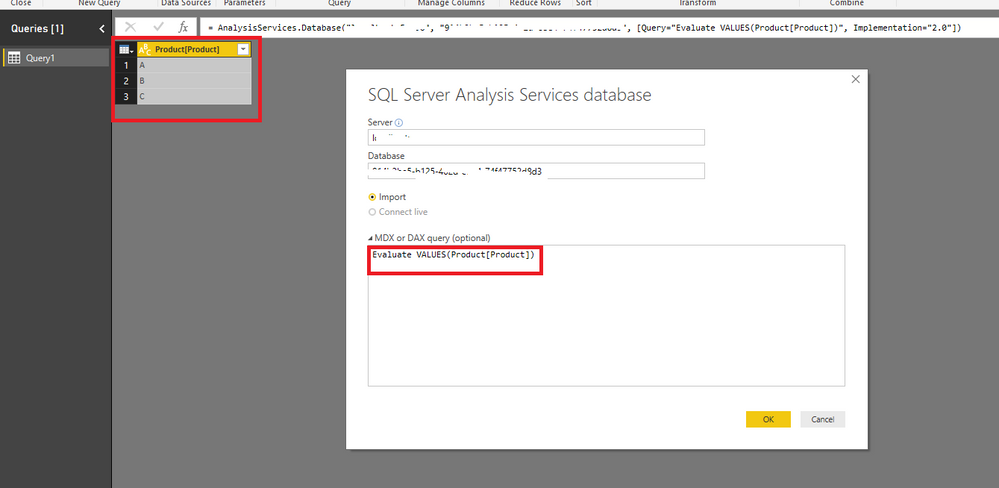
Based on my test, it could work in the Power BI Desktop, you could refer to below picture:

1.PNG

Could you have tried the code EVALUATE VALUES( your table [your column]) instead of the code EVALUATE VALUES(your table)?

I suggest you try again.


Regards,

Daniel He

Community Support Team _ Daniel He
If this post helps, then please consider Accept it as the solution to help the other members find it more quickly.

Helpful resources

Announcements
Power BI DataViz World Championships

Power BI Dataviz World Championships

The Power BI Data Visualization World Championships is back! Get ahead of the game and start preparing now!

November Power BI Update Carousel

Power BI Monthly Update - November 2025

Check out the November 2025 Power BI update to learn about new features.

FabCon Atlanta 2026 carousel

FabCon Atlanta 2026

Join us at FabCon Atlanta, March 16-20, for the ultimate Fabric, Power BI, AI and SQL community-led event. Save $200 with code FABCOMM.